# Rayfish: full documentation
> Auto-generated from src/docs/*.md. Source of truth lives at https://rayfish.xyz/docs.
# Introduction
Rayfish is a peer-to-peer mesh VPN that creates private virtual networks without any centralized infrastructure. It is built on top of [iroh](https://iroh.computer), a library that provides encrypted QUIC-based peer-to-peer connectivity with automatic NAT traversal, hole-punching, and relay fallback.
The core idea is simple: every peer gets a virtual IP address derived from their cryptographic identity. When an application on your machine sends a packet to that virtual IP, rayfish captures it through a TUN device, looks up which peer owns that IP, and tunnels the packet over an encrypted QUIC connection to the right machine. To the application, it looks like all peers are on the same local network.
### New in 0.5.4
`ray apply` now supports per-host mesh SSH account grants and firewall
allowances with peer exclusions. The [Declarative Provisioning guide](/docs/07-declarative-provisioning#new-in-054)
starts with a complete example and explains groups, aliases, enrollment, and
removing access.
### The data path
```mermaid
flowchart TD
A["Application"]
B["TUN device"]
C["rayfish forwarding loop"]
D["iroh QUIC datagram"]
E["Remote peer"]
F["Remote application"]
A --> B
B --> C
C -- "look up peer by dst IP" --> D
D -- "encrypted" --> E
E -- "write to TUN" --> F
```
Rayfish uses QUIC datagrams (not streams) for data packets. Datagrams are unreliable and unordered, just like UDP, which means low latency and no head-of-line blocking. This makes rayfish well-suited for real-time applications like games.
### Address space
The mesh is IPv6-only. Every peer has exactly one mesh address, derived deterministically from its cryptographic identity.
**IPv6, `200::/7`:** blake3 of the peer's identity, with the leading byte replaced by `0x02`. That leaves 120 bits of address, so collisions are not something anyone has to plan around. The address is stable and never rotates: the same identity always produces the same address, every node derives it locally, and it is never carried on the wire or handed out by a coordinator.
There is no mesh IPv4. Earlier versions gave every peer a second address in the `100.64.0.0/10` CGNAT block, which meant fighting Tailscale and anything else built on that range for it. That range is now never claimed, so sharing a host with another VPN needs no mode and no configuration. A `.ray` name answers AAAA only; an A query returns NODATA, because there is no IPv4 address to give.
Local services that listen on IPv4 only are still reachable. `0.0.0.0` is the IPv4 wildcard rather than "any address", so a program bound there has no IPv6 socket for a peer to connect to. The daemon answers on the mesh address for those ports itself and hands the connection to the service over IPv4, so `curl http://box.ray:4000` works against an IPv4-only server. See **Configuration -> IPv4-only services**.
### Why not WireGuard?
WireGuard is excellent for static, pre-configured tunnels between known endpoints. Rayfish solves a different problem: you don't know your peers' IP addresses, you don't want to configure port forwarding, and you want peers to find each other by cryptographic identity alone. iroh handles the hard part: discovering peers through relay servers, punching through NATs, and falling back to relayed connections when direct paths aren't possible.
### How rayfish compares to other mesh VPNs
Tailscale is the closest comparison, but it's not the only mesh VPN. The wider field splits cleanly on one question: **where does coordination and peer discovery live?** Every mainstream option needs a control server (hosted or self-hosted), root servers, or lighthouse nodes. Rayfish is the outlier: discovery rides a public DHT keyed by the network's own public key, so there is no coordination service to run, host, or trust.
| | Rayfish | Tailscale | NetBird | ZeroTier | Nebula |
|---|---|---|---|---|---|
| Data plane | iroh / QUIC datagrams | WireGuard | WireGuard | Custom protocol | Noise framework |
| Control / discovery | None: signed per-network record on a DHT | Proprietary, Tailscale-hosted | Self-hosted or cloud (Management + Signal) | Root servers + network controllers | Self-hosted lighthouses (static IP) |
| Coordinator must be online | Only to admit new members | Always | Always | Always (root servers) | For discovery; existing peers survive |
| Identity | Cryptographic key on disk, no account | Account / SSO | WireGuard key + SSO/MFA | Key + controller | x509-style certs (CA) |
| Addressing | Derived from key, stable, never rotates | Assigned by control plane | Assigned by management | Controller-assigned | Operator-assigned in cert |
| Layer | L3 | L3 | L3 | L2 + L3 | L3 |
| License | Open source | Clients open, control proprietary | BSD-3 | BSL (restricted) | MIT |
On day-to-day features the picture is closer, since these tools converged on the same conveniences:
| Feature | Rayfish | Tailscale | NetBird | ZeroTier | Nebula |
|---|---|---|---|---|---|
| Magic DNS | Yes (in-daemon, no port 53 bind) | Yes | Yes | Partial | No |
| Per-device firewall / ACLs | Yes (local + coordinator-suggested) | Yes (central ACLs) | Yes (central policy) | Yes (flow rules) | Yes (in cert/config) |
| Network segmentation | Yes (network = reachability boundary) | Tags / ACLs | Groups / policies | Network IDs | Groups |
| File transfer | Yes (`ray send`) | Yes (Taildrop) | No | No | No |
| Friend-request connect (no shared net) | Yes (`ray connect`) | No | No | No | No |
| Encrypted multi-device key backup | Yes | Per-device keys | Yes | Yes | Manual certs |
| Declarative deploy | Yes (`ray apply`) | Yes (ACL-as-code) | Yes (IaC) | Partial | Yes (config files) |
| Tor transport | Yes (optional) | No | No | No | No |
| Exit nodes (route all internet traffic) | Yes (`ray exit-node`) | Yes | Yes | Yes | Yes |
| Subnet routers / LAN gateways | No | Yes | Yes | Yes | Yes |
| Keyless mesh SSH | Yes (`ray ssh`, incl. forwarding + `scp`) | Yes (Tailscale SSH) | No | No | No |
| Public ingress (expose a local service) | No | Yes (Funnel) | No | No | No |
| SSO / MFA | No (key on disk, by design) | Yes | Yes | Partial | No |
| Device posture checks | No | Yes | Yes | No | No |
| Web admin console | No (CLI only) | Yes | Yes | Yes | No |
| Mobile + Windows clients | Android; Windows x64 desktop app, ARM64 CLI + service | Yes | Yes | Yes | Yes |
### Where rayfish stands out
Native desktop apps are available for Apple Silicon and Intel macOS, and Windows x64.
The macOS app runs the core in a Network Extension; the Windows app controls
the installed background service. See **Getting Started** for downloads.
- **No coordination server, at all.** Tailscale hosts it, NetBird makes you host it, ZeroTier needs root servers, Nebula needs lighthouses with static IPs. Rayfish replaces every one of those with a signed record served peer-to-peer over a DHT. There is nothing to run, and nothing whose compromise would leak your network's topology.
- **Identity is the address.** Peers are addressed by cryptographic identity, and the mesh IPs are derived deterministically from the key. They are never handed out by a controller and they never rotate. Everyone else assigns addresses centrally.
- **No account, no provider, no operator.** Your identity is a key on your disk. There is no company that can suspend your network or sign-in flow that can lock you out, because there is no company in the loop.
- **Things the others don't have:** `ray connect` (link two peers with no shared network, just a contact id) and an optional Tor transport.
Where it's behind is just as honest. The functional gap people hit first is **subnet routers**: rayfish carries traffic between peers that run the daemon, and now out to the internet through an exit node, but it can't reach a printer, NAS, or whole LAN sitting behind a peer. (Using an exit node is Linux and macOS only for the moment, and tunnels IPv6 alone; see **Exit Nodes**.) On top of that it has no SSO/MFA, posture checks, or web admin console (the SSO and identity-provider pieces are a deliberate non-goal, since they need a central account); the Windows port is new and has known gaps (see **Getting Started**); and iroh is younger and less battle-tested than WireGuard or Nebula's Noise. Tailscale and Nebula are also proven at far larger scale.
### Is rayfish for you? (Probably not, and that's fine)
Worth being blunt about this. **If you already have a working private network (Tailscale, a corporate VPN, a WireGuard mesh you've configured), rayfish gives you very little reason to switch.** It's younger, it has fewer features, and the things it does are things those tools already do, often more smoothly. "It's also a mesh VPN" is not a reason to migrate a setup that already works.
Rayfish earns its place by removing one specific thing: **the central party.** There's no account to sign into, no company that can suspend your network, no control server that has to stay up, no policy database someone else administers. Your identity is a key on your disk, and the network is a signed record any member can serve, so it keeps working if the company behind it disappears, because there isn't one.
So the honest test is a single question: **do you want a private network that belongs to no one but its members?** If yes (you value self-sovereign identity, decentralization, and no operator in the middle), rayfish is built precisely for that. If you don't particularly care, and you just want devices to reach each other reliably, Tailscale is the more capable tool and you should use it without guilt.
### Network topology
A user can join multiple networks simultaneously. Each network has its own
membership and authorization checks. Networks sharing a peer reuse its QUIC
connection, with separate control-frame keys and datagram handles.
Your device sits at the center of all your networks. Each network is a full-mesh bubble, and you participate in all of them simultaneously:
```mermaid
flowchart LR
subgraph gaming["Gaming network"]
F1["Friend 1"]
F2["Friend 2"]
MC["Minecraft server"]
F1 --- F2
F1 --- MC
F2 --- MC
end
YD["Your device"]
subgraph work["Work network"]
CW1["Co-worker 1"]
CW2["Co-worker 2"]
CS1["Company server 1"]
CS2["Company server 2"]
CW1 --- CW2
CW1 --- CS1
CW2 --- CS2
CS1 --- CS2
end
gaming --- YD --- work
```
One rayfish process, one TUN device, one routing table, shared across all your networks.
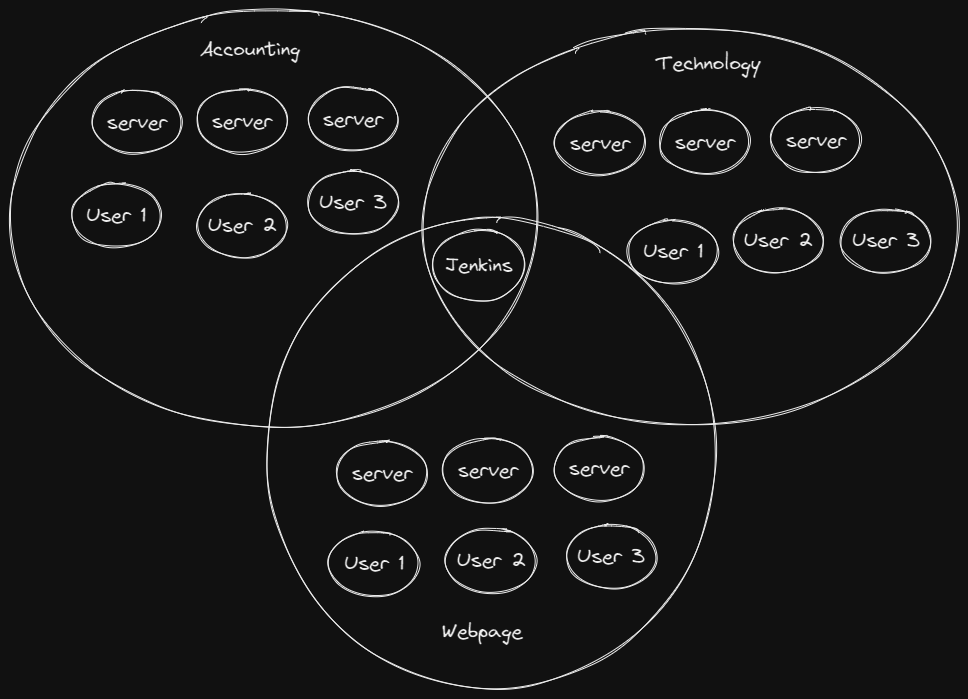
### Enterprise use case
In a company, different departments run separate networks. Shared services (like Jenkins) join multiple networks, sitting at the overlap:
### Joining a network (invitation)
The coordinator creates a network and gets a **room id** (the network's public key). The room id lets peers *discover* the network, but it is not, by itself, an invitation: networks are **closed by default**, so the coordinator admits new peers either by handing out a **one-time invite code** or by approving a join **request** live. (An `--open` network skips the gate: the room id alone admits.)
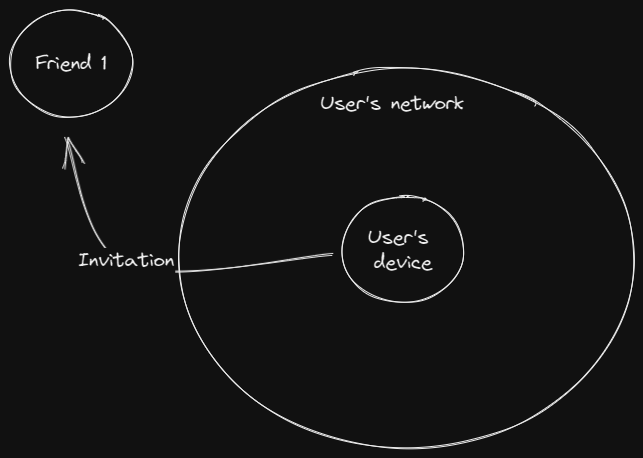
The room id stays useful after joining. It's the discovery key every member keeps polling for membership and policy updates. What it is *not* is an admission credential on a closed network. See **Membership** and **Getting Started** for the full admission flow.
### Per-node architecture
Inside each peer, the stack looks like this:
```mermaid
flowchart TD
APP["Applications"]
TUN["TUN device
200::/7"]
TR["Packet reader"]
TW["Packet writer"]
PT["Routing table
IP → peer"]
PR["Peer readers"]
EP["iroh QUIC endpoint
NAT traversal + TLS 1.3"]
NET["Internet"]
APP -- "traffic to virtual IPs" --> TUN
TUN -- "read" --> TR
TW -- "write" --> TUN
TR -- "look up dst IP" --> PT
PT -- "send packet" --> EP
EP --> PR
PR -- "channel" --> TW
EP -- "encrypted UDP" --> NET
```
---
# Getting Started
### Quickstart
Install Rayfish on both machines. On the first, start the service, create a
network, and mint an invite. Join with that invite on the second.
```bash
curl -fsSL https://rayfish.xyz/install.sh | sh # install the ray binary
sudo ray up # start the daemon (first run installs the service)
ray create --name gaming # create a network, prints a room id
ray invite gaming # mint a one-time invite code, hand it over
# on the second machine (after install + sudo ray up):
ray join # join with the code
```
On Windows the first line is `irm https://rayfish.xyz/install.ps1 | iex` in an
elevated PowerShell, and the rest is the same (with no `sudo`).
With the native macOS app, downloading the DMG, opening Rayfish, and clicking
**Connect** replaces the first two lines. Install its bundled shell command from
the app's **Settings** page before running the remaining commands in Terminal.
Then `ray status` shows both peers online. Everything below fills in the detail:
updating, the daemon lifecycle, the admission options, and the permission model.
For the full command list see **CLI Reference**.
### Installing
On **macOS**, the signed, notarized
[Rayfish app](https://github.com/rayfish/rayfish/releases/latest)
is the easiest route. It supports Apple Silicon and Intel Macs and includes the VPN, a menu bar
control, the full dashboard, and the `ray` command. Drag Rayfish into
Applications, open it, click **Connect**, and approve its network extension when
macOS asks. In **Settings**, click **Install shell command** to make `ray`
available in new zsh or bash terminals. Choose `Rayfish--arm64.dmg`
for Apple Silicon or `Rayfish--x86_64.dmg` for Intel from the latest
release. The home page's **Download for macOS** link selects Apple Silicon.
If the standalone macOS service is already installed, the app imports its
identity and saved networks on first launch, then stops and disables the old
service. The original data is kept. The app and standalone service should not be
run at the same time.
The two macOS installations run the same Rayfish core, use the same identity and
network formats, and speak the same mesh protocol. What owns that core is
different:
| | Native app | Standalone daemon |
|---|---|---|
| VPN process | A macOS packet-tunnel Network Extension | A root daemon managed by launchd |
| Start it | Open Rayfish and click **Connect** | Run `sudo ray up` once to install and start the service |
| Control it | Dashboard, menu bar, or the bundled `ray` command | `ray` commands, including the local browser UI from `ray gui` |
| Stop it | **Disconnect**, or **Disconnect and Quit** | `ray down` for standby; `sudo ray stop` to stop the service |
| Window closed | The menu bar app and VPN keep running | Not applicable; launchd keeps the daemon running |
| Update it | Replace the app with a newer signed DMG | Run `sudo ray update`, or opt into automatic updates |
The app does not install or run the launchd daemon. Its bundled `ray` command
talks to the active Network Extension instead. Conversely, the standalone
binary has no native dashboard or menu bar app.
Standalone binaries are available as
[`ray-macos-aarch64`](https://github.com/rayfish/rayfish/releases/latest/download/ray-macos-aarch64)
for Apple Silicon and
[`ray-macos-x86_64`](https://github.com/rayfish/rayfish/releases/latest/download/ray-macos-x86_64)
for Intel. Stable releases include both DMGs; nightlies include only the
standalone CLI and daemon for both architectures. **Start at login** in the
app's Settings launches the app and connects the VPN after you sign in.
Allow notifications when macOS asks to receive alerts for connection requests,
network join requests, and incoming files. Clicking an alert opens the relevant
page. The **Files** page saves or declines incoming offers; **Settings** has
mesh SSH controls for networks, peers, and local login accounts.
For Linux, FreeBSD, or a standalone command-line installation on macOS, use the
one-line installer. It downloads the latest release for the platform, verifies
its checksum, and installs it to `/usr/local/bin`:
```bash
curl -fsSL https://rayfish.xyz/install.sh | sh
```
Pin a specific version with `RAY_VERSION=v0.1.0`, or change the target with
`INSTALL_DIR=~/.local/bin`.
On **Windows x64**, download the
[Windows installer](https://github.com/rayfish/rayfish/releases/latest/download/ray-windows-x86_64.msi).
Run the MSI, then open **Rayfish** from the Start menu. It installs the desktop
dashboard, tray app, `ray` CLI, Wintun, and background service.
For **Windows ARM64**, or to install x64 from the command line, run this in
**PowerShell as Administrator**:
```powershell
irm https://rayfish.xyz/install.ps1 | iex
```
It picks the route each architecture is published on. **x64** gets the MSI,
which registers the daemon as a LocalSystem service, puts the binary on the system
PATH and records the release identity `ray update` reads. **ARM64** has no MSI
yet, so the script places `ray.exe` with its matching Wintun DLL beside it, adds
the directory to PATH, and leaves `ray install` to register and start the
service. `RAY_VERSION` and `RAY_SKIP_VERIFY` mean what they do on the shell
side; the target directory is `RAY_INSTALL_DIR` rather than `INSTALL_DIR`. See
**Windows** below for what the port does not yet cover.
The scripts you're piping into a shell are
[`install.sh`](https://github.com/rayfish/rayfish/blob/master/install.sh) and
[`install.ps1`](https://github.com/rayfish/rayfish/blob/master/install.ps1) in
the rayfish repo, so you can read and review them like the rest of the code; CI
lints `install.sh` and installs the latest release with it on every change, and
parses `install.ps1` on a Windows runner so a syntax error lands there rather
than in someone's shell. Both refuse to install a binary whose `.sha256` sidecar
is missing rather than silently skipping verification (`RAY_SKIP_VERIFY=1`
overrides), and `install.sh` only escalates to `sudo` when the target directory
genuinely isn't writable.
Every release also ships **static musl Linux builds**
(`ray-linux-{x86_64,aarch64}-musl`) with no glibc dependency, so rayfish runs on
Alpine and on hosts whose glibc predates the gnu build floor. The installer picks
them automatically when the glibc binary won't run on the host, and `ray update`
on a musl-built daemon self-updates to the musl asset.
### Updating
The commands in this section update the standalone binary and daemon. The
native macOS app checks for stable updates and installs them when it quits.
Use **Check for Updates** in the app menu, or toggle automatic updates in
**Settings**, which also shows the app version. When an update is ready, its
notification offers to restart and install; the VPN reconnects if it was
connected before. Replacing the app with a newer signed DMG also updates its
bundled command.
Windows x64 updates through the MSI, including the desktop app. Desktop
installers are stable-release assets; Windows nightlies contain only the CLI
and daemon. Update Windows ARM64 by re-running `install.ps1`.
> **Upgrading to 0.4.0: every node goes together.** The mesh protocol moved from
> 2 to 5, and peers on different versions do not connect at all, so a node left
> on 0.3.x stops seeing the network rather than degrading; `ray status` marks it
> `incompatible`. Nothing on disk changes, so upgrading in place keeps your
> networks, identity and pairings. Two other things break across the boundary:
> the mesh has no IPv4 any more, so check what your services listen on first
> (see **Configuration -> IPv4-only services**), and a command the daemon
> rejects now exits non-zero where it used to print the rejection and exit 0,
> which matters to any script that only checked the exit status.
Check your version and upgrade in place with the built-in self-updater:
```bash
ray --version # show the installed version as ` ()`
ray update --check # report current vs the latest GitHub release, install nothing
sudo ray update # download + verify the latest release, swap the binary, restart the daemon
```
`ray update` fetches the latest release from the same GitHub repo the installer
pulls from, **verifies its SHA-256** before touching anything, then atomically
replaces the running `ray` binary. Before swapping (and in `ray update --check`
when you're behind), it prints the **release notes** for what the update brings:
on the stable channel it walks every release in `(current, latest]` newest-first,
while `--nightly`/`--version` show just the resolved release's notes. The notes
are best-effort, so a failed fetch never blocks the update. If the system service
is installed it also restarts the daemon onto the new binary. By default it only
upgrades when the release is strictly newer than what you're running. Pass
`--force` to reinstall or downgrade. It needs root when the installed binary
lives in a system path (so use `sudo ray update`); `ray --version` and
`ray update --check` never need root.
Each invocation can target one of three channels (nothing is persisted, the
default reverts to stable next time):
```bash
ray update --list # enumerate available releases (newest first), install nothing
sudo ray update # latest stable release (the default)
sudo ray update --nightly # the rolling nightly, rebuilt on every commit to master
sudo ray update --version v0.1.0 # pin a specific release (downgrades allowed)
```
Every binary is stamped with its git short SHA, so `ray --version` and
`ray report` print ` ()`. This is how a nightly build is
identified. Because nightlies all share one crate version, the nightly channel
decides "up to date?" by comparing the published checksum against your running
binary's SHA-256 rather than by semver. `ray status` (and `ray update --check`)
also flag a **stale daemon** (e.g. when a self-update swapped the binary but the
service never restarted onto it) and hint `sudo ray update` to restart it.
### Automatic updates (opt-in)
The manual `ray update` above is always available. You can also let the daemon
keep itself current:
```bash
ray config set auto-update on # opt this node into automatic stable updates
ray config set auto-update off # turn it back off
sudo ray install --auto-update # opt in while (re)installing the service
```
When enabled, the daemon checks for a newer **stable** release a few minutes after
boot and every six hours after that, and when one appears it verifies the checksum,
swaps the binary, and restarts itself onto it. It only ever tracks the stable
channel (nightlies are never auto-applied), and a backoff keeps it from retrying
the same target repeatedly if a restart fails. The opt-in is off by default and
persists as `auto_update` in `settings.toml`; it takes effect on the next daemon
restart.
### Tab completion
For the standalone installation, the installer and `sudo ray up` write
completion scripts for bash, zsh, and fish into the directories those shells
already search, so there is nothing to source and no rc file to edit. Open a new
shell and press tab. The native macOS app's **Install shell command** button adds
the bundled command to zsh or bash, but does not install completion scripts.
It isn't a frozen script. The installed file is a stub that asks the running
`ray`, so completions are the networks and peers you actually have right now:
```
$ ray leave
gaming homelab
$ ray ping
alice 200:1f4a:…:7c93, active
nas 200:3d81:…:ff20, idle
$ ray exit-node use homelab
gateway 200:a72e:…:cb47, active
```
Peer completions are scoped to the network already named on the line, and each
candidate carries its mesh IP and state. Fixed-choice arguments (`in`/`out`,
`allow`/`deny`, `on`/`off`, protocols) complete too, and `ray config set `
lists every settings key with its one-line description.
A tab never starts the daemon and never blocks your shell: it answers from an
open IPC read within a short budget, and every failure (no socket, no daemon, no
reply in time) is the same answer, no candidates.
On a binary-only install, set it up with `ray completions --install`
(system-wide under `sudo`, otherwise for your user); `ray completions zsh` prints
the script instead, for placing yourself. `ray uninstall` removes them, and
`RAY_SKIP_COMPLETIONS=1` tells the installer to leave your shell alone.
Writing them is best-effort: nobody runs an installer in order to get tab
completion, so a read-only `/usr` doesn't turn a working install into a failed
one.
### Building from source
```bash
cargo build
```
Requires Rust 2024 edition.
### Starting the daemon
This section applies to the standalone installation on macOS and to Linux,
FreeBSD, and Windows. The native macOS app has no daemon service: macOS owns its
Network Extension, and the app's **Connect** and **Disconnect** controls start
and stop the Rayfish node inside that extension. Closing the main window leaves
the VPN running from the menu bar; quitting the app disconnects it first.
Before using any network commands, start the service:
```bash
sudo ray up
```
`ray up --enable-ssh` enables and saves mesh SSH while activating the VPN.
It still requires peer and local-account grants; see **Mesh SSH**.
The **first** `ray up` installs the system service if it isn't already present, then starts it. On Linux that means whichever init the host is actually running: a systemd unit, an OpenRC service (Alpine, Gentoo), or an LSB SysV init script (MX Linux, Devuan, antiX); on macOS, a launchd plist. If none is recognised, the error points you at `sudo ray daemon`, which needs no service manager. Under SysV init nothing supervises the daemon, so a crash stays down until the next `ray start`, and `ray up` says so. The service runs `ray daemon`, a long-lived process that owns the iroh endpoint, TUN device, and all peer connections. It listens for commands on a Unix socket at `/var/run/rayfish/rayfish.sock`. On startup, it restores all previously saved networks from config.
Once the daemon is running, `ray up` and `ray down` toggle the **VPN's data plane** rather than the daemon process itself. `ray down` puts the daemon on **standby**: it brings the TUN interface down and reverts system DNS, but keeps the peer connections open, so the node keeps receiving roster, blob, and firewall updates and `ray up` reactivates almost instantly (TUN back up, DNS reconfigured) with no re-dial. Because the already-privileged daemon performs the TUN/DNS work, both commands are ordinary unprivileged IPC calls, and only the very first `ray up` (when no daemon is running) needs `sudo` to install and start the service. This is the same split Tailscale uses between the always-running `tailscaled` and the `tailscale up`/`tailscale down` client commands.
To take the node **fully offline** (the daemon exits and every peer connection closes), use `sudo ray stop`; `sudo ray start` brings it back with both planes on. `ray daemon` runs the daemon loop in the foreground and is invoked by the service. You normally use `ray up`/`ray start` rather than calling it directly. To stop and remove the service entirely, run `sudo ray uninstall`.
### Creating a network
In another terminal, create a network:
```bash
ray create # closed network (default)
ray create --open # public network anyone with the room id can join
ray create --name gaming # custom name
```
This produces output like:
```
✓ network created gaming
IP 200:1f4a:88c1:0e37:9b52:6dd0:41ae:7c93
room id b3f2…9ac1
```
The **room id** is the network's public key. It's how peers *discover* the network, but on a closed network (the default) it is **not** enough to get in; admission goes through the coordinator (see below). On an `--open` network the room id alone admits anyone. If you don't pass `--name`, the daemon assigns a random three-word name (e.g. `gentle-amber-fox`) as the network's local and DNS name; it's a convenience label, not a credential. The coordinator's IP is deterministically derived from their cryptographic identity.
**Your own hostname defaults to this machine's name.** `ray create` and `ray join` with no `--hostname` used to fall back to a random noun, so `ray status` on a fleet read as a list of animals nobody could match to a box. They now fold the machine's own hostname into a mesh name (`Alice's MacBook.local` becomes `alice-s-macbook`). A random name is still used when the machine has nothing usable to offer (`localhost`, which is what Android reports) and when the name is already taken on the network you are joining, since `laptop-1` would read as the name of the `laptop` already there. `ray up --hostname ` still wins over both.
### Inviting and joining
How a peer gets into a network depends on its access mode:
**Closed (default).** Admission is a coordinator's job, satisfied three ways:
- **One-time invite code:** the coordinator mints a single-use, expiring code and hands it over:
```bash
ray invite gaming # mint a code (default 7-day expiry)
ray invite gaming --expires 1d # custom expiry
ray invite gaming --qr # also print a scannable QR code (off by default)
ray invite gaming list # list outstanding/redeemed invites
ray invite gaming revoke # revoke an unused invite
```
The recipient joins with the code; the coordinator verifies and **burns** it. Ideal for letting one person in: consume a token once, no human in the loop.
- **Reusable key:** for unattended fleets, mint a multi-use key instead of a one-time code:
```bash
ray invite gaming --reusable # multi-use key (default 30-day expiry)
ray invite gaming --reusable --expires 90d # custom expiry
```
The key's hash rides the signed network record, so it admits many machines and a `revoke` reaches every coordinator. Each server joins non-interactively, picking its own name and taking the suggested firewall rules in one shot:
```bash
ray join --hostname web01 --auto-accept-firewall
```
Expiring or revoking the key only blocks *new* joins. Machines already admitted stay members.
- **Live approval:** someone with just the room id requests to join and waits in a queue:
```bash
ray requests gaming # coordinator: list waiting peers
ray requests gaming accept # admit one
ray requests gaming deny # reject one
```
**Open** (`ray create --open`). The room id alone admits, no invite or approval needed.
Each gate runs through a coordinator, so one must be online to admit a *new* peer. But if you've granted the network key to several machines (`ray admin add`), the joiner dials across all of them and admission survives any one being offline. Once admitted, a member reconnects by cryptographic identity even when every coordinator is offline.
The recipient joins the same way regardless, with a room id, a one-time code, or a reusable key:
```bash
ray join b3f2…9ac1 --name gaming # by room id (open network, or to request approval)
ray join # by one-time invite code
ray join --hostname web01 --auto-accept-firewall # unattended server
```
The daemon fetches the current member list, dials a coordinator, and either gets welcomed immediately (open / valid invite / already approved) or is told the request is **pending**. It then retries in the background until a coordinator runs `ray requests accept`. On success it establishes direct connections to every other peer in the mesh.
> **Just two people?** If you only want to link up with one other person, skip networks entirely: share your contact id (`ray contact id`) and have them run `ray connect `, which you approve with `ray connect approve `. See **Membership → Direct connections**.
### Nuking a network
A coordinator can leave the network, destroying it if no other coordinator remains:
```bash
ray nuke gentle-amber-fox --force
```
`--force` is required when other members exist. With another coordinator,
even an offline one, this publishes your departure and leaves the network
running. The last coordinator sends signed destruction notices and publishes a
deletion record for offline peers. See **Network Lifecycle**.
### Checking status
Once you have networks running, query the daemon for live state:
```bash
ray status # networks, peers, and connection state
ray status --with-ips # include IP addresses (--ips also works)
ray status --machines # also probe and list controlled machines
```
The header line carries the daemon's state (`up` or `standby`), whether mDNS is on, and your endpoint id, plus `auto-update on` when that is set (see **Configuration**). Each peer row shows its name, how it's reached (**via**: `direct`, `relay`, or `tor`), round-trip time, and traffic.
Peers appear in one of three states. **`active`** means connected right now; **`idle`** means a roster member with no live link that is presumed reachable; **`offline`** is shown only after a reach attempt actually failed. Idle is the resting state of a healthy peer, because rayfish closes connections that see no traffic and re-dials on the next packet (see **Transport -> On-demand connections**). The `members N/M` count on the header line counts everything not confirmed offline. `ray ping ` dials on demand and refreshes a peer's state.
A network saved in your config that the daemon has not brought up yet is drawn from that config, dimmed and marked `connecting…`, or `offline` with the reason once an attempt has failed: the roster, your address and the join code are on disk, so the block looks like a connected one with every peer offline; see **Network Lifecycle**. Below the networks, a **`nearby`** block lists rayfish nodes seen on this LAN that you don't already share a network with, so a new machine on the same network is visible without knowing `ray mdns scan` exists (see **Peer Discovery**).
Paired devices belonging to one user are grouped under that user with an `N devices, M online` rollup (or `M idle` when the whole group is idle). An offline peer running an incompatible (older) build is flagged `incompatible` with a hint to `ray update`, rather than shown as a plain offline peer. When a network has an ephemeral policy set (`ray ephemeral`), its window appears on the header line, as does `exit via ` when this node routes through an exit node and an `exit node` marker when it offers one (see **Exit Nodes**). Peers are shown by DNS name when available (`hostname.network.ray`), falling back to a short endpoint id for peers without a hostname. `--with-ips` adds addresses to network headers, peer rows, and nearby LAN peers. JSON always retains addresses; it includes `managed_machines` only with `--machines`.
Coordinators see each network's admission mode in status. Member nodes show
`mode unknown`, because the coordinator does not share that setting. Peer RTT
highlighting follows that peer's recent baseline. CLI status and the macOS app
warn about high latency, packet loss, or a backed-up send queue.
### Leaving a network
```bash
ray leave gaming
```
This tears down all connections for that network, removes peers from the routing table, and deletes it from the saved config.
### Standby
```bash
ray down # standby: tears down TUN + DNS, keeps peer connections; daemon keeps running
ray up # reactivate (no root, near-instant: connections were kept)
sudo ray stop # fully offline: daemon exits, peer connections close
sudo ray start # back online: daemon restarts with both planes on
```
`ray down` does **not** stop the daemon process or close its peer connections. It puts the data plane on standby so it can be brought back up without root, while the control plane stays connected. For a full shutdown, `sudo ray stop` exits the daemon and closes connections (`sudo ray start` brings it back); to stop and remove the service entirely, use `sudo ray uninstall`.
### Who can run `ray`?
The **native macOS app** authorizes the user who connected its VPN, plus root,
to run mutating commands through the bundled CLI. Read-only commands remain
available to other local users. No operator setting is needed; use the app to
connect, disconnect, or quit the VPN.
The **standalone Unix daemon** runs as root and creates the IPC socket at `/var/run/rayfish/rayfish.sock` with mode `0666`, but socket permissions are **not** the access control. Instead, the daemon checks the caller's UID on every request using kernel-provided peer credentials:
- **Read-only commands** (`status`, `*… show`, `files`) are open to any local user.
- **Mutating commands** (`up`/`down`, `create`/`join`/`leave`, `invite`, `admin`, `firewall`, `apply`, …) need root **or** the configured **operator**.
- **Service management** (`install`, `restart`, `uninstall`, `set-operator`) is root-only.
The user who installs the service (`sudo ray up` or `sudo ray install`) is automatically granted operator access, so they keep running `ray` without `sudo`. To authorize someone else:
```bash
sudo ray set-operator bob
```
### Why sudo?
The standalone daemon needs root to create TUN interfaces on Linux and macOS.
Only the privileged work needs root: the service-internal `ray daemon`, and the
commands that manage or grant access to the service: `ray install`, `ray start`,
`ray stop`, `ray restart`, `ray uninstall`, and `ray set-operator` (plus the very
first `ray up`, which installs and starts the service). Other commands are thin
IPC clients that run unprivileged. The native macOS app uses the network
extension approved through macOS instead.
### All commands
The complete subcommand list, grouped by area, lives in the **CLI Reference**
chapter, and `ray -h` prints the same grouping locally (`ray help ` for
one command's full description). Add `--json` **after** a read command
(`ray status --json`, `ray firewall show --json`, `ray files --json`, …) for
machine-readable output; commands that emit no JSON reject the flag rather than
ignoring it.
### Deploying to servers
```bash
just deploy # cross-build + install + create rayfish group + start daemon service
```
This handles everything: builds for x86_64 Linux, installs the binary, creates the `rayfish` group, installs a systemd service, and starts the daemon. On subsequent deploys it restarts the service to pick up the new binary.
### Windows
Rayfish runs on **Windows x64 and ARM64**. The x64 MSI includes the desktop
dashboard and tray app; ARM64 uses the CLI through `install.ps1`.
The Windows app is a client of the **LocalSystem service**, which owns Wintun
and the VPN. Closing the window leaves the app in the notification area and
keeps the VPN running. The tray can connect, disconnect, reopen the dashboard,
or **Disconnect and Quit**. **Start at login** in Settings starts the desktop
app after sign-in; the service has its own automatic startup.
The CLI is on the system PATH. Open a new terminal after installation. Use an
elevated PowerShell for the first `ray up` to register your account as the
operator; subsequent commands can run without elevation.
- **IPC** is a named pipe authorized by Windows SID, on the same terms as the
Unix socket elsewhere: the listings any local user can read on Linux are
readable there too, and changing anything needs an elevated Administrator or
the account named by `ray set-operator`.
- **The tunnel is Wintun**, pinned and signature-checked at build time.
- **Routes, DNS and search domains** are configured on the Rayfish adapter only
(through NRPT for the `.ray` scope), leaving the rest of the machine's
configuration alone.
- **`ray update`** upgrades in place through the MSI on x64.
**ARM64 is the bare binary.** Snapdragon and other ARM laptops get a native
`ray-windows-aarch64.exe` instead of the x86_64 one under emulation, but there
is no MSI for it: `build-windows-msi.ps1` is x86_64-only and pins the amd64
Wintun. `install.ps1` does by hand what the MSI would, placing the exe with the
arm64 Wintun DLL next to it (`ray.exe` loads Wintun from its own directory, so a
binary on PATH without it installs cleanly and then cannot create the tunnel)
and putting the directory on PATH. Register the service yourself afterwards with
`ray install`. `ray update` does not cover this route yet, so upgrade by
re-running the installer.
Gaps in this port:
1. `ray ssh` is not available on Windows.
2. Tab completion is not installed at all, because PowerShell reads completions
from a profile script rather than from a directory a shell already searches.
3. The Windows binaries are not code-signed yet, so the first install goes through a SmartScreen
warning on x64, and the unsigned ARM64 exe draws an unknown-publisher prompt
from UAC and the firewall.
4. `ray update` is x64-only, ARM64 being upgraded by the installer instead.
### Android
The Android app carries the same daemon, joined to the same networks.
Android Home distinguishes a connected VPN from file-only standby and shows
device names; tapping a peer copies its full `.ray` domain. Send files from
Home or network details and review progress and recent results on Home.
Idle Android nodes can suspend their mesh transport to reduce background
activity and resume it when needed. Incoming pings do not keep it awake or wake
it after suspension. Its file relay remains reachable while idle. Incoming file notifications follow file
state changes instead of idle polling. Optional **Periodic diagnostics** in
**You** sends reports at most every eight hours when warnings, errors, or
unusual network rebind activity occurred; it requires crash reporting to be on.
Release and nightly APKs use a permanent signing key so updates preserve app
data. If moving from an older debug install, back up its identity and restore
it into the release app, which installs alongside the debug app.
**Android 8.0 (API 26) is the minimum.** Every notification the app posts goes
through a notification channel, which is an 8.0 API, so on 7.x those calls threw
and were swallowed: transfers and incoming files were announced by nothing at
all, on a build that otherwise looked like it worked. Rather than keep a tier
where the app is quietly half-functional, 7.x is dropped.
**A new install offers to restore an identity before it mints one.** The
welcome screen sits in front of the first start, so moving to a new phone is the
first thing you can do with the app rather than something to go looking for.
Starting fresh, or backing out of the restore, leaves the phone as it was and
offers again next launch. Backup and restore are also in the **You** tab at any
time; see **Device Pairing -> Key backup and restore**.
Two things behave differently from a desktop node:
- **`.ray` names work in Chrome on an IPv4-only Wi-Fi.** Chrome only asks for an
IPv6 address once it has checked that IPv6 works, by connecting to a fixed
global address, and on a network with no IPv6 that check fails. It then asks
for an IPv4 address alone, which the mesh does not have and never will, so
nothing on the mesh was reachable by name from the browser
(`DNS_PROBE_FINISHED_NXDOMAIN`, for a name every other app on the phone
resolved). The tunnel now carries a route for that check, and only on networks
with no IPv6 of their own. Real IPv6 traffic is untouched.
- **The roster poll runs every 15 minutes**, not every 60 seconds, and the app
runs no metrics collector. Both were per-minute radio wakeups for work a
coordinator push now delivers directly (see **Peer Discovery** and
**Statistics**).
An incoming file raises a notification you can Save or Reject without opening the
app (see **File Sharing**). "Send diagnostics" attaches the log snapshot, node
health block, and install and transport tags to the report it sends; they used to
be dropped on the way out, so every report for a month arrived as a bare line with
nothing in it. A report the backend refuses now says "Diagnostics unavailable"
rather than claiming it was sent.
---
# How It Works
This chapter is the map. The chapters that follow drill into individual
subsystems; this one steps back and shows how the pieces fit: the artifacts
that exist on the wire, and how a network takes shape as peers join.
One idea runs through all of it: **everything in rayfish is keyed by
cryptographic identity, never by IP address.** A peer is its public key. A
network is a public key. Admission, routing, and verification are all decided by
keys and hashes, which is what lets the whole system run without a server in the
middle.
### The cast of keys
Three distinct Ed25519 keypairs are in play. Keeping them straight makes the
rest of the system easy to read.
| Key | Where it lives | What it is |
|-----|----------------|------------|
| **Device identity** | `~/.config/rayfish/secret_key` (32 bytes) | *You, this machine.* The iroh transport key; its public half is your `EndpointId` and the basis for your virtual IPs. |
| **User identity** | the device that paired others to it | One person across several devices. When you pair a phone to a laptop, a single user identity vouches for both device keys (see **Device Pairing**). |
| **Per-network key** | `networks/.toml`, coordinator and admins only | The network itself. It signs the discovery record, and **its public key is the room id**. |
A device key never leaves the machine. A per-network secret key never leaves the
coordinator (and any admins it grants). Nothing secret is ever published.
### The network's signed state
Everything peers need to agree on (who's a member, who's been approved, the
network's name, and any coordinator-suggested firewall rules) lives in a single
record called the **group state**:
| Field | Meaning |
|-------|---------|
| `members` | the active roster, each a `Member` (below) |
| `approved` | identities admitted but not yet connected |
| `suggested_firewall` | per-hostname rule suggestions the coordinator publishes (see **Access Control**) |
| `name` | the network's display name |
Each member entry is itself identity-keyed:
| `Member` field | Meaning |
|----------------|---------|
| `identity` | the device (transport) public key |
| `ip` | the virtual IPv4, *derived* from `identity`, never assigned (see **Membership**) |
| `is_coordinator` | whether this member gates admission |
| `hostname` | optional name, used by Magic DNS and firewall-rule subjects |
| `user_identity` | the owning user, set when this is a paired device |
| `device_cert` | the proof that ties this device to that user |
The record is serialized **canonically**: members and approved entries are
sorted by identity, so the same logical state always produces the exact same
bytes, and therefore the same blake3 hash. That hash is the network's
fingerprint:
```mermaid
flowchart LR
G["group state
(members, approved, rules…)"] --> C["canonical msgpack"]
C --> H["blake3 hash"]
H --> P["committed in the
signed discovery record"]
```
The hash is what the discovery record commits to, and what every joiner
re-computes and checks before trusting a copy. The state itself is shared
peer-to-peer (via iroh-blobs); the record carries only its hash, so it stays
tiny no matter how large the network grows.
### The discovery record
The room id is the address of a single signed record, published to the pkarr/DHT
relay. Because the lookup address *is* the network's public key, the record
can't be spoofed: only the holder of the per-network secret can sign at that
address. It carries three kinds of line:
```
_rayfish TXT "v1" (record version)
_rayfish TXT "h,3a7f1c… (64 hex chars)" (the group-state hash)
_rayfish TXT "p," (a seed peer, one line each)
```
A joiner resolves the room id to `(hash, seed peers)`, fetches the state from a
seed peer, and verifies it against the hash. The full mechanics (publishing
cadence, the 5-minute refresh, the 60-second poll) are in **Peer Discovery**.
### How networks stay isolated
A device runs one iroh endpoint for *all* its networks at once. Connections are
told apart by their ALPN. Each network has its own:
```
rayfish/net//
```
plus three fixed ALPNs shared across networks: blob transfer (used to fetch the
group state and shared files), `rayfish/files/1` for file offers, and
`rayfish/pair/1` for device pairing. An incoming connection is dispatched by its
ALPN to the right handler. The upshot is structural: **a QUIC connection only
exists within a shared network's ALPN, so two peers can exchange packets only if
they share at least one network.** Reachability isn't a policy check, it's the
shape of the connections themselves. See **Transport** for the connection model.
### The control protocol
Alongside the data plane, peers exchange small **control messages** over reliable
QUIC streams. Each is framed as a 4-byte big-endian length followed by a msgpack
body (the same framing the CLI uses to talk to the daemon). The full set:
| Message | Direction | Purpose |
|---------|-----------|---------|
| `JoinRequest` | joiner → coordinator | ask to join; carries an optional invite secret, hostname, and device cert |
| `JoinPending` | coordinator → joiner | closed network, no invite: queued for live approval |
| `JoinDenied` | coordinator → joiner | rejected, with a reason |
| `Welcome` | any member → joiner | admitted; carries the current members + approved lists |
| `MeshHello` | joiner → existing member | introduce myself when wiring up the mesh |
| `MemberApproved` | coordinator → all | the gatekeeper broadcast: "this identity is allowed in" |
| `MemberSync` | any member → all | full roster replacement |
| `BlobUpdated` | any member → all | the group-state hash changed; re-fetch it |
| `AdminGrant` | coordinator → member | hand over the per-network key, making the recipient a co-coordinator |
| `FileOffer` | sender → receiver | offer a file by its blake3 hash (see **File Sharing**) |
A device cert, sent in `JoinRequest` and `MeshHello`, is just three fields:
the `user_identity`, the `device_key` it vouches for, and the user's
`signature` over that device key. Any peer can verify it without contacting the
user.
### How a peer joins
Before a network can form, a newcomer has to find it and be let in. The two
things a joiner can start with are easy to confuse, and the difference is the
whole security story:
- **Room id** is the network's public key. It is the pkarr/DHT address and the
discovery key. It lets anyone *find and fetch* the network state, and on a
closed network that is **all** it does: discovery, never admission.
- **Invite code** is `base58(room id ‖ coordinator id ‖ 128-bit secret)`. It
carries the room id plus the coordinator's id plus a one-time secret that the
coordinator burns to actually admit you.
So a join can begin from a bare room id (which only gets you in on an open
network, or queued for live approval) or from an invite (whose secret redeems
admission on a closed one). The join runs in three phases: **discover** the
network, get **admitted** to it, then **mesh** with its peers. Each is drawn
below, ahead of the walkthrough.
#### 1. Discover
```mermaid
sequenceDiagram
participant J as Joiner
participant D as pkarr / DHT
participant S as Seed peer
J->>D: resolve room id
D->>J: signed record (state hash + seed peers)
J->>S: fetch group state (iroh-blobs)
S->>J: members, approved, rules
Note over J: recompute blake3 hash,
verify against record
```
**(1)** Read the room id, directly or extracted from the invite code. **(2)**
Resolve it against the pkarr/DHT relay to get the signed discovery record: the
blake3 hash of the current network state and a list of seed peers. **(3)** Ask
each seed peer in turn, over iroh-blobs, until one serves the group state.
**(4)** Recompute the hash and verify it against the record before trusting a
single byte, so there is no directory to spoof and no man in the middle. At this
point the joiner knows the roster but is not yet a member of anything.
#### 2. Admit
```mermaid
flowchart TD
R["JoinRequest
(device cert, invite secret?)"] --> Cert{valid device cert?}
Cert -->|no| Drop["drop"]
Cert -->|yes| Appr{already approved?}
Appr -->|yes| Admit["admit"]
Appr -->|no| Inv{valid invite secret?}
Inv -->|"yes, burn it"| Admit
Inv -->|no| Open{open network?}
Open -->|yes| Admit
Open -->|no| Pend["queue as pending
ray requests accept/deny"]
```
**(5)** Dial the member marked coordinator (or the coordinator id pinned in the
invite) and send a `JoinRequest` carrying the device cert, an optional invite
secret, and a hostname. **(6)** The coordinator walks the admission ladder above,
top to bottom, and stops at the first match. The same ladder, in words, is in
**Admission, in one place** below.
#### 3. Mesh
```mermaid
sequenceDiagram
participant C as Coordinator
participant J as Joiner
participant M as Existing members
C->>M: MemberApproved (gatekeeper broadcast)
C->>J: Welcome (full member list)
J->>M: MeshHello (dial each member)
M->>J: Welcome
Note over J,M: direct connection to every peer
```
**(7)** On admit, the coordinator adds you, re-hashes and re-publishes the
record, and sends `Welcome` with the full member list. Because it broadcast
`MemberApproved` to the existing members first, each one already expects you, so
your `MeshHello` is welcomed back without another coordinator round-trip. The
result is a full mesh. The next section walks the same handshake one peer at a
time.
### A network forming, peer by peer
**The coordinator runs `ray create`.** It generates the per-network key (whose
public half becomes the room id), derives its own virtual IP from its device
identity, builds a group state containing just itself, hashes it, stores it, and
publishes the signed discovery record. The network now exists with one member.
**The first peer joins.** It resolves the record, fetches and verifies the group
state, dials the coordinator, and asks to be let in:
```mermaid
sequenceDiagram
participant J as Joiner
participant C as Coordinator
J->>C: JoinRequest (invite? hostname, device cert)
Note over C: decide admission
(invite / approval / open)
Note over C: add to members,
re-hash, re-publish
C->>J: Welcome (members, approved)
Note over J,C: single edge: joiner ↔ coordinator
```
**The second peer joins, the interesting case.** A newcomer must mesh with
*both* the coordinator and the first member, even though it only dialed the
coordinator. The trick is the **gatekeeper broadcast**:
```mermaid
sequenceDiagram
participant J2 as 2nd joiner
participant C as Coordinator
participant M1 as 1st member
J2->>C: JoinRequest
C->>M1: MemberApproved (2nd joiner)
Note over M1: adds 2nd to its
approved set
C->>J2: Welcome (coord, 1st, 2nd)
J2->>M1: MeshHello
Note over M1: finds 2nd in approved →
promotes to member
M1->>J2: Welcome
Note over J2,M1: now meshed both ways
```
When the coordinator approves an identity, it tells the existing members *before*
the newcomer reaches them. So when the second joiner sends `MeshHello`, the first
member already expects it, verifies the identity, promotes it, and welcomes it
back, no coordinator round-trip required.
**The Nth peer joins** exactly the same way, except its `Welcome` lists more
members, so it dials *every* existing one. The result is a **full mesh**: each
pair of peers that share a network has a direct connection.
This is the **gatekeeper property** that gives rayfish its offline-coordinator
resilience: the coordinator gates *first* admission only. Once an identity is
approved, any peer can welcome it back on later reconnects, and the coordinator can
be offline. (**Network Lifecycle** covers reconnection and recovery in full.)
Once two peers are meshed, application packets flow as unreliable QUIC datagrams,
looked up by destination IP and checked against the firewall. See **Packet
Forwarding**.
### Admission, in one place
A fresh `JoinRequest` is decided in this order:
1. **Valid device cert?** verified and matched to the connection, or the request is dropped.
2. **Already approved?** admit.
3. **Carries an invite secret?** redeem it against the coordinator's local ledger, single-use, and **burned** on success. If admission then fails on a collision, the burn is rolled back so the holder can retry.
4. **Open network?** admit anyone who reaches the coordinator.
5. **Closed network, no invite?** queue as *pending* for live approval (`ray accept` / `ray deny`).
An **invite code** is self-contained: it bundles the room id, the coordinator's
id, and a 128-bit secret:
```
invite code = base58( room id (32 bytes) ‖ coordinator (32) ‖ secret (16) )
```
The coordinator stores only the blake3 *hash* of the secret in a local,
owner-only ledger, never the secret itself, and never anything about invites in
the shared group state. **Membership** has the complete admission picture.
### Artifacts at a glance
| Artifact | Encoding | Addressed / verified by |
|----------|----------|-------------------------|
| Device / network key | 32-byte Ed25519 | n/a |
| Room id | network public key | discovery only, never admission |
| Discovery record | signed pkarr packet: `v1` / `h,` / `p,` | signed by the network key; address = network public key |
| Group state | canonical msgpack, sorted | blake3 hash, committed in the record |
| Control / IPC frame | 4-byte length + msgpack (array-encoded) | n/a |
| Invite code | base58(room ‖ coord ‖ secret), 80 bytes | blake3(secret) held in the coordinator's ledger |
| Mesh IP | blake3 of identity → `200::/7` | deterministic, IPv6 only (see **Membership**) |
| File offer | `FileOffer{ blob_hash }` | blake3, fetched over iroh-blobs |
---
# Magic DNS
Magic DNS lets you reach peers by name instead of IP. Every peer gets a hostname, chosen via `--hostname` at create/join time, falling back to a default you set with `ray up --hostname `, and finally to a random name from a word list.
### Resolution scheme
Names resolve under the `.ray` TLD:
- **`alice.gaming.ray`**: fully qualified, hostname + network name
- **`alice.ray`**: flat lookup, searches all active networks, returns first match
The **network name** is the middle segment (`gaming` above). You set it with `--name` at create time; if you don't, the network gets a random three-word name like `gentle-amber-fox`, so peers are reachable at `alice.gentle-amber-fox.ray`. This name is a local/DNS label only; peers join using the network's room id (or an invite code), not its name.
The suffix-less `alice.gaming` form works too, wherever rayfish sees all of your queries rather than only the ones the OS routes to it (the `resolv.conf` backend, an active exit node, Android). `.ray` works everywhere.
### What rayfish claims, and what it hands back
Two rules decide whether a query is answered here or goes to your normal DNS, and they are deliberately different inside and outside `.ray`:
- **Outside `.ray`, a name is claimed only if the roster actually holds it.** A network named `dev` used to be registered with the OS as its own domain, so every lookup under it, `zed.dev` included, was captured and answered NXDOMAIN instead of reaching the real internet. Now a `.` whose host is not a peer misses the roster, is declined, and goes upstream like any other public name.
- **Inside `.ray`, every name is answered here, misses included.** No upstream can resolve a `.ray` name, and only rayfish can say a peer is gone. Forwarding a miss would let a public resolver stamp its negative TTL (up to a day) on a name that should start resolving the moment the peer appears.
One consequence is worth knowing: if a peer's name matches a public name you wanted (a peer literally called `zed` on network `dev`), the peer wins. Use the public FQDN, or rename the peer.
**Bare network names are never registered with the OS**, for the same reason: a network called `dev` would otherwise capture every `*.dev` lookup on the machine. What is registered is `.ray` itself as the routed domain, plus `.ray` and `ray` as search domains so a bare `alice` is tried as `alice.gaming.ray` and `alice.ray`.
### Choosing a DNS mode
Magic DNS has three modes, applied immediately without disconnecting the mesh:
- `ray dns on` (default): resolve `.ray` names and add search domains for bare peer names.
- `ray dns partial`: resolve explicit `.ray` names without adding Rayfish search domains. Use this when bare names should keep following your existing DNS configuration.
- `ray dns off`: remove Rayfish's system resolver configuration. The internal resolver remains available at `200::53`.
`ray config set dns on|partial|off` selects the same modes. They are persisted
as `dns_mode`; older `dns_enabled` boolean settings are still read on upgrade.
Partial mode changes search domains, not the backend's split-DNS capabilities.
### How it works
```mermaid
flowchart TD
A["App DNS query
alice.gaming.ray"]
B["System resolver
.ray pointed at 200::53"]
C["TUN read loop
intercepts 200::53"]
D["In-daemon resolver
AAAA / PTR from hostname tables"]
E["Upstream resolver
(non-.ray names)"]
A --> B
B -- ".ray query to magic IP" --> C
C -- "look up hostname tables" --> D
C -- "non-.ray" --> E
```
Rather than binding the host's port 53, the daemon reserves a **magic DNS IP, `200::53`**, inside the mesh range and routes it into the TUN device. DNS queries the OS sends to that IP surface in the TUN read loop, where the daemon intercepts them: `.ray` queries are answered in-daemon and the synthesized reply is injected back through the TUN, while non-`.ray` queries are forwarded to the upstream resolvers captured from the host's previous DNS config. Because nothing listens on port 53, rayfish never has to fight another local resolver for the port. `200::/7` is rayfish's own range and is already routed to the TUN, so the magic address needs no route of its own.
It answers **AAAA and PTR** for `.ray` names. An A query returns **NODATA**, not NXDOMAIN: the mesh is IPv6-only, so there is no IPv4 address to give, and NXDOMAIN would fail the AAAA query alongside it in most stub resolvers. Because the daemon keeps a reverse table mapping addresses back to names, reverse lookups work too: `dig -x 200:...` returns `hostname.network.ray`.
Test it directly with `dig @200::53 .ray`. The old `100.100.100.53` magic IP is no longer used at all, and an upgrade strips it from `/etc/resolv.conf` on the way through.
The upstream forwarders for non-`.ray` names default to whatever the host was already using, but you can override them with `ray config set dns-upstreams 1.1.1.1,8.8.8.8` (your list is merged over the captured set at activation; see **Configuration**). Upstreams may be IPv6 addresses. Naming only IPv6 servers does not by itself let rayfish take over `/etc/resolv.conf` on a host where it found no working resolver of its own: entries reachable only through a tunnel would leave the machine unable to resolve anything if counted as proof the host has working DNS.
### Resolving rayfish's own names
Configured upstreams may be mesh peers running a DNS server on their mesh IPv6
address. Their queries travel through the mesh and remain subject to the peer's
firewall. The local magic address itself is not an upstream.
On macOS, the forwarder rechecks resolver reachability every 15 seconds and
follows network and VPN changes. A silent root-zone probe is retried with an
ordinary `example.com A` query before the resolver is treated as unavailable.
Loopback and other VPN resolvers are rate-limited to contain forwarding loops.
The daemon looks up two names of its own, the relay and the discovery server, and it does **not** ask the host's resolver for them. It keeps its own short list: your configured `dns_upstreams` first, then the host's resolvers as read before any takeover, then a public resolver as a last resort.
Without that, a host whose nameserver had stopped answering took the whole control plane down with it (no relay connection, no record publishing, and a `ray join` that failed with a DNS error there was nothing to do about). It also settles a chicken-and-egg case: a daemon starting while its own magic DNS address was still listed in `resolv.conf` (after a crash, or a restart before the file was restored) used to wait on the tunnel it was trying to bring up. Only rayfish's own infrastructure names go through this list, never anything from the mesh or from your traffic.
Rayfish **checks that a captured nameserver actually answers** before forwarding to it. On a host whose `resolv.conf` is rendered by another program (NetworkManager, most often) the listed entry can name a server that no longer replies, and trusting it blindly left the box with no DNS at all: ordinary names stopped resolving and even `ray join` failed, because the daemon couldn't look up the discovery server either. A lookup that can't be forwarded now fails immediately rather than hanging until the client gives up.
While an **exit node** is in use, all DNS goes through Magic DNS rather than only `.ray`, so name resolution egresses where the traffic does (see **Exit Nodes**).
### Hostname assignment
Hostnames travel with the network's membership information (the same signed network state used for membership and suggested firewall rules) and are also exchanged when peers connect. This means hostnames are available even when the named peer is offline: any peer that has the network's current state can resolve the name.
For each network, rayfish keeps a forward table (name → IP) and a reverse table (IP → name), and keeps the two in sync.
Hostnames are persisted per network in `~/.config/rayfish/networks/.toml` (the `my_hostname` field) so they survive daemon restarts. If no hostname is chosen at create/join time, rayfish falls back to your personal default (set with `ray up --hostname `), and if that's unset too, a random one is generated from a word list. Changing your default only affects networks you create or join afterward; existing networks keep their hostname.
If two peers choose the same hostname, the coordinator is authoritative and resolves the collision by appending a numeric suffix (e.g., `alice` to `alice-1` to `alice-2`); it never rejects the rename.
```bash
ray create --hostname alice # choose your hostname
ray create # random hostname assigned (e.g., "walrus")
ray join --hostname bob # join with a chosen hostname
ray up --hostname build-box # set your default name for future create/join
ray hostname gaming alice # rename yourself on an existing network
```
### Renaming
`ray hostname ` changes your hostname on a network you've already joined, and the change propagates **immediately**: other peers' `ray status` and `.ray` DNS reflect the new name within a round-trip, no reconnect required. The coordinator is authoritative: it resolves any collision, updates the shared membership, and broadcasts the new roster to everyone. The renamer applies its requested name optimistically and is corrected by the coordinator's authoritative update if the name had to be suffixed.
The rename is also kept as a **durable pending intent**: if the coordinator is offline when you rename, the request is re-delivered on every reconnect and reconverge until the signed roster confirms it. The renamed node keeps showing its new name across reconverges rather than briefly reverting to the old one, so a rename never silently sticks only on the local machine.
### System DNS configuration
Rayfish points the OS resolver at the magic IP `200::53` so `.ray` queries reach the in-daemon resolver. Where the OS supports split-DNS it routes only `.ray` there; where it doesn't, rayfish takes over the host's resolver outright and forwards everything else upstream itself. The detection chain (modeled on Tailscale's approach):
| Platform | Method | How |
|----------|--------|-----|
| macOS | SCDynamicStore | Writes `State:/Network/Service/rayfish/DNS` via SystemConfiguration framework with `SupplementalMatchDomains` and `SearchDomains` (session keys auto-clean on process exit) |
| Linux | systemd-resolved (D-Bus) | `SetLinkDNS` points the link at the magic IP, `SetLinkDomains` scopes `.ray`, via `org.freedesktop.resolve1` (zbus, pure Rust) |
| Linux | systemd-resolved (CLI) | `resolvectl dns/domain` (fallback when D-Bus is unavailable) |
| Linux | resolvconf | Pipes config to `resolvconf -a` (detects openresolv vs Debian variant via `resolvconf --version`) |
| Linux | Direct (resolv.conf takeover) | On hosts with no split-DNS manager, rewrites `/etc/resolv.conf` to point at `200::53` and forwards non-`.ray` names to the captured upstreams |
| Windows | NRPT | A name-resolution policy rule scopes `.ray` to the magic IP, and routes, DNS and search domains are set on the Rayfish adapter only |
| FreeBSD | local_unbound + resolvconf | Registers Rayfish's resolver through `resolvconf -p -a` and forwards `.ray` through the local resolver |
On **FreeBSD**, Rayfish enables and starts `local_unbound` when needed. If the
daemon reports that `/etc/resolv.conf` does not use it, or that resolvconf does
not update it, run `sudo service local_unbound setup` once, then restart
Rayfish. Disconnecting removes Rayfish's resolver registration and managed
Unbound configuration.
**NetworkManager is not used to configure DNS.** Its D-Bus interface can only carry an IPv4 nameserver, so it cannot point the system at `200::53` at all. The ladder falls through it to resolvconf or a direct `/etc/resolv.conf`, both of which take either family.
On **macOS**, the resolver's service also has to look like it has IPv6, or the system never asks it for AAAA records: `ssh web.prod.ray` failed with "nodename nor servname provided" while `dig` against the same resolver answered instantly, because a service publishing no default route doesn't count as having IPv6 at all. The service now says it has one, while ranking itself so it can never become the primary route or take over the host's IPv6 traffic. Another VPN's DNS, routes, and search domains are left alone.
**In `on` mode, bare hostnames resolve wherever DNS lives.** The `.ray` and `ray` search domains used to be handed only to systemd-resolved, so `ping box` worked there but not on a host where rayfish manages `/etc/resolv.conf` or registers with resolvconf, where only the full `box.homelab.ray` resolved. They are now written through whichever backend is in use, and follow every join and leave.
### Direct-mode resolv.conf takeover
On a host with no split-DNS manager, rayfish does a Tailscale-style takeover of `/etc/resolv.conf`: it records the existing upstream nameservers (so the in-daemon resolver can forward non-`.ray` names to them) and rewrites the file to point at `200::53`. Two mechanisms keep that from being undone:
- An **inotify re-assert loop** watches the file and repairs it within milliseconds whenever NetworkManager, dhclient, or similar overwrites it.
- A **`dns=none` NetworkManager drop-in** stops NM from regenerating `resolv.conf` in the first place.
The rewritten file keeps a **verified working nameserver listed after** `200::53`, so the host still resolves names if the daemon stops. If nothing in the original file answers, rayfish refuses to take the file over at all and tells you to set `dns-upstreams`, rather than leaving the host without DNS.
**The working-resolver check runs on both sides of the NetworkManager step.** With NM in `dns=dnsmasq` mode, the server rayfish finds in `resolv.conf` is NM's own local forwarder, and the `dns=none` drop-in is exactly what stops it answering. Checking only beforehand meant taking the file over on the strength of a resolver rayfish then shut down, leaving the host unable to resolve anything outside `.ray`. The difference between the two checks is now the verdict: if servers that were answering a moment earlier stop, rayfish hands the file back and refuses the takeover with the reason. A host with no working DNS to begin with (mid-boot, a link still associating) is an ordinary retry rather than that verdict, and the verdict has to hold twice before rayfish stops trying, so a passing failure no longer costs you Magic DNS until the next restart.
#### Sharing the file with another VPN
Where another VPN manages `/etc/resolv.conf` the same way, rayfish used to refuse the file outright, and `.ray` names stopped resolving for anything going through the system resolver; in the other start order the two overwrote each other every few milliseconds.
Rayfish now **shares** the file. Its resolver goes in ahead of the other VPN's, the other VPN's stays behind it as the next nameserver, and both sets of search domains are kept. Rayfish writes at most once a minute, so the two cannot spin against each other, and it goes back to managing the file alone once the other VPN leaves. Three consequences:
- **The other VPN's names keep resolving.** Sharing the file means rayfish is asked first for every name on the host, the other VPN's included. Rather than relay those, rayfish declines anything outside `.ray`, and the system resolver moves on to the next server in the file, which is the other VPN's. Its own DNS behaviour applies unchanged, nothing is proxied, and the two cannot forward to each other in a circle.
- **DNS comes back when the other VPN leaves.** Neither VPN overwrites a file the other is holding, so one that shuts down would otherwise leave its resolver named in a file nobody will correct. Rayfish notices that resolver has stopped answering and releases DNS, so the host regenerates the file and rayfish takes it over again.
- **Shutting down doesn't take the other VPN's DNS with it.** `ray down` (and a crash, and a restart) removes only the lines rayfish added, rather than restoring a snapshot of the file from before either VPN was on the host.
With **resolvconf** in the path rather than a shared file, both VPNs register a resolver and the system tries them in order, stopping at the first that answers. Second place never sees a `.ray` query. Rayfish now logs which resolver is ahead of it and what to do about it, instead of reporting success.
Both edits are marker-guarded so rayfish only ever touches its own changes, and both are crash-safe: a panic hook plus a next-startup cleanup pass restore the host's original DNS even if the daemon dies uncleanly.
### Backup and crash recovery
On macOS, SCDynamicStore session keys are automatically removed when the process exits (clean or crash), so no backup files are needed. On Linux, before modifying any DNS configuration file, rayfish saves a backup at `.before-rayfish`. On daemon shutdown (clean or SIGTERM), the backup is restored. If the daemon crashes, the next startup detects stale `.before-rayfish` files and restores them before proceeding.
### Status display
`ray status` shows hostnames and connection state. Add `--with-ips` (alias
`--ips`) to include mesh addresses and nearby LAN addresses. JSON output keeps
its address fields regardless of this flag.
### mDNS local peer discovery
Rayfish uses `iroh-mdns-address-lookup` to advertise the daemon's endpoint on the local network via mDNS (service name `_rayfish._udp.local`). When two peers are on the same LAN, iroh automatically uses the mDNS-discovered addresses for direct connections, bypassing relay servers entirely.
mDNS is enabled by default. The setting is stored in `~/.config/rayfish/settings.toml` and can be toggled with `ray mdns on|off` (takes effect immediately without reconnecting).
Discovery uses a 30-second base interval, so a new LAN peer can take 30 seconds
or more to appear. Unchanged announcements do not trigger repeated updates.
You don't need to do anything special to benefit from this. Any peer you already share a network with will automatically get a direct LAN path when both of you are on the same local network. What mDNS found is also visible, and dialable, with `ray mdns scan` and `ray connect `; see **Peer Discovery -> LAN neighbours**.
---
# File Sharing
Rayfish includes peer-to-peer file sharing over the mesh. Files are content-addressed via blake3 and transferred directly between peers, with no cloud storage and no size limits.
### Sending a file
```bash
ray send alice photo.jpg # peer first, then the files
ray send alice a.png b.png c.pdf # several files in one go
```
Rayfish resolves the peer (by hostname, mesh IP, or short ID across all of your networks), then offers them the file, sending its name, size, type, and blake3 hash over a dedicated channel separate from your regular mesh traffic. With several files, each is offered independently: one failing doesn't stop the rest.
The CLI opens the file itself, with **your** permissions, and hands the open file descriptor to the daemon over the IPC socket. The daemon never resolves a path on your behalf, so sending works from macOS TCC-protected folders (Documents, Desktop) and from files only your user can read, and the root daemon can't be talked into reading something you can't. Relative paths resolve against your shell's working directory, not the daemon's.
`ray send` returns as soon as the daemon has the file. If the peer is connected the offer goes out immediately; if it's offline the send is **queued** and delivered automatically when the device comes back, surviving a daemon restart. Queued sends appear in `ray files` and can be dropped before they land:
```bash
ray files # pending inbound offers + queued outbound sends
ray files cancel 3 # drop a queued send that hasn't reached its peer
ray files cancel-transfer 7 # cancel an offer or transfer already sent
```
### Receiving files
Incoming offers are queued so you can review them before accepting:
```bash
ray files # list pending offers
ray files accept 0 # accept, saves to ~/Downloads
ray files accept 0 --output . # accept to specific directory
ray files reject 0 # discard the offer without downloading
```
`ray files --json` returns `pending` (inbound offers) and `queued` (outbound
sends) arrays. Active transfers appear in the text listing. Use the queued-send ID for `cancel` and the transfer ID
for `cancel-transfer`. Rejecting an inbound offer removes it locally without
notifying the sender. `accept`, `reject`, and `cancel` complete IDs from the
corresponding pending list.
The text listing shows transfer state and progress. Failed downloads remain
available for retry with `ray files accept `; the retry reuses data already
downloaded.
**On Android, send files from Home or network details.** Home shows incoming
and outgoing progress and recent results separately from access requests.
Incoming notifications offer **Save** and **Reject**; failed downloads offer
**Retry** on Home and in notifications. Downloads continue while switching
tabs. Only outgoing transfers offer cancellation. The file relay stays
reachable while idle, even when the mesh transport is suspended.
**On macOS, incoming files appear in the app's Files page.** Click an incoming
file notification to open it, then choose **Save to folder...** or **Decline**.
The folder picker starts at Downloads and asks before replacing an existing
file. The page shows live progress, including auto-accepted transfers, and
offers **Show in Finder** for received files. Clicking a completed notification
also reveals the file.
### Accept flow
On accept, rayfish fetches the file directly from the sender, verifies its blake3 hash to guarantee integrity, and writes it to the output directory (`~/Downloads` by default). Because every offer is tied to the sender's verified identity, you always know who a file came from.
**Nothing is held whole in memory**, on either end: the sender hashes and reads from the file on disk, the receiver exports straight out to the target, and neither holds more than a chunk at a time, so file size is bounded by your disk rather than by RAM. Where the filesystem supports it, adding a file to send reflinks rather than copies it. Both ends also **release their copy from the transfer store once the transfer finishes**, so sending and receiving no longer leave a second copy of everything behind.
### Auto-accepting your own devices
Sending a file between two of your own paired devices (see **Device Pairing**) shouldn't require a manual accept on the receiving end. So an incoming offer is accepted automatically when **all** of these hold:
- the sender is one of your own devices (its transport key resolves to your user identity, checked against the verified network state, so a third party can never be auto-accepted), and
- it arrives on a network where own-device auto-accept is enabled (on by default; opt out per network), and
- a download target is configured (see below).
If any condition is missing, the offer queues for a manual `ray files accept`,
unless the sender is explicitly trusted as described below.
Toggle it per network, and opt out at join time:
```bash
ray files auto-accept work off # require manual accept on the "work" network
ray files auto-accept work on # re-enable (also drains any queued own-device offers)
ray join --no-auto-accept-files # opt out for this network at join
```
The per-network flag is stored as `auto_accept_files` in `networks/.toml` (default `true`).
### Auto-accepting trusted senders
Trust an exact peer to accept its file offers without reviewing each one:
```bash
ray files auto-accept add build-box
ray files auto-accept list
ray files auto-accept remove build-box
```
Trust is stored globally as the sender's device identity, rather than its
paired user identity. Other devices owned by that user are not included.
The per-network own-device toggle does not limit explicit trust. Adding trust
also accepts already-pending offers when a download target is configured.
The macOS Files page can add and remove trusted senders too.
### Where auto-accepted files land
The daemon runs as root and never writes into root's `~/Downloads`, so an auto-accept needs an explicit download target. It resolves the target in this order, and if none is set the offer stays queued:
1. `download-dir` if set (owned by `download-user` when that is also set, otherwise by the directory's existing owner);
2. otherwise `download-user`'s `~/Downloads`, owned by that user;
3. otherwise the configured operator's `~/Downloads`, owned by the operator.
Set them once with:
```bash
ray files download-dir ~/rayfish-inbox # absolute path files are written to
ray files download-user alice # the unix user (name or uid) that owns them
ray files download-dir --clear # unset (back to the precedence above)
```
These persist as `download_dir` and `download_user` in `settings.toml` (see **Configuration**). A manual `ray files accept --output ` always overrides them for that one file.
---
# Access Control
This chapter is about **traffic control**: who can talk to whom *once they're in* the network. That's a different question from **admission**, who is allowed to join in the first place, which the coordinator gates with invite codes and live approval (see **Membership** and **Getting Started**). Admission decides membership; everything below decides which packets flow between members.
Rayfish gives you two tools for this, in order of preference:
1. **Network segmentation**: put separate trust domains in separate networks. Two peers can exchange traffic only if they share a network, so this is the coarse, structural boundary.
2. **The local device firewall**: per-device, directional, port- and network-scoped rules for the fine-grained exceptions (see the **Local Device Firewall** chapter). On any network the coordinator can *suggest* firewall rules, which is the closest thing rayfish has to a central policy.
### Why there are no ACLs
Earlier versions of rayfish shipped an identity/tag-based **network ACL**, a coordinator-published allow-list enforced on every peer. **It has been removed.**
The reason is that a single, growing, network-wide rule list is the wrong shape for what rayfish is. ACLs couldn't express direction (A may reach B but not the reverse) or ports, and a flat allow-list tends to sprawl into something nobody can reason about, exactly the kind of central policy engine that large enterprise SDNs are built around. Rayfish is deliberately not that. It's a small mesh for friends, coworkers, and your own fleet, and for that scale the simplest correct boundary is **structural, not a rule**.
That boundary is the network itself. A network is a **logical partition**: a peer can only address a host it shares a network with, and that falls out of the transport. There's no connection to a peer you share no network with, so there's nothing to filter. Need `prod` and `dev` isolated? Make them two networks. Need a box reachable from both? Have it join both. The split *is* the access control, and unlike a rule list you can't get it subtly wrong.
The firewall (below, and the next chapter) covers the cases segmentation can't, like "allow only port 5432" or "inbound but not outbound," without reintroducing a global policy language.
### Coordinator-suggested firewall rules
Segmentation plus a per-device firewall means each node owns its own rules. Sometimes you still want one place to author policy for a whole network, without it becoming a mandatory, enforced-from-above ACL. That's what coordinator-suggested rules are.
This works on **every** network, with no flag at create time. The coordinator gates *admission* (see **Membership**); separately, on any network the coordinator (or any admin holding the network key) may **suggest** firewall rules to members. The suggestions are authored per **subject hostname** and ride inside the network's signed discovery blob, the same verified, network-key-signed state every member already fetches. They are *suggestions*, not commands: each node decides whether to take them (see **Consent**, below).
```bash
# On the coordinator (or any admin):
# "web may receive :443 from anyone; everything else inbound is denied"
ray firewall suggest prod --subject web --allow '*:tcp:443'
# "db may receive :5432, but only from the api host"
ray firewall suggest prod --subject db --allow api:tcp:5432
# Multiple proto:ports tokens for one peer, comma-separated:
ray firewall suggest prod --subject cache --allow api:tcp:6379,tcp:6380
# The '*' subject targets every node; '*' as a peer means any peer.
# "every node opens 6969 to anyone" in one rule:
ray firewall suggest game --subject '*' --allow '*:tcp:6969'
```
Each `--allow`/`--deny` is `peer:spec`, where the spec is a `proto:ports` token (`tcp:443`, `tcp:80-443`, `tcp:*`, `udp:53`) or a bare proto keyword (`icmp`, `any`); comma-separate several. The wildcard `*` works as both a subject (the rule targets every node) and a peer (any peer matches). The `peer:` part is optional: a value starting with a protocol keyword defaults the peer to `*`, so `--allow tcp:443` and `--allow '*:tcp:443'` are the same rule. That shortcut is also a trap, because `any` is a protocol keyword: `--allow any:tcp:443` reads as "every protocol, every port, from any peer", not ":443 from anyone". Suggestions are **purely additive**: each token materializes exactly one allow or deny rule and nothing is synthesized. A subject with `--allow` rules is effectively a **whitelist**, because it relies on the node's own inbound default-deny to drop everything else (rayfish no longer appends a catch-all deny of its own); a subject with only `--deny` rules is a **blacklist**, leaving everything else allowed. Each `suggest` is a read-modify-write of one subject's rules, then the coordinator republishes the signed blob.
### Allowing everyone except selected peers
In 0.5.4, `--allow '*-guest-box,test-box:tcp:443'` permits every network peer
except the named hosts, including peers that join later. The selector is valid
only in allows. Excluding a paired device excludes its shared user identity,
including the user's other devices. It limits this allowance; another rule
can still permit those peers.
`ray apply` accepts the same selector in `allows`, with group and alias
expansion. It also adds `ssh` grants for controlled machines. See
[Declarative Provisioning](/docs/07-declarative-provisioning#new-in-054) for a
complete example and the distinction between firewall suggestions and SSH grants.
### How members materialize suggestions
A suggestion is keyed by hostname and authored before the named peers may even exist. Each node looks for suggestions whose **subject is its own hostname** (plus any `*` subject, which targets every node) and turns them into concrete inbound firewall rules:
- **Peer hostnames resolve to identities** against the same blob's member list (so `api` becomes the api host's cryptographic identity, and names can't be spoofed because the blob is verified). The `*` peer key means any peer.
- **Comma-separated `proto:ports` tokens expand** into individual rules.
- Each suggested token becomes exactly one inbound rule, with **nothing synthesized**. An allow-list relies on the node's own inbound default-deny to drop anything not explicitly allowed, so no extra catch-all deny is added (under the secure default it was redundant, and it surprised operators reviewing `ray firewall pending` with a deny they never suggested). A subject with only denies is a blacklist, and an empty subject materializes no rules at all (fully open).
Rules are re-materialized on every blob/roster update (the group poller, coordinator pushes, and member syncs), so they track joins, leaves, and renames automatically. Suggestions are only ever consumed from the **verified blob**, never from a peer's control message, so a member can't be tricked into installing rules by anyone but a legitimate key-holder.
So that an auto-accepted "allow from alice" resolves to the real alice, hostname authority comes from the **invite binding**, not a network-wide flag: a node admitted with an invite minted by `ray invite --hostname` is assigned that exact name, and a clash with a different identity is rejected rather than silently renamed. A joiner-chosen (free) hostname keeps collision resolution (`name` becomes `name-1`). See **Membership**.
### Consent: auto-accept or review
A node never has rules forced on it. It chooses how to handle suggestions once, per network:
- **Auto-accept** (`--auto-accept-firewall`): suggestions install automatically. The chosen rules replace only this network's managed set; your hand-written `Local` rules and other networks are untouched. This is the right default for a managed node like a server.
```bash
ray join --auto-accept-firewall # opt in at join time
ray firewall auto-accept prod on # or opt in for an already-joined net
ray firewall auto-accept prod off # back to manual review
```
- **Manual review** (the default): suggestions queue, and you accept or reject them yourself.
```bash
ray firewall pending prod # show suggested rules awaiting consent
ray firewall accept prod # take them
ray firewall deny prod # discard them
```
On a terminal, `ray firewall pending` is an interactive picker (`↑`/`↓` to move, `enter` to accept a rule, `d` to deny, `a` to take all, `q` when done), so you can resolve suggestions one at a time. Piped or under `--json` it falls back to a static table.
In `ray firewall show`, suggested rules are tagged `(suggested by )` so you can always tell coordinator-authored rules from your own.
### Multiple admins
Authoring suggestions requires holding the network's secret key. A coordinator can grant that key to another member, making it a co-coordinator that can publish the blob, suggest rules, and admit new members:
```bash
ray admin add prod # grant the network key (coordinator-only)
ray admin list prod # show key-holders
```
See **Membership** for how the grant is transferred and what it implies for authority.
### Declarative provisioning
Authoring suggestions one `ray firewall suggest` at a time is fine for a handful of hosts. Past that, write the whole thing down instead: `ray apply` reconciles a set of networks and their firewall rules against a single YAML file, creates what's missing, and mints the invites. See **Declarative Provisioning**.
---
# Declarative Provisioning
`ray apply` reads a YAML file, creates missing networks, reconciles enrolled
machines, publishes firewall suggestions, and installs mesh SSH grants on
controlled machines.
## Describing access
Use these selectors to describe access:
- **`ssh:`** grants mesh SSH access to local accounts on a controlled machine.
- **`"*-host-a,host-b"` in `allows:`** allows every network peer except the named hosts. Exclusions can also name groups and aliases.
- **`"*-host-a,host-b"` as a target** applies rules to current hosts except the named hosts, while keeping all current members.
This example combines peer exclusions and SSH grants:
```yaml
groups:
operators: [laptop, build-box]
restricted: [guest-box, test-box]
networks:
work:
laptop: {}
build-box: {}
guest-box: {}
test-box: {}
gpu-box:
allows:
"*-restricted": "tcp:443"
ssh:
operators: [user]
```
Read it from the outside in:
1. **`work`** is the network. It is created as a closed network if missing.
2. **Empty subjects** declare those machines as members without adding access rules.
3. **`gpu-box`** is the target machine. Its `allows` and `ssh` entries describe access into that machine.
4. **`"*-restricted": "tcp:443"`** suggests allowing TCP 443 from every peer on `work` except `guest-box` and `test-box`. Future peers are included automatically.
5. **`operators: [user]`** lets `laptop` and `build-box` use mesh SSH to sign in to `gpu-box` as its existing local account `user`.
Concrete hostnames declare membership. List every remote member you want to
keep; plain wildcards do not retain undeclared members. Review the dry run
before applying to an existing network.
The names are examples. Replace them with your network, hostnames, and local
login accounts. Enroll `gpu-box` with the controller first; SSH grants require
a controlled target. See **Device Pairing -> Managing machines without sharing
an identity**.
```bash
ray apply deploy.yaml --dry-run
ray apply deploy.yaml
```
The dry run prints the expanded YAML and membership changes without applying
them. It requires a running daemon, including for specs with only literal
hostnames. It does not prove that a remote machine is reachable or that a local
login account exists.
## The file, line by line
There are three top-level keys:
| Key | Value | Purpose |
|---|---|---|
| `networks` | Network names mapped to target hosts | Networks, desired membership, and access rules to apply |
| `aliases` | Names mapped to user identity strings | Refer to all joined devices belonging to one identity |
| `groups` | Names mapped to lists of aliases or hostnames | Reuse a set of peers or targets |
Each network maps directly to subjects, with no `firewall:` wrapper. A subject
is the host receiving the rules. Each subject accepts three optional maps:
| Key | Map entry | Meaning |
|---|---|---|
| `allows` | Peer selector to protocol/port string | Suggest inbound traffic to allow |
| `denies` | Peer selector to protocol/port string | Suggest inbound traffic to deny |
| `ssh` | Peer selector to list of local account names | Install mesh SSH login grants on a controlled target |
Unknown top-level and subject keys are errors. Keys and hostnames are
case-sensitive; use lowercase hostnames. Files must be YAML (`.yaml` or `.yml`).
### Peer and target selectors
| Selector | Example | Where it works |
|---|---|---|
| Hostname | `laptop` | Subject, `allows`, `denies`, or `ssh` |
| Group or alias | `operators` | Subject, `allows`, `denies`, or `ssh`; expanded when applying |
| Wildcard | `"*"` | Subject or peer; all hosts or all network peers respectively |
| Wildcard with exclusions | `"*-guest-box,test-box"` | Target or peer selector in `allows`; peer exclusions are not accepted in `denies` or `ssh` |
Quote selectors beginning with `*`: YAML otherwise treats them as aliases.
`any` is a protocol token, not a peer wildcard. As a map key it names a host
literally called `any`.
## Mesh SSH grants
The key under `ssh` names **who connects**. The list names **which accounts on
the target** they can use:
```yaml
networks:
work:
laptop: {}
build-box: {}
gpu-box:
ssh:
laptop: [user]
build-box: [build, deploy]
```
After applying, `laptop` can connect as `user`; `build-box` can connect as
`build` or `deploy`. Those accounts must already exist on `gpu-box`. Rayfish
does not create accounts or install SSH keys.
A nonempty grant map enables and saves mesh SSH on the target automatically.
You do not need a separate `allows: {laptop: "tcp:22"}` entry for this feature.
An ordinary firewall allowance for TCP 22 only opens traffic; it does not grant
permission to use the embedded mesh SSH server.
### Account lists
| Value | Accounts permitted |
|---|---|
| `[user]` | Only the named local account |
| `[build, deploy]` | Either named account |
| `[]` | Any non-root local account |
| `[root]` | Root explicitly |
| `["*"]` | Any local account, including root |
**`[]` grants access. It does not revoke it.** To revoke a managed grant, remove
that peer's entry and apply again.
A peer key of `"*"` grants access to every peer on that network. A subject key
of `"*"` applies grants to every current target, so use it only when all targets
are controlled machines. Groups and aliases work on either side. When grants
for the same peer overlap, named accounts are combined; `[]` selects any
non-root account and `["*"]` selects any account including root.
### One identity, every machine, every account
To let one person's devices sign in as any local account across a network,
combine a wildcard subject with a wildcard account list:
```yaml
aliases:
operator: ""
networks:
work:
gpu-box: {}
build-box: {}
"*":
ssh:
operator: ["*"]
```
Replace `` with the identity returned by
`ray identityof work laptop`, using one of that person's joined devices.
`operator` is the alias you choose for that identity; it is not a local login
account. If you want to name a peer hostname instead, use that hostname under
`ssh` and omit the alias definition.
The two wildcards do different jobs:
- **`work: "*"` selects the targets:** every current host in the `work` network.
- **`ssh: operator` selects who connects:** the joined devices resolved from the `operator` identity alias.
- **`["*"]` selects login accounts:** every existing local account on each target, including root.
Save the file as `deploy.yaml`, then preview and apply it:
```bash
ray apply deploy.yaml --dry-run
ray apply deploy.yaml
```
Each target must be enrolled with this controller, and the controller must
coordinate `work`. The local coordinator is skipped when applying SSH grants.
A wildcard can also select uncontrolled members; apply reports an error for
any remote target it cannot manage.
Use a group of enrolled target hostnames instead of the subject `"*"` if the
network contains other machines.
Declare members explicitly even when using a wildcard target. A wildcard SSH
target applies grants to the hosts retained by the membership reconciliation;
it does not retain unnamed members by itself.
Once applied, the person's devices can choose any existing target account when
connecting, for example `ssh root@gpu-box.work.ray`. Reapply after adding target
machines or devices that must be included in the alias expansion: managed SSH
grants are sent at apply time and are not broadcast automatically to future members.
### Enrollment and versions
The target must trust this controller through machine enrollment, and the
controller must coordinate the network being changed. Enrollment alone leaves
SSH off; applying nonempty `ssh` grants enables it.
Upgrade the controller and controlled target to **0.5.4 or later** for this
syntax. Installing grants requires management protocol v3. Older machines can
still support basic network management, but report an upgrade error for SSH
grants. An uncontrolled target cannot receive grants through firewall consent
or an invitation; enroll it first.
### Reapplying and removing access
Each apply replaces the managed SSH grants for controlled targets remaining on
each listed network. This is independent of `--prune`, which affects firewall
suggestions only.
To clear managed SSH grants while keeping the machine in the network:
```yaml
networks:
work:
gpu-box:
ssh: {}
```
Keeping `gpu-box: {}` without an `ssh` key has the same clearing effect. List
other members too if they should remain. Removing a host entirely removes its
membership unless another concrete selector includes it. Omitting the whole
network leaves it untouched.
Local grants made with `ray ssh allow` remain separate. Clearing
managed grants leaves mesh SSH enabled, and another local grant or shared
network may still authorize the peer. Authorization changes affect new
sessions; they do not terminate an existing SSH session. See **Mesh SSH**.
## Firewall exclusions
Use a quoted `*-` selector to allow everybody on the network except selected
peers:
```yaml
networks:
work:
laptop: {}
build-box: {}
guest-box: {}
test-box: {}
gpu-box:
allows:
"*-guest-box,test-box": "tcp:443,icmp"
```
This suggests TCP 443 and ICMP access to `gpu-box` for every network peer except
`guest-box` and `test-box`. It also covers peers joining later, without listing
or reapplying for each new peer.
An exclusion limits **this allowance**. It does not create a deny rule: other
rules or an allow-by-default firewall can still permit the excluded peer.
Firewall suggestions still require each node's consent or its
`--auto-accept-firewall` setting. See **Access Control**.
Exclusions match the identity used by the firewall. **Excluding one paired
device also excludes the other devices sharing its user identity.** Literal
hostnames that have not joined yet are retained and resolve when they join.
### Groups and aliases in exclusions
Groups let you keep the excluded set in one place:
```yaml
groups:
restricted: [guest-box, test-box]
networks:
work:
laptop: {}
build-box: {}
guest-box: {}
test-box: {}
gpu-box:
allows:
"*-restricted,build-box": "tcp:443"
```
At apply time, the selector expands to the hostnames in `restricted` plus
`build-box`. A dry run shows that expanded selector. If you change the group,
apply again to publish the new set.
An alias in an exclusion expands to its currently joined devices on that
network. **If it has no joined devices, apply fails** rather than silently
broadening access. An excluded group must be nonempty and contain hostnames or
aliases, not nested groups or `"*"`.
Peer exclusion selectors are rejected in `denies` and `ssh`. They can be used
as targets, as described below.
### Excluding targets
Use an exclusion as the subject to apply access rules to current hosts except
the selected devices:
```yaml
groups:
personal: [laptop, phone]
networks:
work:
"*-personal":
allows:
"*": "tcp:443"
ssh:
laptop: [user]
```
Target exclusions expand against the current roster and concrete hosts in the
spec. They retain current members, including excluded devices, and clear prior
firewall suggestions on excluded targets. Other explicit target rules can still
apply to those devices. Managed SSH grants are reconciled separately.
Groups and aliases work in target exclusions. An alias with no joined devices
is an error. Reapply after new members join to update the target set.
## Firewall protocol syntax
`allows` and `denies` take strings containing comma-separated protocol tokens:
| Token | Meaning |
|---|---|
| `tcp:443` | One TCP port |
| `tcp:80-443` | An inclusive TCP port range |
| `tcp:*` or `tcp` | All TCP ports |
| `udp:53` | One UDP port |
| `icmp` | ICMP traffic |
| `any` | All protocols and ports |
| `tcp:443,udp:53,icmp` | Several rules in one value |
A bare number is not a valid token. Write `tcp:443`, not `443`. Apply does not
validate these protocol strings: invalid tokens can be published and then
skipped by the receiving node. Check `ray firewall show` on the target.
Suggestions add inbound rules; they do not set the node's default policy.
Unmatched traffic follows that policy, which is inbound deny by default.
An empty subject adds no firewall rules and does not open the firewall.
## Aliases and groups
An alias maps a name to a user identity. Obtain it from a joined peer with:
```bash
ray identityof work laptop
```
Use the returned value in `aliases`; `` below is a placeholder:
```yaml
aliases:
operator: ""
groups:
operators: [operator, build-box]
```
A paired peer returns its user identity; an unpaired peer returns its transport
identity. Aliases expand to that identity's joined hostnames on each network.
Node-local aliases from `ray alias` are included, with the spec's aliases
winning on a name clash.
Resolution order is group, alias, then literal hostname. Groups contain aliases
and literal hostnames. Expansion happens on the controller when applying, so
changes to group contents or an alias's joined devices require another apply.
An ordinary alias with no joined devices produces a note and is skipped;
an alias used in an exclusion produces an error instead.
## Membership and applying changes
A spec describes membership as well as access. Hosts named as subjects or
ordinary peers in `allows`, `denies`, and `ssh` contribute to desired membership.
Hosts named only in peer exclusions are not requested as new members. Wildcard
subjects, wildcard peers, and peer exclusions are access selectors; they do not
retain unnamed members. Target exclusions expand into concrete current hosts
and therefore retain the current population.
Applying a network performs these steps:
1. Create it as a closed network if absent.
2. Publish its firewall suggestions.
3. Join missing enrolled machines with firewall auto-accept enabled. Retry managed machines whose roster entry exists but whose network is inactive. Remove undeclared members from closed networks, even if their enrollment record is gone. Keep the local coordinator.
4. Send SSH grants to the controlled targets that remain, including newly joined targets.
5. Report missing uncontrolled hosts and their invite commands, or mint invites with `--invite-missing`.
Enrollment is a separate step. Apply cannot enroll machines or force firewall
suggestions onto uncontrolled nodes. A machine whose enrollment name differs
from its joined hostname is matched by endpoint identity.
**Apply is not atomic.** A later SSH error does not undo networks, firewall
suggestions, or membership changes already applied. Fix the reported target or
grant and run it again.
## Flags
| Flag | Effect |
|---|---|
| `--example` | Print a commented YAML template |
| `--dry-run` | Print the expanded spec and membership diff without changing state |
| `--prune` | Remove firewall suggestion subjects absent from the spec |
| `--invite-missing` | Mint one-time, hostname-bound invites for missing uncontrolled hosts |
Without `--prune`, a listed subject replaces that subject's entire firewall
suggestion set, while unlisted subjects keep theirs. With `--prune`, the listed
subjects become the complete suggestion set. Neither mode changes local
firewall rules, and neither limits membership or SSH reconciliation.
Only networks named in the file are changed. To keep members without publishing
access rules, list their hostnames as empty subjects. This also clears their
managed SSH grants:
```yaml
networks:
work:
laptop: {}
build-box: {}
gpu-box: {}
```
---
# Local Device Firewall
The local device firewall gives each peer control over its own inbound and outbound traffic. It is the fine-grained layer on top of network segmentation: which networks a host joins decides *who can reach it at all*, and the firewall decides *what those peers can do*, by direction, protocol, port, and per-network scope. It is bottom-up by default ("I decide what reaches my ports"), but on any network the coordinator can suggest rules that ride in the signed network state; see the **Access Control** chapter.
### Policy model
Rules are evaluated **first-match-wins**, and the defaults are **direction-aware**:
- **Inbound default: deny.** Out of the box, unsolicited inbound TCP/UDP is blocked, so joining an open or public network never exposes a local listening port to peers until you explicitly open it.
- **Outbound default: allow.** You initiate connections freely; a stateful conntrack lets the return traffic for those flows back in even though inbound is denied.
This is secure-by-default: a fresh install is locked down for inbound without any configuration. Inbound **ICMP is allowed** so `ping` and reachability checks work out of the box, but this isn't a hard-coded carve-out. It rides as an ordinary, removable `allow in icmp` rule that the daemon seeds into a fresh config; it shows up in `ray firewall show`, and removing it makes the inbound deny default cover ICMP too.
The firewall supports both allow and deny rules. Order matters (the first matching rule wins), and `ray firewall add` inserts new rules at the **front**, so the newest rule takes precedence. Adding a rule that targets the same direction/protocol/port/peer/network as an existing one **replaces** it rather than stacking a second, so toggling a rule between allow and deny never leaves dead entries behind.
> **Upgrading from an older build?** The secure inbound default applies to existing installs automatically: an older `firewall.toml` that predates direction-aware defaults loads straight into the locked-down posture. The seeded `allow in icmp` rule only ships with a brand-new config, so an install that already has a `firewall.toml` keeps exactly the rules you set. If you relied on the old permissive inbound behavior, run `ray firewall default allow` (see below).
### Rule structure
Each rule specifies:
- **Direction**: `in` (packets arriving from peers) or `out` (packets leaving to peers)
- **Action**: `allow` or `deny`
- **Protocol**: `tcp`, `udp`, `icmp`, or `any`
- **Port**: optional. A single port (`22`), a range (`8000-9000`), or a comma list (`80,443` or `22,8000-9000`) that expands to one rule per item. Applies to the destination port.
- **Peer**: optional peer identity filter. If set, the rule only matches packets from/to that specific peer.
- **Network**: optional network filter. If set, the rule matches peers sharing that network, regardless of which shared network carries their packets. Omitted, it matches any reachable peer. For example, a rule scoped to `work` permits only peers belonging to `work`, even if their connection also carries another network.
### Packet matching
Rayfish inspects each packet's protocol and destination port to match it against your firewall rules. ICMP has no ports, so use protocol-only rules for it.
Mesh traffic is IPv6, and IPv6 lets a packet carry a chain of **extension headers** before its transport header. The parser walks that chain to the real protocol, so a packet with a hop-by-hop, routing or destination-options header is classified on its own ports rather than on whatever sits at a fixed offset.
### Enforcement
The firewall is the only packet filter on the data plane (there is no separate network ACL; see **Access Control**). It runs in both directions:
- **Inbound:** an arriving packet is checked against your `in` rules using its destination port and the sending peer.
- **Outbound:** a leaving packet is checked against your `out` rules using its destination port and the target peer.
A stateful conntrack lets return traffic for an outbound flow back in even under a deny default. Firewall changes take effect immediately.
The conntrack is echo-type-aware for ICMP, which has no ports to tell a request from its reply. Only an outbound echo-request opens a flow, and only an inbound echo-reply may ride the conntrack bypass back in. An inbound echo-request (a peer pinging you) is always treated as new inbound traffic and faces your rules and the inbound default. So your own `ping` still gets its replies under deny-inbound, but a peer can't ride your outbound ping to reach you, and removing the seeded `allow in icmp` rule genuinely denies inbound ping.
Rules only ever match a **well-formed** header. An IPv4 packet claiming a header shorter than the 20-byte minimum is dropped as malformed rather than evaluated, since its "ports" and TCP flags would be read from bytes sitting inside the IP header, letting the sender pick which rule the packet appeared to match. Every OS discards such packets on receive anyway.
**Fragments are refused, the first one included.** A fragment after the first carries no transport header to classify, and forwarding the first alone would only put a datagram on the wire the peer can never reassemble. Reading them at a fixed offset used to record every such packet as protocol 44 with no ports, which is a single conntrack entry matching *every* fragment from that peer: one ordinary outbound fragment (any UDP send larger than the 1280-byte tunnel MTU) opened a 30-second window in which that peer could reach any local port, whatever the rules said.
IPv6 packets carrying a Fragment header do not cross the mesh. Keep UDP
datagrams within the effective TUN MTU (normally 1500 bytes, including IP and
UDP headers), or use TCP. This is separate from protocol 6 tunnel fragmentation:
Rayfish reassembles its transport fragments before applying the firewall.
Refused IP fragments count as `malformed` drops in `ray status`.
### Silent drop vs. fail-fast reject
By default a denied packet is **silently dropped**: the sender gets no response and its connection attempt hangs until it times out. This is the stealthy posture (your closed ports look unreachable rather than refused), but it can be slow to debug, since a misconfigured rule looks identical to a peer being offline.
`ray firewall reject on` switches to **fail-fast reject** (opt-in, default off): a denied packet gets an active rejection in both directions, a TCP RST for a denied TCP segment or an ICMP-unreachable for other protocols, so the initiator fails immediately with "connection refused" instead of hanging. Turn it back off with `ray firewall reject off` to restore silent drop.
### Global on/off kill switch
For a host that already runs a well-configured host or kernel firewall, a second packet filter on top can be more trouble than it's worth. `ray firewall off` disables the rayfish firewall entirely on this device:
```bash
ray firewall off # allow every packet: skip all rules and both defaults
ray firewall on # resume enforcing rules and defaults
```
While off, every packet is allowed: all rules, the inbound/outbound defaults, and conntrack are bypassed. Two things still apply, because they sit outside the firewall: **mesh membership** still gates who can reach you at all (you can only be addressed by a peer you share a network with), and the **ingress anti-spoof** check still drops any inbound packet whose source IP isn't the sending peer's mesh address (see **Security Model**). The disabled state persists as `disabled = true` in `firewall.toml`; the field defaults to `false`, so an existing install and any older config keep enforcing.
### Where rules come from
Each rule records its origin. **Local** rules are the ones you add by hand with the commands below and are never touched by anything else. **Network** rules are materialized from a network's coordinator-suggested rules (see **Access Control**); `ray firewall show` tags them `(suggested by )`. When a network's suggestions change, only that network's managed rules are replaced; your `Local` rules and other networks' rules stay put.
### Desktop controls
macOS Settings and the Windows dashboard can view, add, and remove Rayfish
firewall rules. Select the peer and network scope and set the inbound default
there, or use the CLI below.
### CLI commands
```bash
# Show current rules and the per-direction default policy
ray firewall show
# Set the INBOUND default (outbound stays allow either way)
ray firewall default deny # the secure default: block unsolicited inbound
ray firewall default allow # restore permissive inbound (old behavior)
# Denied packets: silently dropped (default) or actively refused
ray firewall reject on # send TCP RST / ICMP-unreachable so callers fail fast
ray firewall reject off # back to stealthy silent drop
# Disable the firewall entirely on this device, or re-enable it
ray firewall off # allow everything (rules + defaults bypassed)
ray firewall on # resume enforcing
# Add rules (direction action [options]); --port / -P takes a comma list too
ray firewall add in allow --proto tcp --port 443
ray firewall add in allow --proto tcp --port 80,443
ray firewall add in allow --peer ab3f
ray firewall add out deny --proto any --peer e71a
ray firewall add in deny
# Scope a rule to one network (only matches traffic arriving via "db")
ray firewall add in allow --proto tcp --port 8080 --peer ab3f --network db
# Remove a rule by index
ray firewall remove 2
```
**In the Android app**, "+ Allow inbound" writes the same rules. It asks for a
protocol, a port and a **peer**, picked from the network's members and
defaulting to any peer, so a rule from the phone can be scoped the way one typed
on a desktop is; earlier builds passed no peer at all, making every rule the app
could write apply to the whole network. The rule list names the peer rather than
printing its short id.
### Testing a rule
Check a hypothetical new packet without sending traffic:
```bash
ray firewall test build-box tcp:443
ray firewall test build-box udp:53 --direction out
ray firewall test build-box icmp --network work --json
```
The default direction is inbound. The result reports allow or deny and the
rule or default that decides it, including whether the firewall is disabled.
`--network` limits peer lookup. This checks local policy for a new packet;
it does not probe reachability or predict an established connection's return
traffic. The remote node has its own firewall.
### Persistence
Firewall rules are stored in `~/.config/rayfish/firewall.toml`:
```toml
default_inbound = "deny"
default_outbound = "allow"
[[rules]]
direction = "in"
action = "allow"
protocol = "icmp"
peer = "any"
[[rules]]
direction = "in"
action = "allow"
protocol = "tcp"
port = "443"
peer = "any"
```
The file is loaded at daemon startup and saved on every rule change. The `allow in icmp` rule above is the seeded default that keeps `ping` working; delete it to deny ICMP too. A rule scoped to a network also carries a `network = "db"` field; rules written before this field existed simply omit it and match any network. An older config written with a single `default_action` field still loads: the missing per-direction fields fall back to the secure posture (inbound deny, outbound allow).
### Example: lock down a server
```bash
# Deny all inbound by default
ray firewall default deny
# Allow SSH from a trusted admin peer
ray firewall add in allow --proto tcp --port 22 --peer ab3f
# Allow HTTPS from anyone
ray firewall add in allow --proto tcp --port 443
# Allow all outbound
ray firewall add out allow
```
### Example: a host shared between two networks
Suppose a database box is a member of both a `db` network and a `dev` network, and you want the `dev` side to reach only its Postgres port while `db` peers keep full access. Because the box has one virtual IP across both networks, you express the distinction with a network-scoped rule rather than by address:
```bash
ray firewall default deny
# dev peers: Postgres only
ray firewall add in allow --proto tcp --port 5432 --network dev
# db peers: everything
ray firewall add in allow --network db
```
This pairs with rayfish's segmentation-first model: which networks a host joins is the coarse boundary (you can only reach a host you share a network with), and network-scoped firewall rules are the fine-grained exceptions on top.
### Mesh SSH (`ray ssh`)
The embedded SSH server is managed with `ray ssh`. It authenticates remote
peers by mesh identity and lets you choose which local accounts they may use.
`ray firewall ssh` remains an alias. See **Mesh SSH** for grants, ports, local
connections, and host firewall handling.
```bash
ray ssh on # start the embedded server on this node
ray ssh allow prod alice # authorize the peer "alice" to log in
ray ssh show # server state + per-network allow lists
```
---
# Mesh SSH
Rayfish ships an embedded SSH server, so you can SSH into a node over the mesh
with no SSH keys to manage. It is the same model as Tailscale SSH: the peer
connecting to you is already cryptographically identified by the encrypted mesh
link, so that identity is the credential and there are no `authorized_keys` files
anywhere.
Turn it on, authorize a peer, and connect with a stock client:
```bash
ray ssh on # start the embedded server on this node
ray ssh allow prod alice # let the peer "alice" log in over "prod"
ssh admin@web.ray # from alice's machine
```
Nothing is distributed and nothing is exchanged. SSH authentication itself uses
the `none` method, because the identity is already proven; authorization, not key
exchange, is the only gate.
`ray firewall ssh` remains an alias for `ray ssh`.
`ray up --enable-ssh` enables and saves the same server setting while bringing
the VPN up. It does not grant access to peers by itself.
For enrolled machines, `ray apply` can enable mesh SSH and install per-host
login grants. See [Declarative Provisioning](/docs/07-declarative-provisioning#mesh-ssh-grants)
for the `ssh: {peer: [account]}` syntax and how to remove managed grants.
### Who may log in
In the native macOS app, open **Settings**, enable **Mesh SSH**, and choose
**Add access rule**. Select a network, a peer (or all peers), and the local
accounts they may use. Rules can also be edited or removed there, including
stored rules for peers that are offline or have left the network. Approve
Rayfish in **Login Items & Extensions** when prompted: the app runs SSH sessions
in a bundled launchd helper outside the network extension. Disconnecting the
VPN closes its listeners and sessions.
A session is admitted only if the connecting peer appears in an `ssh allow` list
on a network the two nodes share. Identify the peer by hostname, mesh IP, short
id, or `*` for any peer on that network:
```bash
ray ssh allow prod alice # a specific peer
ray ssh allow prod '*' # any peer on "prod"
ray ssh deny prod alice # revoke
ray ssh show # server state + per-network allow lists
ray ssh off # stop the server
```
Grants are checked across all verified shared network memberships, regardless
of which network established the current mesh connection. Paired devices use
their owner's identity; a kicked or revoked device cannot inherit a grant
through that network. Removing one rule can still leave access through another
matching rule.
Authorization is evaluated once, when the connection is accepted, so an
`allow`/`deny` change applies to *new* sessions. An already-established session
is not torn down by a later `deny`.
On Linux and macOS, SSH to this node's own mesh address uses the local socket's
owner instead of a mesh grant. A local user can sign in as their own account
without a password; root can select any account. If the caller's socket owner
cannot be verified, access is refused. Remote peers still need mesh SSH grants.
If you add an allow rule while the server is off, `ray ssh allow` says
so and points at `ray ssh on`. The rule is stored either way, but with
the server down a connection falls through to the host's own `sshd` and asks for
a password, which looks like the rule was ignored rather than never applied.
### Which local user
Each grant also restricts which local unix accounts the peer may log in as. By
default a grant permits any **non-root** account. Limit it to named accounts with
`-u`/`--user`, or pass `*` to permit any account including root:
```bash
ray ssh allow prod alice -u deploy,ci # only these two accounts
ray ssh allow prod alice -u '*' # any account, including root
```
The check is by uid, so a uid-0 account under any name is blocked unless root is
explicitly granted.
### What a session gets
An authorized peer gets what a stock `sshd` session gives it:
| Capability | Works | Notes |
|---|:---:|---|
| Interactive shell, `ssh host ` | Yes | |
| `scp`, `sftp` | Yes | Needs an sftp-server binary on the host |
| Local + dynamic forwarding (`-L`, `-D`, `ProxyJump`) | Yes | |
| Reverse forwarding (`-R`) | Yes | Binds loopback on the remote host |
| Unix-socket forwarding (`-L :/path.sock`, `-R`) | Yes | Permission-checked, see below |
| Agent forwarding (`-A`) | Yes | Keys stay on your machine |
| Locale environment (`SendEnv`/`SetEnv`) | Yes | `LANG`, `LC_*`, `TZ`, `TERM`, `COLORTERM` only |
| Signals | Yes | A killed process reports its signal, not a made-up exit code |
| Multiplexing (`ControlMaster`, `ssh -M`) | Yes | Every session on the connection, not just the first |
| X11 forwarding (`-X`) | No | Refused explicitly rather than left hanging |
Sessions know they are remote: `SSH_CONNECTION`, `SSH_CLIENT` and (on a terminal)
`SSH_TTY` are set, so prompts, `screen`, and scripts that check whether they run
over SSH behave the way they do everywhere else.
Only the locale variables above are accepted from the client. Anything else is
refused, since an arbitrary environment would let the other side steer your login
shell.
### Forwarding
Responsive idle sessions stay connected: the server sends keepalives after
15 seconds without incoming traffic and closes an unresponsive connection
after roughly a minute. The server offers no SSH compression, so clients with
`Compression yes` use an uncompressed session.
Any peer allowed to log in may forward. The target socket is opened by the daemon
on the remote host, so a forward reaches loopback-only services there, exactly as
a shell on that host would:
```bash
ssh -L 8080:localhost:80 web.ray # reach a loopback service on web
ssh -D 1080 web.ray # SOCKS proxy through web
ssh -J web.ray db.ray # jump host
ssh -R 9000:localhost:3000 web.ray # publish a local port on web
ssh -L 2375:/var/run/docker.sock web.ray # reach a unix socket
ssh -A web.ray # agent forwarding
```
Reverse forwards bind loopback on the remote host, matching `sshd`'s default
`GatewayPorts no`.
The daemon does the forwarding and the daemon is root, so two rules keep a
forward from being worth more than a shell on the same host. A **TCP** forward
goes anywhere the host can reach, which is what a shell could do anyway. A
**unix-socket** forward is checked first against the login account's own
permission on that socket (or on the directory the socket would be created in),
because there the filesystem *is* the access control and root ignores it.
### A login is a real login
An interactive session is handed to the host's `login(1)`, so it gets what a
directly-spawned shell silently skips:
- the PAM account check, so a locked or expired account is refused rather than
let in;
- a proper PAM/logind session, with its `XDG_RUNTIME_DIR` and resource limits;
- the utmp/wtmp records behind `who` and `last`;
- `/etc/nologin` and the motd.
Root sessions and non-interactive commands still spawn the shell directly:
`login` refuses a root session on a pseudo-terminal, and refuses it by hanging
rather than by failing. Set `RAYFISH_SSH_NO_LOGIN=1` on the daemon to turn the
handoff off everywhere.
### `scp` and `sftp`
OpenSSH 9.0 and newer copy files over the SFTP protocol rather than the old rcp
one, so `scp` needs the `sftp` subsystem. Rayfish serves it using the host's own
`sftp-server` binary, picking up the path and flags from the host's `sshd`
config. On a host with no `sftp-server` installed the client is told so straight
away instead of hanging, and the daemon log names the package to install
(`openssh-sftp-server` on Debian and Ubuntu).
### How it binds
The mesh SSH port defaults to 22. Change it when another SSH service should
use mesh port 22:
```bash
ray config set ssh-port 2222
ssh -p 2222 user@host.ray
```
The change updates the live listener mapping and firewall passthrough. The
daemon binds an internal port and rewrites remote mesh traffic to it in its
userspace forwarding path. A separate listener on the configured mesh port
handles verified local callers. The host's `sshd` on other interfaces is
untouched.
To keep clients that already trust the host from tripping a host-key mismatch,
the embedded server presents the machine's existing OpenSSH ed25519 host key when
one is available (discovered via `sshd -T`, or the standard ED25519 key path
if inspection fails), falling back to a generated key otherwise.
`ray ssh on` opens the configured TCP port in the local Rayfish firewall;
`ray ssh off` removes it (see **Local Device Firewall**).
### When the host firewall is in the way
Because the kernel sees an inbound mesh SSH connection arriving at the internal
port rather than at 22, a host firewall rule that allows "22/tcp" has not
allowed it. On a host with a default-DROP inbound policy the SYN dies there:
the listener is up, the rayfish firewall permits the flow, ICMP still works, and
`ssh` just hangs.
On Linux, enabling mesh SSH and daemon startup check the host ruleset. If the
internal listener is blocked, Rayfish adds an allow rule on its mesh interface
through active UFW, or through ip6tables when no firewall manager is active.
With firewalld or nftables managing the rules, it prints the command to run
instead. Existing rules are not removed or replaced.
The mesh is IPv6, so the server listens on IPv6: the check reads `ip6tables`
rather than `iptables` and the command it prints opens the right family.
### Why source-IP identity is safe here
Mesh SSH maps the connection's source mesh IP back to a peer identity. That is
sound because rayfish drops any inbound mesh packet whose source IP isn't the
sending peer's assigned mesh address (ingress anti-spoofing; see **Security
Model**), so no peer can forge another's identity to a shared node's SSH server.
### Where the state lives
The server toggle is global, persisted as `ssh_enabled` in `settings.toml`;
`ray config set ssh on|off` is the same switch as `ray ssh on|off`. The
allow lists are per network, stored as `ssh_allow` for local rules and
`managed_ssh_allow` for controller-applied rules in `networks/.toml`,
each entry a peer plus the accounts it may log in as. Neither is published in the
shared network state. An enrolled controller that coordinates the network can
install managed grants; coordinator status alone does not grant that authority. The
configured TCP port passthrough that `ssh on` adds is an ordinary rule in `firewall.toml`.
See **Configuration**.
---
# Device Pairing
Rayfish's identity model normally binds one cryptographic key to one device. Device pairing extends this so that a single user can operate multiple devices under a shared identity, using certificate-based pairing.
### The problem
Without pairing, each device has its own Ed25519 keypair and its own EndpointId. If you use rayfish on a laptop and a phone, they appear as two separate peers, with different IPs and different identities. You'd need to admit and write firewall rules for each device independently.
### How pairing works
Pairing creates a certificate chain: the primary device's identity key signs a certificate for each secondary device, binding the secondary's transport key to the primary's user identity.
```mermaid
flowchart TD
P["Primary device
(user identity key)"]
P -- "signs certificate" --> A["Secondary device A"]
P -- "signs certificate" --> B["Secondary device B"]
```
After pairing, all devices share the same user identity for authorization purposes, while maintaining separate transport keys for independent QUIC connections.
### Pairing flow
**On the primary device:**
```bash
ray pair
```
This generates a pairing secret, creates a pairing ticket, and displays it as both a text string and a QR code in the terminal. The daemon temporarily listens on the `rayfish/pair/1` ALPN to accept the incoming pairing connection.
**On the secondary device:**
```bash
ray pair
```
The secondary daemon decodes the ticket, extracts the primary's identity and the pairing secret, and connects to the primary on the `rayfish/pair/1` ALPN. The pairing secret authenticates the request: only someone with the ticket can pair.
The primary verifies the secret, then signs a certificate that binds the secondary's transport key to the primary's user identity. The signed certificate is sent back to the secondary, which stores it at `~/.config/rayfish/device_cert`.
### After pairing
When a paired device joins a network, it presents its certificate as it introduces itself. Receiving peers verify the certificate signature against the user identity and remember that this device belongs to that shared user.
This means:
- **Firewall rules** that reference the user identity (including coordinator-suggested rules) apply to traffic from any of the user's devices
- **IP addresses** remain per-device (each device still has its own transport key and derived IPs)
- **Connections** remain per-device (each device maintains its own QUIC connections)
When matching a firewall rule's peer filter, rayfish maps each paired device's transport key to the shared user identity before checking; unpaired devices simply use their own key. This keeps single-device setups working exactly as before.
Paired devices also pick up networks added to their primary while they were
offline. They join those networks after reconnecting. Status keeps paired
devices grouped under their primary even while offline.
### Deep links (`rayfish://`)
A pairing ticket can also be handed over as a `rayfish://pair/` link (the mobile apps generate these, and a QR code encodes one). `ray open` handles it and routes to the right action:
```bash
ray open rayfish://pair/ # same as: ray pair
ray open rayfish://join/ # same as: ray join
```
So the same link works whether it's tapped on a phone or pasted into a terminal.
### Revoking a device (`ray unpair`)
If a paired device is lost, sold, or compromised, revoke it from the **primary** device:
```bash
ray unpair old-laptop # identify by hostname, mesh IP, short id, or endpoint id
```
Only the primary can unpair (a secondary can't revoke its siblings). The primary records the revocation durably, so it survives restarts, and stamps a **nullifier** (the revoked device's key) into the signed record of every network it coordinates. Members adopt the nullifier when they reconverge on the new record and remove access based on the revoked certificate. The device loses access granted through that certificate. Memberships it established independently are preserved, along with their routes and connections.
The revoked device notices too. When it sees a verified record that nullifies its own key and is coordinated by its own user identity (so only your real primary can trigger this, not some unrelated network that happens to list the key), it **unpairs itself**: it deletes its stored certificate and leaves every network it had joined under the shared identity. Networks joined independently of the certificate remain. Re-pairing the device later clears the nullifier. The security implications are covered in the **Security Model** chapter.
### Key backup and restore
If you lose your primary device, you lose the identity key that signed all device certificates. To guard against this, rayfish supports encrypted key backup:
**Backup:**
```bash
ray pair backup
```
You are prompted for a passphrase (it is not echoed to the terminal). The identity key is encrypted using chacha20poly1305 with a key derived from the passphrase via argon2. The resulting backup code is displayed for you to store securely (e.g., print it, write it down, save it in a password manager).
**Restore:**
```bash
ray pair restore
```
You are prompted for the passphrase. The backup code is decrypted and the identity key is restored to `~/.config/rayfish/secret_key`. After restore, the device has the same EndpointId and user identity as the original primary device.
**Storing the backup in 1Password.** Instead of copy-pasting the code by hand,
both commands can read and write it directly from a 1Password vault via the `op`
CLI:
```bash
ray pair backup --1password [--vault ] [--item ]
ray pair restore --1password [--vault <vault>] [--item <title>]
```
With `--1password` (also `--1p`), backup stores the identity backup in a
1Password **Secure Note**, and restore reads it back. There is no separate
backup-passphrase prompt: protection comes from the 1Password vault's
encryption. This requires the `op` CLI to be installed and signed in.
New backups also include the pairing certificate and saved networks, so
restoring a paired device restores its network membership and retries its
connections. Older key-only backups remain readable but need pairing again.
**On Android** the same backup is a card in the **You** tab. Backing up asks for
a password, encrypts the key with it, and hands the result to the system file
picker, so it can go to Drive, OneDrive, Files, or anything else on the phone
registered as a document provider; the blob is encrypted before it leaves the
process, so the provider is trusted with nothing. Restoring reads the file back,
asks for the password, and swaps the identity in, warning first if the phone
already has one. It is the same `enc1` format `ray pair backup` prints, so a
backup made on a laptop restores onto a phone and the other way round. A new
install offers the restore before it mints an identity of its own (see **Getting
Started -> Android**), which is the one moment it matters. The node has to be
stopped to swap the key, so the app does that and restarts it only if it stopped
it: a mistyped password leaves the phone exactly as it was.
### Firewall rules with paired devices
Because firewall rules match on the user identity, a single rule covers all of a user's paired devices at once, whether it's a local rule you add yourself or a coordinator-suggested rule. Each device still appears as a separate peer in the mesh (separate IP, separate connection), but the firewall's peer matching treats them as one user, so you don't have to enumerate every laptop and phone.
### Managing machines without sharing an identity
Machine enrollment keeps the machine's identity separate. A controller may
inspect its status, request network joins or leaves, and apply mesh SSH grants
on networks it coordinates. Enrollment alone does not enable SSH or share the
machine's private key.
On the controller, `ray machines enroll` mints a one-time ticket (7-day default
expiry). `--reusable` allows multiple enrollments (30-day default); `--expires`
sets another duration. On the machine, use `ray up --controller <ticket>` or,
if it is already running, `ray controller add <ticket>`.
The controller lists its inventory with `ray machines`, or includes it in
`ray status --machines`. Plain `ray status` does not probe managed machines. It can run
`ray join <network> --delegate <machine>` for a network it coordinates, using
the local network name or public key, and `ray leave <network> --delegate
<machine>` to remove membership. Optional join flags include `--hostname` and
`--auto-accept-firewall`. **Declarative Provisioning** uses the same enrollment
to reconcile managed hosts named in a spec.
`ray machines revoke-enrollment <id>` invalidates a ticket for future use.
`ray machines forget <machine>` removes the controller's inventory entry and
blocks automatic rediscovery. Neither revokes the machine's stored controller
grant: run `ray controller revoke <id>` or `ray controller revoke --all` on the
machine to remove that authority.
New enrollments keep a signed receipt. The machine announces itself at startup
and reconnect, with retries every five minutes, so a missing controller
inventory entry can be restored. For an existing machine that already trusts
this controller, `ray machines confirm <endpoint-id>` enables recovery.
Explicitly forgotten machines need confirmation or enrollment again. Basic
management supports protocol v1 peers; receipts and recovery need v2 on both
ends. Applying SSH grants requires v3, available in 0.5.4. See
**Declarative Provisioning -> Mesh SSH grants**.
---
# Exit Nodes
An exit node is a member that offers itself as an **internet gateway** for a
network: other members route all their non-mesh traffic out through it, so their
public IP becomes the gateway's. It's the same idea as a Tailscale exit node.
Nothing about mesh traffic changes; only the destination of packets that would
otherwise have gone straight out your own uplink.
Two roles, and a node can hold both:
- The **gateway** permits specific peers to route out through it
(`ray exit-node allow`).
- The **client** picks one of the peers advertising an exit and sends its
internet-bound traffic there (`ray exit-node use`).
### Offering an exit node
On the machine that should carry other people's traffic:
```bash
ray exit-node allow work alice # let "alice" route out through this node
ray exit-node allow work '*' # let any member of "work" route out
ray up # activate: installs forwarding + NAT
ray exit-node disallow work alice # revoke
```
The first `allow` on a network turns this node into an exit node for it. The
kernel plumbing (IP forwarding plus a NAT masquerade so replies find their way
back) is installed on the next `ray up` and removed on `ray down` or when the
last `allow` is revoked, so a node that offers no exit leaves the host's network
configuration exactly as it found it.
The NAT rule matches only what arrived on the **rayfish interface**. A host
acting as both a rayfish exit node and another VPN's subnet router used to
masquerade the other's forwarded traffic too.
Offering an exit installs **IPv6 forwarding and NAT only**. Earlier releases also
enabled IPv4 forwarding and installed an IPv4 NAT rule for `100.64.0.0/10`
alongside; the mesh carries no IPv4, so there was nothing of ours for either to
act on, and on macOS and FreeBSD that rule matched on the uplink rather than on
the rayfish interface, so the only traffic it could still catch belonged to
another VPN sharing the host. Both are gone. Teardown still restores the IPv4
forwarding setting, so a host that enabled it under an older release is put back
as it was.
`peer` is a hostname, mesh IP, short id, or `*` for any member. The allow-list is
**node-local**: it lives in that network's config file and never rides the signed
record. What *is* published is the bare fact that this node offers an exit, so
peers can discover it. The local list is the real gate, so a peer that fakes an
offer in the roster only wastes a dial.
### Using an exit node
On the machine whose traffic should go out through someone else:
```bash
ray exit-node status # who offers an exit on which network?
ray exit-node use work gateway # route all non-mesh traffic through "gateway"
ray up # takes effect here
ray exit-node none work # back to direct egress on "work"
ray exit-node none # clear the selection on every network
```
`ray exit-node status` prints, per network, whether this node is offering
(and to whom), which peer it is currently routing through, and which peers
advertise an exit:
```
work:
offering: no
using: gateway (IPv6 traffic only; IPv4 leaves directly)
available: gateway (IPv6), backup-gw
```
The selection is per network and persists across restarts. Selecting a peer that
doesn't advertise an exit is refused up front rather than silently blackholing
your traffic.
**The status line says when your selection is not actually carrying anything.**
The selection is config and the tunnel is kernel state, and they are allowed to
differ: a gateway that stops being usable does not clear your selection, so you
can still see what to change. The line used to read `using: <peer>` either way
while every packet left directly. It now says the selection is not in effect and
why: the routing rules would not install, the data plane is down, the peer is not
in the roster yet, or the gateway cannot carry the family this node tunnels.
### The tunnel carries IPv6 only
`ray exit-node use` routes your **IPv6** internet traffic through the gateway.
Your IPv4 traffic keeps leaving directly, which both `ray exit-node use` and
`ray exit-node status` say out loud rather than leaving you to find out from a
leak test.
The mesh carries no IPv4, so there is no IPv4 for a tunnel to source transit
from; claiming your IPv4 default route would take it from whatever else is using
the box and send it into a hole. Offering an exit node is unaffected.
**A gateway that cannot carry IPv6 is refused, with a reason.** Gateways report
whether they have an IPv6 uplink, and ones that do are marked `(IPv6)` in
`ray exit-node status`. Picking one that reports otherwise is refused rather than
left to time out. The check runs on every re-apply, not only when you pick, so a
gateway that loses its uplink stops tunnelling with a message instead of silently
carrying nothing, and picks the tunnel back up by itself when it reports one
again. A gateway on a network whose coordinator predates this feature reports
nothing either way: it stays selectable, since refusing would rule out every
gateway on such a network, and `ray exit-node use` tells you the claim is
unverified.
**DNS follows the tunnel.** While a tunnel is up, the daemon's own DNS forwarder
is pointed at an IPv6 resolver, so its lookups go through the exit rather than
around it. On Linux hosts using systemd-resolved or resolvconf, applications'
non-`.ray` lookups still leave directly, and the daemon logs a warning saying so.
If you pinned your own resolvers with `ray config set dns-upstreams … --replace`
and none of them are IPv6, yours are kept rather than swapped for public ones:
they stay reachable over the IPv4 a tunnel leaves direct, so those lookups go
around the exit instead of to a resolver you did not choose.
### Coexisting with another VPN
The full tunnel's routing rules sit above the ones Tailscale (and anything else
doing policy routing) installs, and their routes live in a table of their own
rather than the main one, so turning our tunnel on used to black-hole them
entirely. Their routes are now copied into the tunnel's own table and their
destinations directed there, so that VPN keeps working. This covers connections
that arrived over it too: an SSH session into this host over its Tailscale
address used to die the moment `ray exit-node use` ran, because the replies are
sourced from that address and took a rule that looks up the main routing table,
where the route isn't.
**Re-applying no longer leaks traffic while it rebuilds.** Every `ray exit-node`
command, and every roster change that reaches a live tunnel, rebuilds the routing
rules. The catch-all that sends traffic into the tunnel was torn down first and
re-added last, so anything sent in between left the physical uplink with the
host's own address. It now stays in place across the rebuild.
### What an exit node will and will not carry
An exit node is strictly an **internet** gateway. It forwards to
globally-routable addresses only, and refuses everything else the gateway can
reach but the internet cannot: its own loopback, its private LAN (RFC 1918 and
unique-local), link-local, multicast, and the unspecified/broadcast addresses.
That last exclusion matters more than it looks. Link-local covers
`169.254.169.254`, the cloud instance metadata service that hands out
credentials, so permitting a peer to route out through a cloud VM never also
hands it that VM's identity. Reaching a gateway's LAN is a **subnet router**, a
different capability, and offering an exit node deliberately does not imply it.
Rayfish has no subnet routers today.
**The gateway's own attached prefixes are refused too.** The address-range checks
above catch an IPv4 LAN for free, because a private IPv4 LAN is in RFC 1918. An
IPv6 LAN normally is not: it is a *global* prefix handed out by the ISP, which
none of those checks can recognise, so a client of the exit node could reach every
other machine on the gateway's LAN. The gateway now reads the prefixes it is
directly attached to and refuses transit into them.
Traffic addressed to the overlay is never transited either: a mesh destination is
routed to its own peer long before transit is considered.
### Staying reachable from outside the tunnel
Turning on a full tunnel changes every route decision on the client, including
for connections that have nothing to do with the mesh. Two things keep that from
locking you out:
- **The mesh's own transport stays outside the tunnel it carries.** If iroh's
sockets followed the default route into the TUN, the tunnel would be carrying
itself. On Linux they are marked (`SO_MARK`) and a matching policy-routing rule
sends marked packets to the main table; on macOS they are pinned to the
physical default-route interface. This is the standard WireGuard/Tailscale loop
prevention.
- **Connections that arrive from outside keep answering out the interface they
arrived on**, including ones already open when the tunnel comes up. A headless
host stays reachable on its public IP, and the SSH session you turn the tunnel
on from survives it.
DNS follows the tunnel: while an exit is in use, name resolution goes out through
the exit rather than to the local network's resolvers, so lookups match where the
traffic actually egresses.
### Path MTU
Protocol 6 splits packets that exceed one QUIC datagram into tunnel fragments,
then reassembles them before delivery. A packet exceeding the peer's receive
limit gets ICMPv6 Packet Too Big feedback, independent of the firewall's
`reject` setting. Paths needing tunnel fragmentation require protocol 6 at both
ends; protocol 5 peers receive whole datagrams only.
### Seeing it in `ray status`
Both roles show up without asking:
```
work [member] members 3/4 exit via gateway
gateway 200:3d81:7ba6:c40f:12e9:5a7d:88b3:ff20 direct 14ms tx 1.2M rx 3.4M in use
backup-gw 200:a72e:5c04:b918:3f6d:e281:0a55:cb47 direct 22ms tx 0 rx 0 offers
```
The network header carries `exit via <peer>` when this node routes through one,
and an `exit node` marker when it is itself offering. The trailing peer column
reads `in use` for the peer actually carrying your traffic and `offers` for peers
that merely advertise one, so with several exit nodes on a network you can tell
where your packets go.
### Platform support
| | Linux | macOS | FreeBSD |
|---|:---:|:---:|:---:|
| Offering an exit node | Yes (nftables) | Yes (pf) | Yes (pf) |
| Using an exit node | Yes (fwmark) | Yes (`IP_BOUND_IF`) | Not yet |
| `allow` / advertise / `status` | Yes | Yes | Yes |
The control surface is cross-platform everywhere; only the data-path plumbing is
OS-specific. Full-stack IPv4 and IPv6 on both ends.
### Compatibility
Exit nodes are backward compatible on the wire: peers on an older release stay
connected, they just can't offer or discover one until they update. An older
**coordinator** ignores the exit-node advertisement, so offers on its networks
don't propagate until it runs a build that understands them. Since the release
that introduced exit nodes, a peer that receives a control message it can't
decode tells the sender, so a version mismatch surfaces in the sender's log
instead of a feature failing silently.
### Where the state lives
Per network, in `networks/<name>.toml` (see **Configuration**):
- `exit_allow`: peers permitted to route out through this node. Non-empty means
this node offers an exit.
- `exit_node_use`: the peer this node routes its own non-mesh traffic through.
Neither is published in the shared network state.
---
# Configuration
Rayfish persists its state so that networks survive restarts. Configuration is **sharded**: global settings live in `settings.toml`, and each network gets its own file under `networks/<name>.toml`. The daemon reads them all on startup to reconnect to every saved network.
### Where the config directory lives
| Platform | Default |
|----------|---------|
| Linux | `/etc/rayfish` (fixed) |
| macOS | `~/Library/Application Support/rayfish` |
| FreeBSD | `/usr/local/etc/rayfish` |
The macOS path is the **daemon's** home, and under launchd that is `/var/root`, not the home of whoever ran `sudo`.
Set **`RAYFISH_CONFIG_DIR`** to use a directory of your own instead, on any platform. That makes side-by-side test nodes and non-standard install layouts possible. The daemon and the CLI have to agree on it, so export it in the service environment as well as your shell; leaving it unset (or empty) keeps the per-platform paths above exactly.
Log files follow the platform too: `/var/log/rayfish/` on Linux and FreeBSD, `/Library/Logs/rayfish/` on macOS (see **Statistics -> Log files**).
The rest of this chapter (and the rest of the docs) writes the config directory as `~/.config/rayfish/` for brevity; substitute whichever path above applies to your platform.
### Why sharded files
An earlier build kept everything in a single `networks.toml`. Rewriting that one file on every membership change meant concurrent updates to different networks could race, and a non-atomic rewrite that lost the race could silently drop a network. The sharded layout fixes both: one network's churn only ever touches its own file, and every write goes through a temp file plus an atomic rename, so a crash mid-write can never leave a half-written or truncated config. A legacy `networks.toml` is migrated into the new layout automatically the first time the daemon loads it.
### File layout
```
~/.config/rayfish/
settings.toml # global settings (see below)
networks/
gentle-amber-fox.toml # one file per network
work.toml
```
`settings.toml` holds the global knobs:
```toml
mdns_enabled = true # LAN peer discovery (ray mdns on|off)
dns_mode = "on" # Magic DNS: on, partial, or off
default_hostname = "build-box" # personal fallback name for future create/join
operator_uid = 1000 # UID allowed to run mutating commands without root
auto_update = false # opt into daemon-applied automatic updates (ray config set auto-update on|off)
on_demand = true # close idle peer connections and re-dial on demand
idle_timeout_secs = 120 # no-traffic window before an on-demand link closes
ssh_enabled = false # embedded mesh SSH server (ray ssh on|off)
ssh_port = 22 # public mesh SSH port (ray config set ssh-port)
quic_engine = "standalone" # forwarding engine: standalone or experimental fq-codel
file_auto_accept_peers = [] # exact trusted sender identities
v4_bridge = true # reach this host's IPv4-only listeners over the mesh
download_dir = "/path/to/inbox" # where auto-accepted files land (ray files download-dir)
download_user = 1000 # uid that owns auto-accepted files (ray files download-user)
relay = ["rayfish"] # custom transport relays (ray config set relay)
discovery_dns = ["rayfish"] # custom discovery / pkarr server
dns_upstreams = ["1.1.1.1"] # Magic DNS forwarders for non-.ray names
```
Each `networks/<name>.toml` holds one network:
```toml
name = "gentle-amber-fox"
group_mode = "open"
my_ip = "200:1f4a:88c1:0e37:9b52:6dd0:41ae:7c93"
my_hostname = "alice" # your hostname on this network
network_secret_key = "deadbeef..." # hex-encoded, only for coordinators
network_public_key = "cafebabe..." # the room id
auto_accept_firewall = false # auto-install suggested rules without review
auto_accept_files = true # accept file offers from your own devices (default true)
ephemeral_ttl_secs = 604800 # coordinator-only: auto-remove members offline this long
exit_allow = ["*"] # peers allowed to route the internet out through us
exit_node_use = "gateway" # the peer carrying our own internet traffic
transport = "tor" # optional; omitted unless joined with --tor
admins = ["mno345pqr678..."] # coordinator-only: identities granted the network key
[aliases] # node-local display names (ray alias); never published
alice = "abc123def456..." # alias -> identity, shown in `ray status`
[[ssh_allow]] # peers allowed to SSH into this node (ray ssh allow)
peer = "abc123def456..." # identity, or "*" for any peer on this network
users = ["deploy", "ci"] # empty = any non-root account; ["*"] = any, incl. root
[[members]]
identity = "abc123def456..."
ip = "200:3d81:7ba6:c40f:12e9:5a7d:88b3:ff20"
is_coordinator = true
[[members]]
identity = "def456ghi789..."
ip = "200:1f4a:88c1:0e37:9b52:6dd0:41ae:7c93"
is_coordinator = false
[[approved]]
identity = "jkl012abc345..."
ip = "200:a72e:5c04:b918:3f6d:e281:0a55:cb47"
```
### What each network file stores
For each network, the file records its local name (the three-word alias) and access mode (`group_mode`: `open` or closed/`restricted`), your own IP and hostname on that network (`my_hostname`), the list of current members, and the list of approved-but-not-yet-connected peers. Each member entry includes the peer's identity, its IP, hostname, and whether that peer is the coordinator. If you are the coordinator of a network, the file also stores that network's secret and public keys: the public key is the room id you share with others.
A few per-network fields capture firewall and transport choices (see **Access Control** and **Transport**):
- `auto_accept_firewall`: whether this node auto-installs coordinator-suggested rules instead of queuing them for manual review (set by `ray join --auto-accept-firewall` or `ray firewall auto-accept <net> on`). A per-node, per-network choice.
- `auto_accept_files`: whether file offers from your own paired devices are accepted without a manual `ray files accept` (default `true`; cleared by `ray join --no-auto-accept-files` or `ray files auto-accept <net> off`). See **File Sharing**.
- `ephemeral_ttl_secs`: coordinator-only. When set, the coordinator auto-removes any member offline longer than this (omitted/`None` disables it). Managed with `ray ephemeral <net> <Nh|Nd|Nw|off|show>`; see **Network Lifecycle**.
- `aliases`: node-local map of display name to identity, set with `ray alias`. Purely cosmetic (it labels peers in `ray status` and seeds a `ray apply` spec's `aliases:`, see **Declarative Provisioning**); it is never published in the shared network state and doesn't affect DNS or firewall matching.
- `managed_ssh_allow`: SSH grants installed by `ray apply` on controlled machines. Reapplying replaces these grants separately from local `ssh_allow` rules.
- `ssh_allow`: peers permitted to SSH into this node over this network, each with the local accounts it may log in as (`ray ssh allow`). Only consulted when the global `ssh_enabled` toggle is on; node-local and never published. See **Mesh SSH**.
- `exit_allow` / `exit_node_use`: the two exit-node roles. `exit_allow` lists the peers permitted to route their internet traffic out through this node (`*` for any member); a non-empty list means this node offers an exit. `exit_node_use` names the peer carrying this node's own non-mesh traffic. Both are node-local and never published in the shared network state. See **Exit Nodes**.
- `transport`: set to `"tor"` when the network was joined with `--tor`; omitted otherwise.
- `admins`: coordinator-only local record of identities granted the per-network key via `ray admin add`. The key is shared and not attributable, so this is the granting node's record, not a verifiable roster, and is never published in the shared network state.
The global fields in `settings.toml` are: `default_hostname`, your personal fallback name used when `create`/`join` omit `--hostname` (set with `ray up --hostname <name>`); `operator_uid`, the UID authorized to run mutating commands without root; `mdns_enabled` (default `true`), which toggles LAN peer discovery and is controlled with `ray mdns on|off`; `auto_update` (default `false`), the opt-in for daemon-applied automatic updates (`ray config set auto-update on|off`, see **Getting Started**); `on_demand` (default `true`) and `idle_timeout_secs` (default 120), which govern idle connection teardown (see **Transport -> On-demand connections**); `download_dir`/`download_user`, which set where auto-accepted files are written and who owns them (`ray files download-dir`/`download-user`, see **File Sharing**); `ssh_enabled` (default `false`), the embedded mesh SSH server's switch (`ray ssh on|off`, see **Mesh SSH**); and `v4_bridge` (default `true`), which reaches this host's IPv4-only listeners over the mesh (see below).
The native macOS app authorizes its VPN session's user directly, so
`operator_uid` does not grant access to its bundled CLI. The standalone daemon
still uses the operator setting.
A stale `ipv6_only` key from an older release is **ignored** rather than treated as an error. The setting no longer exists; see **No mode for running alongside another VPN** below.
**Writes are transactional and durable.** Every writer of `settings.toml` used to read the whole file, change its one field and write the whole file back, so a setting saved while another was in flight was reverted a moment later by a copy that predated it: turning on SSH could put back an operator uid you had just cleared, with nothing reporting anything wrong. Globals now go through the same transaction the per-network files already used. Each write also goes to a temp file with a name of its own (a shared one meant two saves landing together could rename each other's half-written copy into place) and waits for the file *and* its directory entry to reach the disk before reporting success, so a machine that loses power seconds later comes back with the save rather than without it.
Per-network saves touch **only the fields they own**. Rewriting the whole file each time meant `ray net config <net> ephemeral-ttl` silently stopped applying after a daemon restart, a network's admin list was cleared on every member reconnect, and a co-coordinator was demoted by its own reconnect when the saved network key was overwritten from the handshake.
### `ray config`
`ray config` reaches **every** single-value setting, not just the server overrides. Each one is a named key with a validated type, so a setting behaves the same whichever way you write it:
```bash
ray config # show every key's current value
ray config get ssh # one key
ray config set relay rayfish # use the rayfish relay (keeps n0 as fallback)
ray config set relay https://r1,https://r2 # multiple custom relays
ray config set discovery-dns rayfish # custom discovery / pkarr server
ray config set dns-upstreams 1.1.1.1,8.8.8.8 # forwarders for non-.ray names
ray config set relay https://r1 --replace # drop the n0 defaults entirely
ray config set on-demand off # stay eagerly connected to every peer
ray config set auto-update on # install new releases automatically
ray config set v4-bridge off # stop answering for IPv4-only local services
ray config unset relay # back to defaults
```
| Key | Type | Default | See |
|-----|------|---------|-----|
| `relay` | list | iroh's n0 relays | **Transport** |
| `discovery-dns` | list | public pkarr relay | **Peer Discovery** |
| `dns-upstreams` | list | the host's own | **Magic DNS** |
| `dns` | on/partial/off | on | **Magic DNS**, applies immediately |
| `mdns` | on/off | on | **Peer Discovery**, applies immediately |
| `auto-update` | on/off | off | **Getting Started** |
| `on-demand` | on/off | on | **Transport** |
| `ssh` | on/off | off | **Mesh SSH** |
| `ssh-port` | port (1-65535, except the internal listener port) | 22 | **Mesh SSH**, applies immediately |
| `quic-engine` | standalone/fq-codel | standalone | **Transport**, requires restart |
| `file-auto-accept-peers` | list of device identities | empty | **File Sharing** |
| `v4-bridge` | on/off | on | below |
| `pf-passthrough` | on/off | on | macOS firewall coexistence, below |
| `download-dir` | path | unset | **File Sharing** |
| `download-user` | uid | unset | **File Sharing** |
| `firewall.enabled` | on/off | on | **Local Device Firewall** |
| `firewall.reject` | on/off | off | **Local Device Firewall** |
| `firewall.default-in` | allow/deny | deny | **Local Device Firewall** |
The **list keys** accept values appropriate to the key: relay/discovery presets
or URLs, and IPv4 or IPv6 addresses for DNS upstreams, including mesh peers.
By default a custom server is added alongside the defaults; `--replace` swaps
them out. When unset, defaults are restored.
The dedicated commands (`ray firewall off`, `ray ssh on`, `ray files download-dir`, `ray mdns off`) are still the recommended spelling. They share one code path with `ray config`, so neither can drift from the other. `ray config set --help` lists every key with a one-line description, and `ray config get` on its own prints them all, so nothing is reachable only by guessing its name. (`ray auto-update on|off` is the exception that moved the other way: it is now `ray config set auto-update on|off`, with the old spelling kept working but hidden from help and completion.)
A **mistyped key is caught before the daemon is contacted**: `ray config get|set|unset <key>` validates the name first, so a typo reads as "unknown config key: …" with the list of valid ones, rather than "rayfish daemon is not running" on a stopped node.
`ray config set|unset`, along with `ray mdns` and `ray files download-dir|download-user`, writes through the **daemon** rather than from the CLI process. On macOS and FreeBSD the config directory is derived from the environment, so a CLI running under a different `HOME` than the service used to write a `settings.toml` the daemon never read and the setting silently reverted on restart. These commands consequently require the daemon to be running.
`quic-engine` replaces the older `quic-congestion` setting. Saved controller
choices migrate to an engine. Explicit file trust is global; use
`ray files auto-accept add|remove|list` to manage it by peer name.
### IPv4-only services
The mesh is IPv6-only, so a peer reaches a service at `[<mesh ip>]:<port>`. `0.0.0.0` is the IPv4 wildcard rather than "any address", so a program bound there has no IPv6 socket and never saw the connection: the port was open in `ray firewall`, the name resolved, and the connection was refused with nothing saying why.
The daemon now answers on the mesh address for those ports itself and hands the connection to the local service over IPv4, so this works against an IPv4-only server:
```bash
curl http://box.ray:4000
```
Scope and limits:
- **TCP listeners on ports below 32768**, which is what a service someone dials by number is. UDP and higher ports still need the service on `::`.
- **Linux and macOS.** On Linux a port becomes reachable the moment the service starts listening, because the kernel says so; on macOS it is picked up within about fifteen seconds. Other hosts need the service on `::`.
- **Nothing new is exposed.** Only a service already listening on every interface (`0.0.0.0`) is bridged; one bound to `127.0.0.1` is left alone, and the firewall decides who reaches it exactly as before.
- **The service sees `127.0.0.1` as the source**, not the peer. Keep per-peer rules in `ray firewall` rather than in the application.
Turn it off with `ray config set v4-bridge off`.
Where the bridge doesn't reach, bind `::` instead, which accepts both families on Linux. Go and Node already do this; nginx needs `listen [::]:80;` adding, and `--bind 0.0.0.0` defaults and Docker published ports need the flag changed. `ss -tlnp` shows which is which: `0.0.0.0:port` is affected, `[::]:port` is not.
### No mode for running alongside another VPN
Earlier releases had an `ipv6-only` setting, three-valued, for the case where Tailscale (or anything else built on CGNAT space) already routed `100.64.0.0/10`, the range rayfish derived its second address from. Both are gone: `ray config set ipv6-only`, `ray up --ipv6-only`, and the startup scan behind them.
There is nothing left to choose. The overlay never claims `100.64.0.0/10`, so sharing a host with another VPN needs no mode and no configuration. What used to be the mode's caveats are now just how rayfish works: `.ray` names answer AAAA only, Magic DNS lives at `200::53`, and `ray exit-node use` tunnels IPv6 alone (see **Exit Nodes**). Rayfish also now shares `/etc/resolv.conf` with another VPN rather than leaving the file alone, so `.ray` names resolve on such a host without you arranging it (see **Magic DNS -> Sharing the file with another VPN**).
On standalone macOS, `pf-passthrough` defaults to `on`. Rayfish installs a PF
rule for traffic on its own mesh interface so another VPN's kill switch does
not drop `200::/7` traffic. The encrypted transport still follows the host's
routes. `ray config set pf-passthrough off` disables this behavior; `ray up`
then reports a blocking ruleset when it finds one. This does not override
another VPN's DNS ownership.
### Coordinator vs. member
The `my_ip` field distinguishes the coordinator from members:
- **Coordinator:** `my_ip` is `None`. The coordinator doesn't need to store their own IP separately because they know it from their identity.
- **Member:** `my_ip` is `Some(ip)`. This is the IP confirmed during the join handshake.
This distinction also shapes how each side behaves: coordinators wait for incoming peers, while members connect out to the coordinator.
### Other files under `~/.config/rayfish/`
Beyond `settings.toml` and the `networks/` directory, the config directory holds a few others:
- `secret_key`: your persistent Ed25519 identity key.
- `device_cert`: your device certificate (set when this device is paired to a user identity).
- `firewall.toml`: your per-device firewall rules, including any materialized from a coordinator's suggestions (see **Local Device Firewall**).
- `invites/<network>.toml`: **coordinator-only** ledger of one-time invite codes (id, blake3-hashed secret, expiry, redeemed/revoked status). Never published in the shared network state.
The daemon itself runs as root and stores nothing user-facing here; these all live under the operator's home directory.
### When config is written
A network's file is updated automatically at a few key moments, each write going through a temp file and atomic rename:
1. **Create:** when you create a network, its file is written with you as the only member and an empty approved list.
2. **Join:** when you join a network and receive its current state, both the member list and the approved list are saved.
3. **Approval:** when a coordinator approves a new peer or moves an approved peer into the member list.
4. **Leave:** when you run `ray leave`, that network's file is removed.
---
# CLI Reference
Every `ray` subcommand, grouped by what it does. This is the lookup table; the
**Getting Started** chapter walks the common ones in order, and the feature
chapters explain the concepts behind them.
The **Needs daemon** column marks commands that talk to a running daemon over the
IPC socket. Most run unprivileged once the daemon is up; only the service and
TUN-owning commands need `sudo` (see **Getting Started -> Why sudo?**).
`ray -h` prints this same list grouped into Networks, Members & access, Devices &
links, Files, Policy, Service, Diagnostics and Setup, one line per command;
`ray help <command>` has the full description of any one of them.
`--json` is accepted by the commands that actually produce JSON (`status`,
`firewall show`, `files`, `invite list`, `requests`, `admin list`, `ping`,
`netcheck`, `mdns scan`, `config`, …) and it goes **after** the command:
`ray status --json`, not `ray --json status`. Writing it after a subcommand's
action works too (`ray firewall show --json`). Colour and spinners are turned off
automatically. Commands that emit no JSON now reject the flag instead of
accepting it and ignoring it.
### Service and lifecycle
| Command | Description | Needs daemon |
|---------|-------------|:---:|
| `ray up [--hostname NAME] [--controller TICKET] [--enable-ssh]` | Activate the VPN data plane; first start needs elevation. Optionally set the default hostname, enroll with a controller, or enable and save mesh SSH | n/a |
| `ray down` | Put the data plane on standby (TUN down, DNS reverted; peer connections kept, process keeps running) | Yes |
| `sudo ray start` / `sudo ray stop` | Start / fully stop the daemon (`stop` closes all peer connections) | No |
| `sudo ray install` | Install/refresh the service unit and start it | No |
| `sudo ray restart` | Restart the running service (e.g. after upgrading the binary) | No |
| `sudo ray uninstall` | Stop and remove the system service | No |
| `sudo ray set-operator USER` | Authorize a user to run `ray` without sudo | No |
| `ray gui [--port N] [--no-open]` | Start a localhost web UI that drives the CLI: a mesh map, per-network peer tables with connection type and latency, and pending join requests / firewall suggestions / file offers as one-click chips (`--no-open` prints the URL) | Yes |
| `ray completions [SHELL] [--install]` | Print a completion script, or `--install` it where the shell will find it (`ray up` and the installer already do this) | No |
### Networks
| Command | Description | Needs daemon |
|---------|-------------|:---:|
| `ray create [--open] [--name NAME] [--hostname H]` | Create a network (closed by default; `--open` for public) | Yes |
| `ray join ROOM-ID\|INVITE [--name ALIAS] [--hostname H] [--auto-accept-firewall]` | Join by room id or one-time invite code; `--auto-accept-firewall` auto-installs suggested rules | Yes |
| `ray leave NAME` | Leave a network and remove its config | Yes |
| `ray nuke NAME [--force]` | Coordinator: leave if another coordinator remains, otherwise destroy with signed notices and a deletion record; `--force` is required with other members | Yes |
| `ray hostname NAME HOST` | Rename yourself on a network; propagates to peers immediately | Yes |
| `ray alias NAME set KEY ALIAS\|list\|remove` | Node-local display label for a peer's identity (cosmetic; not published) | Yes |
| `ray status [--with-ips] [--machines]` / `ray s` | Show networks and peers; `--with-ips` (alias `--ips`) adds addresses, `--machines` probes controlled machines | No\* |
### Exit nodes
| Command | Description | Needs daemon |
|---------|-------------|:---:|
| `ray exit-node allow NAME PEER\|*` | Gateway: permit a peer to route its internet traffic out through this node (activate with `ray up`) | Yes |
| `ray exit-node disallow NAME PEER\|*` | Gateway: revoke a permission (removing the last one withdraws the offer) | Yes |
| `ray exit-node use NAME PEER` | Client: route all non-mesh traffic through an exit peer (takes effect on the next `ray up`) | Yes |
| `ray exit-node none [NAME]` | Client: restore direct egress (no network clears every selection) | Yes |
| `ray exit-node status [NAME]` | Show this node's offer + selection and the peers advertising an exit | Yes |
### Admission and membership
| Command | Description | Needs daemon |
|---------|-------------|:---:|
| `ray invite NAME [--expires DUR] [--hostname H] [--qr]` | Coordinator: mint a single-use invite code (`--hostname` binds the name the holder takes; `--qr` also prints a scannable QR) | Yes |
| `ray invite NAME --reusable [--expires DUR]` | Coordinator: mint a reusable, expiring key for unattended fleets | Yes |
| `ray invite NAME list\|revoke ID` | List or revoke invites (reusable keys tagged; revoke propagates) | Yes |
| `ray requests NAME` | Coordinator: list peers awaiting approval (readable by any local user) | Yes |
| `ray requests NAME accept ID` / `ray requests NAME deny ID` | Admit / reject a pending join request (was `ray accept` / `ray deny`) | Yes |
| `ray admin NAME add ID\|list` | Coordinator: grant the network key (co-coordinator) / list key-holders | Yes |
| `ray kick NAME PEER [-y]` | Coordinator: remove a user and all their paired devices from a closed network; confirms multi-device removal unless `-y` | Yes |
| `ray ephemeral NAME Nh\|Nd\|Nw\|off\|show` | Coordinator: auto-remove members offline past a window (1h floor) | Yes |
### Direct connections and devices
| Command | Description | Needs daemon |
|---------|-------------|:---:|
| `ray connect CONTACT-ID\|LAN-ID [--hostname H]` | Request a direct 2-peer connection by contact id, or by the id of a neighbour from `ray mdns scan` (dials over the LAN, no DHT lookup) | Yes |
| `ray connect [approve ID]` | Bare: list incoming connect requests; `approve` accepts one (mints a 2-peer network). Was `ray connections` | Yes |
| `ray contact [id\|rotate]` | Print (default) or rotate your shareable contact id | Yes |
| `ray pair [TICKET\|backup\|restore CODE]` | Multi-device identity: pair a device, or back up / restore the key | Yes |
| `ray unpair DEVICE` | Primary: revoke a paired device mesh-wide (invalidates its certificate) | Yes |
| `ray open rayfish://…` | Handle a `rayfish://join/…` or `rayfish://pair/…` deep link | Yes |
### Machine management
Enrollment grants a controller status and network-management access to a
machine. It also permits applying mesh SSH grants on networks the controller
coordinates. Enrollment alone does not enable SSH or pair identities. See
**Device Pairing -> Managing machines without sharing an identity**.
| Command | Description | Needs daemon |
|---------|-------------|:---:|
| `ray machines` | Probe enrolled machines and list their status and networks | Yes |
| `ray machines enroll [--reusable] [--expires DUR]` | Mint an enrollment ticket, valid for 7 days by default, or 30 days if reusable | Yes |
| `ray machines enrollments` | List tickets and their status | Yes |
| `ray machines revoke-enrollment ID` | Revoke a ticket without revoking already-enrolled machines | Yes |
| `ray machines forget MACHINE` | Remove a machine from this controller's inventory | Yes |
| `ray machines confirm ENDPOINT-ID` | Enable inventory recovery for a machine that already trusts this controller | Yes |
| `ray controller [list]` | List this machine's authorized controllers | Yes |
| `ray controller add TICKET` | Enroll this running machine | Yes |
| `ray controller revoke ID` / `ray controller revoke --all` | Revoke controller authority on this machine | Yes |
| `ray join NETWORK --delegate MACHINE [--hostname H] [--auto-accept-firewall]` | Ask an enrolled machine to join a network this controller coordinates | Yes |
| `ray leave NETWORK --delegate MACHINE` | Ask an enrolled machine to leave a network | Yes |
### Firewall
`ray fw` is an alias for `ray firewall`. `ray firewall ssh` is an alias for
`ray ssh`.
| Command | Description | Needs daemon |
|---------|-------------|:---:|
| `ray firewall show\|default\|reject\|add\|remove …` | Manage the per-device local firewall (`reject on\|off` toggles fail-fast RST/ICMP-unreachable) | Yes |
| `ray firewall test PEER PROTO[:PORT] [--direction in\|out] [--network NAME] [--json]` | Explain the matching rule or default for a new packet without sending traffic | Yes |
| `ray firewall on\|off` | Enable / disable the whole local firewall on this device (`off` allows everything) | Yes |
| `ray firewall suggest NAME --subject H …` | Coordinator: suggest firewall rules on a network (`*` = all hosts/any peer) | Yes |
| `ray firewall pending\|accept\|deny NAME` | Review and take/discard suggested rules (manual consent) | Yes |
| `ray firewall auto-accept NAME on\|off` | Toggle this node's auto-install of suggested rules for a network | Yes |
| `ray ssh on\|off\|allow\|deny\|show …` | Embedded mesh SSH (no keys): run the server and authorize peers by mesh identity; `allow NET PEER [-u a,b\|*]` scopes login accounts (see **Mesh SSH**) | Yes |
### Files
| Command | Description | Needs daemon |
|---------|-------------|:---:|
| `ray send PEER FILE…` | Send one or more files (returns immediately; queued if the peer is offline) | Yes |
| `ray files [accept ID [--output DIR]]` | List pending offers + queued sends, or accept an offer | Yes |
| `ray files cancel ID` | Drop a queued send that hasn't reached its peer yet | Yes |
| `ray files reject ID` | Discard an inbound offer without fetching it or notifying the sender | Yes |
| `ray files cancel-transfer ID` | Cancel an outgoing offer or transfer already started | Yes |
| `ray files auto-accept NAME on\|off` | Toggle auto-accepting file offers from your own devices on a network | Yes |
| `ray files auto-accept add\|remove PEER` / `list` | Manage exact trusted sender identities; adding trust also accepts pending offers if a download target is set | Yes |
| `ray files download-dir [PATH\|--clear]` / `download-user [USER\|--clear]` | Set where auto-accepted files land and who owns them | Yes |
### Declarative provisioning
| Command | Description | Needs daemon |
|---------|-------------|:---:|
| `ray apply SPEC [--prune] [--dry-run] [--example] [--invite-missing]` | Provision networks, firewall suggestions, and controlled-machine SSH grants from a YAML spec (supports `aliases:`/`groups:`). See **Declarative Provisioning** | Yes |
| `ray identityof PEER [--json]` | Search all networks for a peer's user identity, or device identity if unpaired; list ambiguous matches | Yes |
| `ray identityof NAME HOST [--json]` | Limit the peer lookup to one network | Yes |
| `ray identityof CONTACT-ID [--json]` | Read the advertised device identity from signed discovery without connecting or requesting approval | Yes |
### Diagnostics and config
| Command | Description | Needs daemon |
|---------|-------------|:---:|
| `ray ping PEER [-c N] [-i SECS]` | Active mesh probe to a peer: RTT, packet loss, direct-vs-relay path (dials on demand and refreshes the peer's state) | Yes |
| `ray netcheck` | Local diagnostics: bound UDP port, home relay + latency, public addresses, UDP reachability | Yes |
| `ray logs [--since DUR] [-f]` | Print daemon logs over IPC, or unified app/core logs with the bundled macOS CLI, including while disconnected; `-f` follows | Standalone only |
| `ray config [get\|set\|unset KEY [VALUE] [--replace]]` | Show or change global settings; see **Configuration** for keys and defaults. DNS and mDNS changes apply immediately; other startup settings need a restart | Yes |
| `ray dns on\|partial\|off` | Resolve names with search domains, resolve explicit `.ray` names only, or remove system integration | Yes |
| `ray mdns on\|off\|scan` | Immediately enable/disable mDNS local peer discovery, or list the rayfish nodes it has seen on this LAN | Yes |
| `ray report` | Bundle logs + metrics, open a pre-filled issue | Yes |
### Version and updates
| Command | Description | Needs daemon |
|---------|-------------|:---:|
| `ray version` / `ray --version` | Print the installed `ray` version as `<version> (<git-sha>)` | No |
| `ray update [--check] [--force] [--nightly] [--version V] [--list]` | Self-update to the latest GitHub release (verifies SHA-256, swaps the binary, restarts the daemon); prints the pending release notes before swapping; `--check` only reports; `--nightly` tracks the rolling nightly; `--version` pins/downgrades to a release; `--list` enumerates releases; needs root when the binary is in a system path | No |
| `ray config set auto-update on\|off` | Opt this node in/out of daemon-applied automatic stable updates (was `ray auto-update`) | Yes |
\* `ray status` reads cached daemon state and prints what it can even while the
data plane is on standby.
The service commands (`up`, `install`, `start`, `stop`, `restart`, `uninstall`)
detect the host's init system and install the matching service: a **systemd**
unit, an **OpenRC** service (Alpine, Gentoo), or an **LSB SysV** init script (MX
Linux, Devuan, antiX); launchd on macOS. Detection is about what is running, not
what is installed, since a systemd host still has `/etc/init.d`. If none of the
three is recognised, the error points you at `sudo ray daemon`, which needs no
service manager at all. Under SysV init nothing supervises the daemon, so
`ray up` says as much: a crash stays down until the next `ray start`.
On **Windows x64** the service is installed by the MSI as a LocalSystem service
alongside the desktop app, and `ray` goes on the system PATH; `ray update` upgrades in place through it. On
**ARM64** there is no MSI, so `install.ps1` places the binary and `ray install`
registers the service, and an upgrade means re-running the installer. Gaps in
this port: `ray ssh` is not available, tab completion is not installed
at all (PowerShell reads completions from a profile script rather than a
directory a shell already searches), and nothing is code-signed yet, so a first
install goes through SmartScreen on x64 and an unknown-publisher prompt on
ARM64.
The **native macOS app** runs the core inside a Network Extension. Its bundled
CLI omits `ray gui` and `ray set-operator`; use the app for connection lifecycle
and **Check for Updates** for stable app updates. A newer DMG also updates it.
The user who connected the app's VPN can run mutating commands without an operator setting. Standalone macOS builds
for Apple Silicon and Intel retain the daemon service and both commands.
### Exit status
**A command the daemon rejects exits non-zero.** Until 0.4.0 every command that
talked to the daemon printed the rejection to stderr and then exited 0, so
`ray join` on a spent invite, `ray exit-node use` on a gateway that cannot carry
IPv6, and forty-odd others reported success to whatever ran them. They now exit
1. Scripts that only checked the exit status were being told every command
worked; scripts that deliberately relied on the old behaviour need updating.
A reply the CLI does not recognise, which is what a `ray` binary and a daemon on
different versions produce, exits non-zero for the same reason and names the
version skew as the likely cause.
### Renamed commands
Four commands moved next to the thing they act on. **The old spellings all still
work**, so existing scripts are unaffected; they no longer appear in `ray --help`
or in tab completion.
| Was | Now |
|-----|-----|
| `ray connections` | `ray connect` (bare, lists incoming requests) |
| `ray connections approve ID` | `ray connect approve ID` |
| `ray accept NET ID` | `ray requests NET accept ID` |
| `ray deny NET ID` | `ray requests NET deny ID` |
| `ray auto-update on\|off` | `ray config set auto-update on\|off` |
`ray open` (the `rayfish://` link handler, which nobody types) is hidden for the
same reason.
### Help output
`ray --help` is grouped into sections, one line per command, and so is
`ray firewall --help`: its 13 actions are listed under Rules, Mode, Coordinator
suggestions and Mesh SSH. Everywhere else a command's one-line summary is
actually one line. Descriptions that ran to a paragraph on a single unwrapped
line were cut back to a summary, with the detail moved into
`ray help <command> <action>`, which wraps to your terminal.
### Tab completion
Completion covers the **ids you copy out of a listing**. `ray requests <net>
accept`, `ray requests <net> deny`, `ray connect approve`, `ray invite <net>
revoke`, `ray files accept`, `ray files cancel` and `ray firewall remove`
complete their argument from what is actually waiting, each candidate carrying
who or what it refers to, so an id printed one line up doesn't have to be
retyped. `ray requests <net>` is readable by any local user, so the tab answers
without sudo. Admitting needs root or the standalone daemon's operator, or the
VPN session's user with the native macOS app.
`ray up` and `ray completions --install` install the script where the shell
actually looks, by reading the real `fpath` off the zsh on the box rather than
assuming one path fits every distribution. (The old code wrote to
`/usr/share/zsh/site-functions`, which Arch and Fedora search but Debian and
Ubuntu do not, so the install reported success and pressing tab did nothing.) A
stub an earlier version left somewhere zsh ignores is cleared out by the next
`sudo ray up` or `ray update`. Installing for one user
(`ray completions zsh --install`) writes to a directory no zsh searches by
default, so it checks and says so, with the two lines to add to `~/.zshrc`.
---
# Membership
Membership is the heart of rayfish's identity and authorization system. It decides how peers are identified, how their IP addresses are assigned, and who is allowed to join a network.
### Identity-derived IP addresses
Rather than assigning IPs sequentially (first joiner gets .2, second gets .3), rayfish derives each peer's address deterministically from its cryptographic identity. There is one address, and it is IPv6.
#### IPv6 derivation (blake3)
```mermaid
flowchart LR
A["identity string"] --> B["blake3 hash"] --> C["15 bytes"] --> D["prepend 0x02"] --> E["200::/7 address"]
```
The blake3 hash provides 120 bits of address space within the `200::/7` range, so collisions are not something the system has to plan for. There is no collision index, no coordinator-assigned seat, and no re-convergence step: the address is a pure function of the identity, computed on demand rather than stored, so every peer works out every other peer's address for itself and none of it is carried on the wire.
The key property: **a peer gets the same address, in every network, on every run.** That makes it a stable identifier other peers and applications can rely on.
Because the address is the same across networks, a host can belong to **several networks at once** and remain reachable in each. Two peers can exchange traffic only if they share a network, so joining (or not joining) a network is itself the coarsest access boundary. See the **Security Model** chapter.
#### No mesh IPv4
Earlier versions were dual-stack: every peer also had an address in the `100.64.0.0/10` CGNAT block, derived by FNV-1a over 22 bits of host space. That space was small enough for collisions to be real, which is what the collision index and the coordinator's seat assignment existed to handle, and the range was one Tailscale and anything else built on CGNAT space already claimed.
Both problems are gone with the address. Nothing claims `100.64.0.0/10` any more, so sharing a host with another VPN needs no mode and no configuration, and dropping the second address and its index is part of what makes the signed roster smaller (see **Transport**). Services on the mesh are reached at `[<mesh ip>]:<port>` or by their `.ray` name, which answers AAAA and returns NODATA for A.
### Group state
All network state (members, approved peers, and any coordinator-suggested firewall rules) is bundled into a single signed record that any peer can fetch and verify (see **Access Control**).
### Admission: who gets in
The **room id** (the network's public key) is a *discovery* key, published so peers can find the network. It is never an admission credential on a closed network. Whether a peer is admitted depends on the network's access mode and, for closed networks, on the coordinator.
**Open networks.** Any peer that reaches the coordinator is auto-admitted. The room id is effectively the invitation. Good for public/community networks.
**Closed networks (default).** A coordinator gates admission, satisfied three independent ways:
- **One-time invite code.** The coordinator mints a single-use, expiring code (`bs58(room-id ‖ coordinator ‖ secret ‖ checksum)`) and hands it out. The joiner presents the secret in its join request; the coordinator verifies it against its local invite ledger and **burns** it, so the same code can't be reused. (If admission then fails on a hostname or IP collision, the burn is rolled back, so a collision doesn't lock the legitimate holder out of retrying.) Invites are coordinator-only state, stored owner-only and never published in the shared network record. When a network has several coordinators, the minting one gossips the invite, and its later redemption, to the others, so any of them can validate and burn it. Ideal for handing one person or machine a single ticket in.
The trailing **4-byte checksum** exists because base58 carries no error detection of its own. A code that lost or gained characters on its way through a chat client now fails immediately with "invalid invite code" rather than decoding into a well-formed invite for a network that doesn't exist, which used to surface much later as a confusing join failure. Codes minted before the checksum still decode, so nothing in flight broke; codes minted now are four characters longer, so a peer on a build that predates the checksum can't redeem them.
- **Reusable key** (`ray invite <network> --reusable`). A multi-use, expiring key for unattended fleets. Unlike a one-time code, the key's hash rides inside the network's **signed record**, so it admits many machines and a `revoke` propagates to every coordinator. A server joins non-interactively with `ray join <key> --hostname web --auto-accept-firewall`. The hostname is *not* authoritative for a reusable key, so two servers both asking for `web` become `web` and `web-1`; give each a unique `--hostname` (e.g. a cloud instance id) for stable names, and prefer the `*` wildcard subject for fleet firewall suggestions. **Key expiry is not member expiry:** expiring or revoking a key only blocks *new* joins. Machines already admitted stay members. Default expiry is 30 days (vs. 7 for a one-time code).
- **Live approval.** A peer holding only the room id sends a join request and is queued as *pending*. A coordinator sees it (`ray requests <network>`) and admits it (`ray requests <network> accept <id>`) or rejects it (`ray requests <network> deny <id>`). The joiner retries in the background until it's welcomed.
Each path runs through a coordinator, but that need not be a single machine. The full set of coordinators is published in the signed record (see **Multiple admins**), and a fresh joiner dials the invite's minter first, then falls back across the others, so admission survives any one coordinator being offline. A pending reply does not stop this search: the request reaches every available coordinator, and any of them can approve it. Approval clears the pending request on the others when their roster updates. Once a peer is admitted it reconnects by identity, and no coordinator need be online at all.
**Removing a member.** A coordinator can also reverse admission on a closed network with `ray kick <network> <peer>`: the member is dropped from the roster and disconnected mesh-wide. It can re-request to join unless its invite or reusable key is also revoked. For fleets, `ray ephemeral` makes this automatic, pruning members that stay offline past a set window. See **Network Lifecycle → Removing a member** and **Ephemeral members**.
### Approve-then-welcome
Once a peer is admitted (by any of the paths above), getting it into the running mesh follows an approve-then-welcome lifecycle:
1. The coordinator records the peer in the approved list.
2. The coordinator announces the approval so every peer learns the newcomer is allowed in.
3. The approved peer connects to any peer in the network. That peer welcomes them, promoting them from approved to full member.
4. The welcoming peer announces the new member so everyone updates their member list.
Because approval and welcome are separate steps, the coordinator does not need to be online when an *already-approved* peer reconnects; it only needs to have approved it beforehand. This is the "offline coordinator resilience" property: the gate is only at the moment of *first* admission.
### Access modes
A network's access mode is chosen at creation and persisted in config (`group_mode`):
```bash
ray create --name gaming # closed (default)
ray create --name gaming --open # open / public
```
The room id is the same either way; only the coordinator's admission behavior differs. The mode is fixed for the life of the network in the current release.
### Multiple admins
An admin is simply any machine holding the network's per-network secret key, the credential that lets it publish the signed network record (and, on any network, suggest firewall rules). The coordinator can grant that authority to an existing member:
```bash
ray admin add gaming <identity> # coordinator-only: grant the network key
ray admin list gaming # show the local node + granted identities
```
The grant is delivered over the network's authenticated mesh connection (`AdminGrant`): the recipient verifies the key against the network's public key, persists it, switches its accept handler to the coordinator role, and starts publishing record updates itself. A co-coordinator can do everything the original coordinator can: publish the signed record, suggest firewall rules, and **admit fresh joiners**. The granting coordinator marks the grantee as a coordinator in the roster and republishes, so the *full coordinator set* is visible in the signed record. Joiners use that set to dial across coordinators with fallback, which is why admission no longer depends on one specific machine being online. Because the secret key is shared rather than attributable, `ray admin list` is the granting node's local record of who it handed the key to, not a verifiable roster.
### Local aliases (`ray alias`)
Short ids and identity strings are precise but unfriendly to read. `ray alias` lets you pin a memorable label to a peer's identity on a given network, purely for your own display:
```bash
ray alias infra set alice-laptop alice # label that identity "alice" on "infra"
ray alias infra set cecc1507dc1d... alice # or bind by identity string directly
ray alias infra list
ray alias infra remove alice
```
The `key` is either a currently-joined hostname (resolved to its identity) or an identity string. The binding is **node-local**: it's stored in that network's config, never published in the shared record, and has no effect on DNS, routing, or firewall matching. It only relabels peers in `ray status` and can seed the `aliases:` block of a `ray apply` spec (see **Declarative Provisioning**). Because it's per-node, your alias for a peer is yours alone.
### Looking up an identity
`ray identityof <peer>` searches all joined networks and lists matches when a
name belongs to different identities. `ray identityof <network> <host>` limits
the lookup to that network. Paired peers resolve to their user identity;
unpaired peers resolve to their device identity.
`ray identityof <contact-id>` reads the signed discovery record without
connecting or requesting approval. It returns the advertised device identity,
which may differ from its paired user identity. These commands require the
daemon to be running.
### Direct connections (`ray connect`)
Sometimes you don't want to spin up a network at all. You just want to link up with one other person, the way you'd add a contact. Direct connections cover that case with no room id and no invite code.
Every node has a standing **contact id**: a rotatable handle, separate from your network identity and per-network keys, that you can share like a phone number. It's published to the DHT (as a record mapping the contact key to your current endpoint) while your daemon is active, and shown at the top of `ray status`.
```bash
ray contact id # print your shareable contact id
ray contact rotate # rotate it (existing links keep working)
ray connect <their-contact-id> # ask to connect; you wait, pending
ray connect # they see the incoming request…
ray connect approve <id> # …and approve it
```
`ray connect` also takes the id of a LAN neighbour from `ray mdns scan`, which dials that peer directly over the local network and skips the DHT lookup, so two machines on the same LAN can link up with no internet (see **Peer Discovery -> LAN neighbours**). Approval is unchanged either way. The trade-off is that anyone on your LAN can send you a request without knowing your contact id, so rotating it doesn't stop local requests.
Approval spins up a private **two-peer network** automatically: a real network, so Magic DNS, the per-device firewall, and the mesh all work exactly as they would anywhere else. `ray status` shows it with the role `[direct]` and hides its room id (a two-peer network isn't meant to be shared or grown). Consent is symmetric in the way a friend request is: the requester consents by asking, the recipient by approving, and approval is recipient-only, so no one joins you without your say-so. Rotating your contact id stops *new* requests from reaching the old id while leaving every established link intact; to be unreachable to someone, simply don't share the id. (If two peers happen to `connect` and `approve` each other at the same instant, exactly one network is minted, and the daemons break the tie deterministically.)
### Invite-bound hostnames
Coordinator-suggested firewall rules are keyed by hostname (see **Access Control**), so when a rule names a host, that host's name has to be authoritative, otherwise a peer could claim another's name to inherit its rules. Authority comes from the **invite binding**, not a network-wide flag. An invite can pin the name the holder will take:
```bash
ray invite gaming --hostname web # mint an invite bound to the hostname "web"
```
The holder joins with just `ray join <code>` (no `--hostname` of its own); the coordinator assigns the bound name on redemption. A join carrying an invite-bound hostname already held by a different identity is **rejected** rather than silently renamed. A joiner-chosen (free) hostname, one not pinned by an invite, keeps `-1`/`-2` collision suffixes as before.
---
# Network Lifecycle
This chapter ties everything together by walking through the complete lifecycle of a network.
### Creating a network
When you run `ray create` (closed by default, or `--open` for a public network), the daemon:
1. **Generates a three-word name.** A random adjective-noun-noun name like `gentle-amber-fox`.
2. **Checks it isn't a duplicate.** Active and saved networks reserve their names. An explicit `--name` already in use is refused; an automatically selected name gets a free suffix.
3. **Derives your virtual IP** from your public key. This is your address on the new network.
4. **Generates a per-network keypair.** A random secret key signs the network's records; its public key becomes the room id.
5. **Starts listening** for this network's traffic on the shared connection.
6. **Sets up membership.** It creates a member list with you as the only member, marked as the coordinator, and records the access mode (`open` or closed/`restricted`) so the coordinator's admission gate knows how to treat new peers.
7. **Publishes the network state.** It records the current members, approved peers, and any suggested firewall rules, hashes them with blake3, and publishes a single discovery record (the state hash plus itself as a seed peer) signed with the network secret key.
8. **Keeps the record fresh** in the background, re-publishing on changes and every 5 minutes.
9. **Saves the network to config.** It writes the network's own file at `~/.config/rayfish/networks/<name>.toml`, including the per-network secret key (hex), public key, and access mode.
10. **Reports back** the generated name, the room id (public key), and your IP.
### Joining a network
`ray join` accepts either a **room id** or a **one-time invite code** (decoded by length: an invite code carries the room id, the coordinator's id, and a secret). When you run it, the daemon:
1. **Reads the argument.** A room id, or an invite code from which it extracts the room id, coordinator id, and invite secret.
2. **Looks up the discovery record** to get the current state hash and a list of seed peers, then fetches and verifies the network state (members, approved list, and any suggested firewall rules) by blake3 hash. (Even invite joins resolve the record, because the joiner needs the current network state.)
3. **Dials a coordinator** (in order: the id pinned in the invite code first, then the remaining members marked `is_coordinator` in the verified record) until one responds, and **sends a join request first**, carrying the invite secret (if any), its hostname, and its device certificate. Because it falls back across the whole coordinator set, the join succeeds as long as *any* coordinator is online.
4. **The coordinator replies on the same stream:**
- **Welcome**: admitted (open network, valid one-time or reusable key, or already approved). The joiner finalizes the join. A one-time secret is burned; a reusable key is not.
- **Pending**: a closed network with no invite. The join is queued for live approval; `ray join` reports *pending* and the daemon retries with backoff on the *same* coordinator until it runs `ray accept` and the join is welcomed.
- **Denied**: invalid/expired invite, or `ray deny`. The join fails with a clear error.
5. **Validates its address** against the member list. The address is blake3 of the joiner's own identity, so it derives it locally and rejects any roster that would put a *different* identity on it. (See **Membership → Identity-derived IP addresses**.)
6. **Connects to the rest of the mesh,** introducing itself to every other member.
7. **Starts background tasks** for reading from peers, reconnecting, and keeping its copy of the network state up to date.
8. **Saves the network to config** (membership, approved list, room id) and **reports back** the assigned IP.
> A peer that already knows the network (reconnecting or restoring from config) skips the join-request step and uses the legacy coordinator-speaks-first handshake. The gate only applies to *new* admissions.
### Nuking a network
`ray nuke <network>` is coordinator-only. With other members present, it
refuses unless `--force` is supplied; it does not show a confirmation prompt.
If another coordinator remains, including one that is offline, the command
publishes this coordinator's departure and leaves. The network keeps running.
If this is the last coordinator, it destroys the network: connected peers
receive a signed destruction notice and remove it locally. A signed deletion
record lets offline peers discover the destruction when they reconnect.
Connections needed by other shared networks remain available.
### Removing a member (`ray kick`)
`ray nuke` leaves or destroys a network according to the remaining coordinators; `ray leave` removes *you* from one. To remove *someone else*, a coordinator uses `ray kick`:
```bash
ray kick prod alice # coordinator-only: remove "alice" from the closed network "prod"
```
Identify the member by hostname, mesh IP, short id, or user identity. A kick
removes that user's paired devices together. Multi-device removal asks for
confirmation; `--yes` or `-y` skips it. Only a coordinator can kick, and removal
takes effect across the mesh:
1. **Prune and republish.** The coordinator drops the target from the network's roster and approved list, removes its Magic DNS entries, and republishes the signed network record so the removal is authoritative.
2. **Routes are revoked.** Remaining members remove the target's routes for
this network. Its QUIC connection closes when no other shared network needs it.
3. **The kicked node removes the network locally.** Its saved config, status,
and open desktop dashboard drop the network after the verified removal notice.
Kicking is **refused** in three cases: on an **open network** (the target would just re-join, so kicking is meaningless there), against another **coordinator** (kicking can't revoke a key-holder's access; revoke the key instead), and against **yourself** (use `ray leave` or `ray nuke`).
A fresh invite or approval can admit the same device again immediately. Revoke
any outstanding reusable key as well if it should no longer allow admission.
### Ephemeral members (`ray ephemeral`)
`ray kick` is a manual, one-off removal. For fleets where nodes come and go, a coordinator can set an **ephemeral policy** instead: any member offline longer than a chosen window is auto-removed.
```bash
ray ephemeral prod 2w # auto-remove members offline more than 2 weeks
ray ephemeral prod show # print the current policy
ray ephemeral prod off # disable it
```
The duration is `Nh` / `Nd` / `Nw` (hours, days, weeks), with a **1-hour floor** (finer grains are rejected). It's coordinator-only and never rides the signed record: only the coordinator enforces it, and the setting lives in that network's local config (`ephemeral_ttl_secs`). `ray status` shows the active window on the network's header line.
Enforcement runs in the background on the coordinator (a sweep every 30 minutes, reading the current window each time, so a change takes effect without a restart). A member is pruned only when it has been seen offline (its `last_seen` was stamped when it actually disconnected) for longer than the window. A coordinator, yourself, a currently-connected peer, or a member never yet observed offline is never pruned. Removal reuses the same mesh-wide teardown as `ray kick`: the member is dropped from the roster and Magic DNS, the record is republished, and every node closes its link to it. As with a kick, a pruned member can re-request to join later unless its invite or key is also revoked.
### Coordinator's accept loop
Every node holding the network key runs this same accept loop: the original coordinator and any co-coordinator promoted with `ray admin add`. It acts as a pure gatekeeper, approving identities and broadcasting approvals, rather than being the sole welcome point:
1. **Accepts a connection** from an incoming peer.
2. **Identifies the peer** by deriving its IP from its identity.
3. **Case 1, known member reconnecting.** If the peer is already a member, the coordinator sends it the current member list, adds it back to the routing table, and starts reading from it.
4. **Case 2, approved peer connecting.** If the peer was approved earlier and is now connecting, the coordinator welcomes it with the member and approved lists, promotes it from approved to full member, tells all existing peers about the new member, and starts reading from it.
5. **Case 3, unknown peer.** This is the admission gate. The coordinator reads the peer's join request and decides:
- **Has a valid invite secret?** It checks the secret first against its one-time invite ledger (under a per-network lock, so a code can't be burned twice), then against the reusable keys in the signed record. A one-time match burns the code; a reusable match leaves the key intact. Valid → admit; invalid/expired/revoked → deny.
- **No invite, open network?** Admit.
- **No invite, closed network?** Queue the peer as *pending* (in memory) and reply *pending*. The joiner continues to the other available coordinators, so any can run `ray requests <net> accept <id>`. Approval clears pending entries on the others as their roster updates. `ray requests <net> deny <id>` drops the local pending request.
When the coordinator decides to **admit** a peer it:
a. **Records its address**, derived from the joiner's identity rather than assigned.
b. **Broadcasts the approval** to all connected peers so they add the new identity to their own approved lists.
c. **Immediately promotes** the peer to full member, since it's already connected.
d. **Welcomes it** with the member and approved lists.
e. **Tells all existing peers** about the new member and starts reading from it.
`ray accept` runs the same admit path for a queued peer: it moves the peer out of the pending queue, approves it, republishes, and broadcasts the approval, so the joiner's next retry is welcomed.
### Any-peer welcome
Every peer in the mesh can welcome approved peers, not just the coordinator. When a peer receives an incoming connection:
1. **Verifies identity.** It confirms the connecting peer's claimed identity matches the actual connection.
2. **Approved peer?** If the connecting peer is in the local approved list, it welcomes it with the member and approved lists, promotes it from approved to member, and tells the other peers about the new member.
3. **Known member?** If the peer is already a member, it adds it back to the routing table (a reconnection).
4. **Unknown peer?** It rejects the connection. Unknown peers must be admitted by a coordinator first (via invite, reusable key, live approval, or auto-admit on an open network); only then can any peer welcome them.
### Reconnecting after disconnection
Reconnection happens at two levels.
#### Per-peer reconnection (within a mesh session)
When a single peer's connection drops while the mesh keeps running:
1. **Detect the drop.** Reading from that peer fails, which signals a disconnect.
2. **Coordinator side.** The coordinator removes the dead peer from its routing table. It doesn't actively reconnect; peers reconnect to it.
3. **Joiner side.** A joiner removes the dead peer from its routing table and starts trying to reconnect with exponential backoff (1s initial, 30s max):
- Reconnects to the peer.
- Reintroduces itself to re-establish the relationship.
- Adds the restored connection back to its routing table.
- Resumes reading from the peer.
4. **During the gap.** With no entry for the disconnected peer's IP, packets destined for it are silently dropped. Once the connection is restored, traffic resumes transparently.
#### Full session reconnection (coordinator or all peers lost)
When the entire mesh session fails:
1. **Reconnect loop.** A joiner retries with exponential backoff. On each attempt it:
- Tries to refresh the member list from the discovery record (if one is saved in config) for a potentially fresher list.
- Tries the coordinator first.
- If the coordinator is unavailable, tries every known peer from the saved config.
- On a successful connection, re-enters the mesh, syncs the current member list, and reconnects to the other peers.
2. **Any peer can help.** Known peers accept reconnection requests because they hold the current member list. This is the "offline coordinator resilience" feature: if the coordinator goes down, existing members can still reconnect to each other. Refreshing from the discovery record enhances this by providing a potentially more up-to-date member list than the local config.
3. **A restoring coordinator dials out.** When a peer (re)enters a network (on join, and when a coordinator or co-coordinator restores a network at startup) it doesn't only wait for others to dial in: after it starts accepting connections, it proactively dials every member it knows and reintroduces itself. This closes a gap where two co-coordinators that restart at the same time would each sit waiting for the other; whichever comes up reaches out to the rest.
### Daemon startup
The first `sudo ray up` installs the system service and starts the daemon (which runs `ray daemon`); after that `sudo ray start` is the explicit way to bring the daemon back online once it has been stopped. Either way, when the service starts the daemon:
1. **Loads your identity** from `~/.config/rayfish/secret_key`.
2. **Creates shared resources.** A single network connection, virtual network device, routing table, and stats are created and shared across all networks.
3. **Restores saved networks** from config, bringing each one back up. A restore that fails is retried rather than abandoned (see below).
4. **Starts accepting connections,** dispatching each incoming connection to the right network's handler.
5. **Starts listening for commands** on the Unix socket at `/var/run/rayfish/rayfish.sock`.
6. **Waits for shutdown** (SIGINT/SIGTERM, or `sudo ray stop`).
All networks share the same virtual network device and routing table, since the address space is flat (`200::/7`) and each peer's address is a 120-bit hash of its identity.
### A saved network that didn't come up
A network can fail to connect at startup: the coordinator was unreachable, the machine had no network yet, or the join is still queued for approval. It stays in your config either way, and the daemon **keeps trying** rather than leaving it dead until the next restart.
Every minute the daemon re-checks that each saved network is actually connected and restarts the ones that aren't. A peer sending traffic for a network in that state triggers the retry immediately instead of waiting for the next sweep. This covers coordinator networks too, which previously got one attempt at startup and no retry at all.
Until a restore succeeds `ray status` draws the network from its saved config, in the same block a connected one gets: your address on it, its roster and its join code are all on disk, and after a reboot the restore is up to a minute of backoff, which used to render as a bare name over one line of apology. The name is dimmed and the block is marked **`connecting…`** while the daemon is still working, or **`offline`** once an attempt has actually failed, with the reason on the line under it. Every peer on it reads offline, because nothing on an unregistered network is reachable and their packets are dropped as belonging to an unknown network, and the member count is a plain total rather than `0/3`. Pairing is left unresolved: the device-to-user map is only filled by applying a verified roster, which has not happened yet. The daemon's log has the rest, so `ray logs` is where a reason that needs more than a line lives (see **Statistics**).
This state is always a failed or pending restore, never a setting. A node whose other networks look healthy can still have one sitting there, which is exactly the case that used to read as "the mesh is up but this peer is unreachable for no reason". A daemon older than this projection sends the name alone, and the CLI falls back to the previous one-line `inactive` block.
**The daemon reports these itself**, rather than the CLI reading the config directory of whoever ran it. On macOS those are not the same directory (the daemon runs as root, so its config lives under `/var/root`), and the CLI found an empty one it had just created, so a network whose restore was failing was missing from the output entirely rather than listed as inactive. The daemon now reports them along with why the last restore attempt failed.
### A network on an incompatible mesh version
A network whose coordinator has moved to a newer (or older) mesh protocol version is listed as **`incompatible`**, saying which version it runs and which your build speaks, with the same `ray update` nudge an incompatible peer gets.
It used to be worse than that: rejoining a saved network stopped at the version check, so such a network was never registered and appeared nowhere at all, reading as gone rather than as out of step. It is registered now. Its peers stay unreachable, since the version gate is what it always was, and the daemon keeps watching: the network goes back to normal on its own once its coordinator republishes at a version you speak.
A first-time `ray join` against such a network still fails with the version message, because there is no way for its coordinator to admit you.
### Standby vs. stop: `up`/`down` and `start`/`stop`
There are two levels of "offline", and they are not the same:
- **`ray up` / `ray down` toggle the data plane only.** `ray down` is **standby**: it tears down the TUN device, routes, Magic DNS, and the inbound forward gate, but the daemon keeps its peer connections open, so it still receives roster, blob, and firewall updates while you're paused. `ray up` then reactivates almost instantly, with no re-dial. Neither needs root, since the daemon is already running and they run over the local socket. Because the control plane stays connected on standby, the node also keeps publishing its contact record, so a peer can still `ray connect` to a node that is `down`.
- **`sudo ray start` / `sudo ray stop` toggle the whole daemon.** `ray stop` takes the node **fully offline**: the daemon exits and every peer connection closes. `ray start` brings it back, restoring both planes. These manage the system service itself, so they need root.
---
# Statistics
rayfish exposes Prometheus-compatible metrics, alongside iroh's own endpoint metrics.
### Counters
| Counter | Meaning |
|---------|---------|
| `rayfish_packets_rx_total` | Packets received from peers |
| `rayfish_packets_tx_total` | Packets sent to peers |
| `rayfish_bytes_rx_total` | Total bytes received |
| `rayfish_bytes_tx_total` | Total bytes sent |
| `rayfish_drops_total{reason="..."}` | Dropped packets, labeled by reason |
| `rayfish_pending_joins_evicted_total` | Join requests evicted when the bounded approval queue fills |
Drop reasons: `firewall` (local firewall denied), `send_failure` (QUIC send error), `no_peer` (no route to destination), `malformed` (oversized, non-IP, or a refused IPv6 fragment; see **Local Device Firewall -> Packet matching**).
### Per-peer metrics
A background collector polls iroh connection stats every 60 seconds and exports per-peer gauges:
| Metric | Meaning |
|--------|---------|
| `rayfish_peer_rtt_us{peer="200:…"}` | Round-trip time in microseconds |
| `rayfish_peer_bytes_tx{peer="200:…"}` | Total bytes sent to peer (from iroh) |
| `rayfish_peer_bytes_rx{peer="200:…"}` | Total bytes received from peer (from iroh) |
| `rayfish_peer_lost_packets{peer="200:…"}` | Packets lost to peer |
Additional per-peer gauges report lost bytes, congestion window and events,
path MTU, direct or relay path, and datagram send queue bytes. Queue depth
includes the FQ-CoDel backlog when that engine is selected.
TUN metrics report write batches, packets, errors, batch limits, and whether
TCP and UDP offloads are enabled. These distinguish packet I/O limits from
QUIC congestion or a backed-up send queue.
### Prometheus endpoint
The daemon starts an HTTP metrics server bound to **`127.0.0.1:9090`**. Scrape it with Prometheus or curl:
```bash
curl http://localhost:9090/metrics
```
The output includes both rayfish-level metrics (`rayfish_*`) and iroh endpoint metrics (`socket_*`, `net_report_*`) in OpenMetrics text format.
It binds loopback deliberately. The exporter used to bind `0.0.0.0:9090`, so any device on the same Wi-Fi could read it, and its counters name every peer by mesh IP with per-peer round-trip times and traffic volumes, which is a usable picture of who a node talks to and when. Scraping from the same machine is unaffected; **to scrape a node remotely, reach it over the mesh.**
**The mobile app runs no metrics collector.** The exporter and its per-peer sampling loop used to start on Android too, waking the app every 60 seconds to measure connections for an endpoint nothing on a phone can scrape. Neither is started there.
### Periodic logging
rayfish logs a stats summary every 30 seconds as deltas (not cumulative totals):
```
INFO (30s) rx=42 tx=38 bytes_rx=49356 bytes_tx=44100 drops=0
```
### CLI status
`ray status` shows per-peer traffic and connection state. Use `--with-ips`
(or `--ips`) to include addresses and `--machines` to probe controlled machines.
`ray status --json` always includes addresses; add `--machines` to include the
`managed_machines` field.
The CLI and macOS app warn when latency, loss, or send queue backlog is high.
RTT highlighting compares each peer against its own recent baseline, so a
normal long-distance path does not appear slow merely because it is far away.
## Logs & diagnostics
Beyond metrics, two commands probe connectivity live, and the daemon keeps on-disk logs it can bundle into a report.
### `ray ping` and `ray netcheck`
Where `ray status` is a passive snapshot, these two actively test the path:
```bash
ray ping alice # mesh probe to a peer: RTT, loss, direct-vs-relay
ray ping alice -c 10 -i 0.5 # 10 probes, half a second apart
ray netcheck # this node's own bound port, relay, reachability
```
`ray ping <peer>` sends live echo probes over the encrypted connection to a peer (named by hostname, mesh IP, or short id) and reports per-probe round-trip latency, packet loss, and whether the path is **direct** (hole-punched) or via a **relay**, so you can tell at a glance whether a link is up and why it's slow. `-c/--count` and `-i/--interval` tune the run, and `--json` emits the per-probe array. Unlike `ray status`, it verifies the round-trip end to end.
`ray netcheck` reports your own node's local conditions: the bound UDP port (and whether it's the fixed forwardable port or an ephemeral fallback), your home relay and its latency, your public IPv4/IPv6 addresses, and whether UDP is getting through. `--json` is supported.
### Log files
The CLI always logs human-readable text to stdout. The daemon *additionally*
writes a rolling daily log file, `rayfish.log`, under a platform log directory:
- **Linux:** `/var/log/rayfish/`
- **macOS:** `/Library/Logs/rayfish/`
- **FreeBSD:** `/var/log/rayfish/`
Only the 7 most recent daily files are kept; older ones are pruned. Console logs
are colored only when stdout is a terminal, so output collected by
systemd/journald (or piped anywhere) is plain text rather than escape codes. The
console output stays at `info`, but the log *files* capture `debug`-level detail for
Rayfish itself (dependency logs stay at `info`), so a `ray report` bundle is
traceable without re-running under `RUST_LOG`. Setting `RUST_LOG` still overrides
everything. A panic in any subsystem, including a spawned background task, is
captured to `panic.log` in the same directory and then **aborts the process** so
the service manager (systemd / launchd) restarts it from a known-good state and
peers reconnect. Limping along with a dead forwarding loop is worse than a clean
restart.
### `ray logs`
Those files are root-owned, so reading them used to mean `sudo cat` plus knowing which file, or `ray report`, which bundles a week of them into a tarball meant for sharing. `ray logs` prints them through the daemon over IPC instead, so it needs no root:
```bash
ray logs # everything since the last daily rotation
ray logs --since 2h30m # only the last two and a half hours
ray logs -f # keep streaming new lines, like tail -f
ray logs --since 5m -f # the last five minutes, then keep streaming
```
Output goes through `$PAGER` (`less`) on a terminal and straight through when piped or following, so `ray logs | grep peer` and `ray logs -f` both behave the way you would expect. Because the files carry `debug`-level detail for rayfish itself, this is usually more informative than the console output the service manager captures.
It is the one IPC call that answers with a stream of frames rather than a single reply: a day of debug output is many times the protocol's frame cap, and a `--follow` has no last frame by definition.
The native macOS app's bundled CLI reads unified app and core logs, including
while the VPN is disconnected. It supports the same `--since` and `-f` flags
without root; the standalone daemon continues to serve its log files over IPC.
### `ray report`
`ray report` asks the daemon to build a diagnostic bundle (the logs are
root-owned, so the daemon assembles it and writes it to a path you own), then
opens a pre-filled GitHub issue so you can attach it:
```bash
ray report
```
The bundle contains your logs, mesh IPs, and peer IDs, but **no private
keys**. Review it before sharing.
**The bundle is private to whoever asked for it.** It packs the daemon's debug
logs, status dump, peer ids and mesh IPs, and any local account can request one,
so a world-readable archive in `/tmp` handed all of that to every other user on
the box. The finished archive is owned by the requester and readable by them
alone, written to an unpredictable, exclusively created path with ownership set
through the open file descriptor, so a symlink planted in `/tmp` cannot redirect
the root daemon's output over a file it should not touch.
**A new report reclaims your previous ones.** Each run used to write a fresh
archive under a new name with nothing ever removing the old ones, so a machine
that had run it often held a gzip of a week of debug logs per run.
### OpenTelemetry export (optional)
Built with `--features otel`, the daemon can export tracing spans to an
OpenTelemetry collector over OTLP/HTTP. It's inert unless you point it at a
collector with the standard OTLP environment variables: set
`OTEL_EXPORTER_OTLP_ENDPOINT` (or `OTEL_EXPORTER_OTLP_TRACES_ENDPOINT`) and spans
are exported under the service name `rayfish`.
```bash
cargo build --features otel
```
---
# Audit Logging
rayfish keeps an append-only log of peer connection events at `~/.config/rayfish/audit.log`. The daemon opens (or creates) it on startup.
### Format
Each line is a tab-separated record:
```
1719835423 connect 200:1f4a:88c1:0e37:9b52:6dd0:41ae:7c93 abc123def456...
1719835430 disconnect 200:1f4a:88c1:0e37:9b52:6dd0:41ae:7c93 abc123def456...
```
Fields:
1. Unix timestamp (seconds since epoch)
2. Event type (`connect` or `disconnect`)
3. Peer's virtual IP
4. Peer's EndpointId
### When events fire
A peer is recorded as **connected** on its first connection within a network,
and as **disconnected** when its last connection to that network drops, so the
log tracks a peer's reachability per network, not every individual link. If the
log file can't be opened, the daemon still runs, just without auditing.
---
# Troubleshooting
Most problems fall into one of four buckets: the daemon isn't running the way you
think, two peers can't reach each other, DNS names don't resolve, or the firewall
is dropping traffic you expected to flow. Work top-down: confirm the daemon,
then the connection, then the name, then the policy.
### First checks
```bash
ray status # is the daemon up? which networks are active? who's online?
ray netcheck # local networking: UDP port, home relay, public addresses
ray logs # what the daemon actually did (no root needed)
ray --version # is this build current? (see "Stale daemon" below)
```
`ray status` is the single most useful command. Each peer row shows how it's
reached (`via: direct`, `relay`, or `tor`), its round-trip time, and traffic
counters. A peer stuck at `relay` with no `tx`/`rx` is a connectivity problem; a
peer shown `offline` failed an actual reach attempt.
`ray logs` is the second. It reads the daemon's rolling debug log over IPC, so it
needs no `sudo` and no hunting for files: `ray logs --since 10m` after a failure,
or `ray logs -f` while you reproduce it. Anything the daemon decided quietly
(which DNS backend it picked, why a restore failed, why it refused a DNS takeover)
is recorded there.
**`idle` is not a problem.** With on-demand connections a healthy peer holds no
live link most of the time, so `idle` is the normal resting state, not a warning.
Use `ray ping <peer>` to dial it and find out for real. See
**Transport -> On-demand connections**.
### The daemon isn't running
Symptoms: commands hang or print "could not connect to the daemon."
With the **native macOS app**, open Rayfish and click **Connect**. Its bundled
CLI talks to the Network Extension; it does not start a standalone daemon.
For the **standalone daemon**:
- The **first** `ray up` on a machine installs and starts the service and needs
`sudo`. If nothing is running yet, `sudo ray up` (or `sudo ray start`).
- If the service is installed but stopped, `sudo ray start` brings it back with
both planes on. `ray up`/`ray down` only toggle the data plane once the daemon
is already running (see **Getting Started -> Standby**).
- Check the socket exists at `/var/run/rayfish/rayfish.sock`. If it's missing,
the daemon isn't up; if it's present but commands are refused, you may lack
operator access (see **Permission denied** below).
### Permission denied
With the **native macOS app**, run the bundled CLI as the macOS user who
connected the VPN. Open Rayfish as that user and reconnect if needed. The app
does not use `ray set-operator`.
With the **standalone daemon**, mutating commands need root or the configured
operator. An administrator can grant access with `sudo ray set-operator USER`.
On Windows, run `ray set-operator USER` from an elevated terminal.
### Stale daemon after an update
Symptom: `ray status` or `ray update --check` flags a **stale daemon**.
A self-update swapped the binary on disk but the running service never restarted
onto it, so the old code is still live. Fix it with:
```bash
sudo ray update # if you're also behind on releases
sudo ray restart # if the binary is already current, just restart onto it
```
### Two peers can't connect
Symptom: a peer shows `offline`, or connects only via `relay` with no traffic.
1. **Both sides on the same build?** An offline peer running an older,
incompatible build is flagged `incompatible` in `ray status`. Mesh protocol
versions that differ share no common ALPN and can't connect at all. Run
`sudo ray update` on both sides (see **Transport -> Protocol compatibility**).
2. **Is the target actually admitted and online?** On a closed network a peer
only meshes after a coordinator admits it. Check `ray requests NAME` on the
coordinator for a pending join, and `ray status` for the peer's presence.
3. **Probe the path directly:**
```bash
ray ping <peer> -c 10 # RTT, packet loss, and whether the path is direct or relay
```
4. **Stuck on relay?** Relay still works (fully encrypted end to end), it's just
higher latency. About 10% of peer pairs can't hole-punch and stay relayed.
To force a direct path, forward the fixed UDP port **`41383`** on your router
to the machine (see **Transport -> NAT traversal**). `ray netcheck` reports
whether UDP is reachable and which relay is home.
5. **Coordinator offline and you can't join?** Admission needs a coordinator, but
granting the network key to several machines (`ray admin add`) lets a joiner
dial across all of them so admission survives any one being offline. Already
admitted members reconnect by identity with every coordinator offline.
### A network shows `connecting…` or `offline`
Symptom: `ray status` dims a network and marks it `connecting…` or `offline`,
and peers on it are unreachable while everything else looks healthy. (A daemon
older than this rendering marks it `inactive` instead.)
The network is saved but the daemon never got it connected: the coordinator was
unreachable at startup, the machine had no network yet, or the join is still
queued for approval. Packets from peers on it are dropped as belonging to an
unknown network, which is why the mesh can look up while one peer times out both
ways.
The daemon retries every minute (and immediately when a peer sends traffic for
it), so this often clears itself. `ray logs` names the reason a restore stopped.
If it never clears, the usual causes are a coordinator that is gone for good or
an approval that was never granted: check `ray requests <net>` on the
coordinator, or `ray leave <net>` and rejoin.
### A service on the mesh refuses connections
Symptom: `ray firewall show` permits the port, the `.ray` name resolves, and
`curl http://box.ray:4000` is still refused with nothing saying why.
The mesh is IPv6-only, so a peer reaches a service at `[<mesh ip>]:<port>`.
`0.0.0.0` is the IPv4 wildcard, not "any address", so a program bound there has
no IPv6 socket and never sees the connection. Check with `ss -tlnp`:
`0.0.0.0:port` is affected, `[::]:port` is not.
- The **v4 bridge** covers most of this automatically: the daemon answers on the
mesh address for TCP ports below 32768 and hands the connection to the local
service over IPv4. Linux picks a port up the moment the service listens;
macOS within about fifteen seconds. Confirm it isn't off with
`ray config get v4-bridge`.
- **Outside that scope** (UDP, ports at or above 32768, hosts other than Linux
and macOS), bind `::` instead, which accepts both families on Linux. Go and
Node already do this; nginx needs `listen [::]:80;` adding, and `--bind
0.0.0.0` defaults and Docker published ports need the flag changed.
- The service sees the bridged connection as coming from `127.0.0.1`, not from
the peer, so per-peer rules belong in `ray firewall` rather than in the
application.
### Two VPNs on one machine
There is no longer a mode for this and nothing to configure. Rayfish never
claims `100.64.0.0/10`, so running alongside Tailscale needs no setup. If you
are looking for `ray config set ipv6-only`, it is gone; a stale `ipv6_only` key
in `settings.toml` is ignored rather than an error.
- **`.ray` names don't resolve on such a host?** Rayfish now shares
`/etc/resolv.conf` rather than leaving it to whoever holds it: its resolver
goes in ahead of the other VPN's, which stays behind it as the next
nameserver. If names still fail, check whether `resolvconf` is in the path
instead, where the system stops at the first resolver that answers and second
place never sees a `.ray` query. `ray logs` says which resolver is ahead of
rayfish and what to do about it.
- **The whole host lost DNS after a takeover?** With NetworkManager in
`dns=dnsmasq` mode, the resolver rayfish found was NM's own forwarder, and the
drop-in that stops NM is what stops it answering. Rayfish now checks on both
sides of that step and hands the file back rather than taking it, so this
should resolve itself; `ray logs` carries the refusal and its reason.
### DNS names don't resolve
Check `ray config get dns` first. In `partial` mode, use explicit `.ray` names;
Rayfish does not add search domains for bare peer names. If integration is off,
`ray dns on` restores the system resolver configuration immediately.
Symptom: `ping web01.gaming.ray` fails but the peer's mesh address works.
- The peer needs a **hostname** for a name to exist. One is derived from the
machine's own hostname by default; set yours explicitly with
`ray up --hostname <name>` or per network at create/join time. Peers without
one appear by IP only.
- **An `A` lookup returns nothing, and that is correct.** `.ray` names answer
AAAA and PTR; the mesh is IPv6-only, so an A query returns NODATA. Test with
`dig @200::53 <host>.ray`, and note the old `100.100.100.53` magic IP is gone.
- Magic DNS answers `.ray` names in-daemon. If resolution is dead for every name,
system DNS takeover may have been reverted (a `ray down` puts DNS back). Bring
the data plane up with `ray up` and confirm with `ray status`. See **Magic DNS**
for how interception works and how to inspect it.
- **Nothing resolves and `ray join` fails with a discovery error?** On a host
where rayfish manages `/etc/resolv.conf` itself, the upstream it captured may
not answer. Rayfish verifies upstreams and refuses the takeover when none of
them do, telling you to set them explicitly:
```bash
ray config set dns-upstreams 1.1.1.1,8.8.8.8
sudo ray restart
```
- **A public name stopped resolving after you joined a network?** It shouldn't:
rayfish claims a non-`.ray` name only when its roster actually holds it, so
`zed.dev` reaches the real site even on a network called `dev`. The one case
where the mesh wins is a peer whose name *is* the public one you wanted (a peer
called `zed` on network `dev`). Use the public FQDN, or rename the peer.
- **A `.ray` name for a peer that just appeared?** `.ray` misses are answered
in-daemon rather than forwarded, precisely so a public resolver can't cache
them as missing for a day. If it still fails, the peer has no hostname or isn't
on a network you share.
### Mesh SSH hangs
If small probes work but SSH or larger transfers stall, update both peers.
Protocol 6 carries packets across QUIC paths too small for a whole IPv6 packet
by fragmenting the tunnel payload. Protocol 5 compatibility alone cannot do
this. Linux interface rules should now match `rayfish0`, not the old `tun0`.
Symptom: `ssh user@host.ray` sits there with no prompt and no error, while `ping`
to the same host works.
1. **Is the server on, and are you allowed?** On the target,
`ray ssh show` gives both. A stored allow rule with the server off is
reported as inactive.
2. **Is the host firewall dropping it?** Mesh SSH arrives at an internal
listener, so opening only its public port in the host firewall is insufficient.
`ray ssh on` allows the listener through active UFW or unmanaged ip6tables
on Linux. With another firewall manager it prints the command to run.
See **Mesh SSH -> When the host firewall is in the way**.
3. **`scp` or `sftp` specifically?** The host needs an `sftp-server` binary
(`openssh-sftp-server` on Debian and Ubuntu). Without it the client is told so
immediately and the daemon log names the package.
4. **Only the second and later commands hang?** That was a `ControlMaster`
multiplexing bug fixed in 0.3.0; `sudo ray update` on the target.
5. **Connecting from the node itself?** On Linux and macOS, local mesh SSH
verifies the caller's socket owner. Use your own account, or run the client
as root to select another account. If that owner cannot be verified, the
connection is refused. Check `ray ssh show` and the configured `ssh-port`.
### Invite code rejected
Symptom: `ray join <code>` fails with "invalid invite code".
Invite codes carry a checksum, so a code that lost or gained characters in
transit is rejected on the spot rather than turning into a lookup for a network
that doesn't exist. Copy the code again in full, and check it wasn't wrapped or
truncated by the chat client that carried it. If both sides are on very different
builds, note that codes minted with a checksum can't be redeemed by a peer whose
build predates it: `sudo ray update` on the joiner.
### Traffic doesn't go out through the exit node
Symptom: `ray exit-node use` succeeded but your public IP hasn't changed.
1. **Check which IP you tested.** The tunnel carries **IPv6 only**; your IPv4
traffic leaves directly, by design, because the mesh has no IPv4 to source
transit from. A leak test that reports your IPv4 is showing you the intended
behaviour. Test with an IPv6-capable endpoint.
2. The selection takes effect on the next **`ray up`**. Run it.
3. `ray exit-node status` on the client: does the gateway show under
`available`, and is it marked `(IPv6)`? A gateway that reports no IPv6 uplink
is refused up front. One on a network whose coordinator predates the check
reports nothing either way and stays selectable, with `ray exit-node use`
saying the claim is unverified. If the gateway doesn't appear at all it isn't
advertising an exit (or its coordinator is on a build too old to propagate
the offer).
4. Does the status line say the selection **is not in effect**? It names the
reason: the routing rules would not install, the data plane is down, the peer
is not in the roster yet, or the gateway cannot carry the family this node
tunnels.
5. `ray exit-node status` on the gateway: is your peer in the `allow` list, and
has the gateway run `ray up` since the first `allow`? The kernel forwarding
and NAT are installed then.
6. Check the platform table in **Exit Nodes**. Using an exit node is Linux and
macOS only today.
7. Remember an exit node carries **internet** traffic only. It will not reach the
gateway's LAN (IPv6 prefixes included), its loopback, or link-local
addresses, by design.
### Traffic is blocked
Use `ray firewall test <peer> tcp:<port>` to see which local rule or default
would decide a new inbound packet. Add `--direction out` to check outbound
policy, or `--network <network>` to limit peer lookup. It sends no traffic.
Symptom: the peer is online and named, but a connection is refused or times out.
The local firewall denies inbound TCP/UDP by default; only outbound and inbound
ICMP are allowed out of the box. If a service isn't reachable:
```bash
ray firewall show # what rules are active on this device
ray firewall reject on # get fast RST/ICMP-unreachable instead of silent drops (easier to debug)
```
- Add an inbound allow for the port you're exposing (see **Local Device
Firewall**). Remember the direction: the *server* side needs the inbound allow.
- A coordinator-suggested rule only takes effect once you accept it:
`ray firewall pending NAME` then `ray firewall accept NAME`.
- `ray firewall off` disables the whole local firewall (allows everything) as a
quick way to confirm the firewall is the cause. Turn it back on afterward.
### Filing a report
If none of the above resolves it, bundle logs and metrics into a pre-filled
issue:
```bash
ray report # collects debug logs + metrics, opens a pre-filled GitHub issue
```
Include the output of `ray status`, `ray netcheck`, and `ray --version` (which
prints the exact `<version> (<git-sha>)`) so the build and network state are
unambiguous.
---
# Glossary
Rayfish's vocabulary is dense and load-bearing, and several terms are easy to
confuse (room id vs invite code, coordinator vs operator, member vs peer). This
chapter defines each one in a sentence or two, with a pointer to the chapter that
covers it in full.
### Identity and addressing
**Device identity.** The Ed25519 keypair at `~/.config/rayfish/secret_key`. Its
public half is your `EndpointId` and the basis for your virtual IPs. One key per
machine; it never leaves the machine. See **Identity**.
**EndpointId.** The public half of a device identity, and the address iroh uses
to find and connect to a peer. Everything in rayfish is keyed by this, never by
IP. See **How It Works**.
**User identity.** A key that vouches for several device keys, so one person can
run multiple devices under a shared identity. Created when you pair devices. See
**Device Pairing**.
**Mesh IP.** The single `200::/7` IPv6 address a peer uses on the mesh, blake3 of
its identity, **derived deterministically** and never handed out by a server. The
same key always yields the same address. The mesh has no IPv4. See
**Membership**.
**Contact id.** A shareable, rotatable identifier used by `ray connect` to link
two peers directly without a shared network. See **Membership -> Direct
connections**.
### Networks and discovery
**Network.** An independent full mesh: every member connects directly to every
other member. Networks are isolated from each other (different ALPNs, different
member lists). A device can belong to many at once.
**Room id.** The network's public key, and the pkarr/DHT address of its discovery
record. It lets anyone *find and fetch* the network state. On a closed network
that is **all** it does: discovery, never admission. See **How It Works**.
**Invite code.** `base58(room id ‖ coordinator id ‖ 128-bit secret ‖ 4-byte
checksum)`. Unlike a bare room id, it carries a one-time secret the coordinator
burns to actually admit you; the checksum makes a truncated or mangled code fail
on the spot. See **Membership**.
**Reusable key.** A multi-use, expiring admission credential for unattended
fleets; its hash rides the signed record so a revoke reaches every coordinator.
See **Getting Started -> Inviting and joining**.
**Discovery record.** The signed pkarr/DHT record at the room id address. It
carries the record version, the group-state hash, and a list of seed peers. It
can't be spoofed because only the network secret can sign at that address. See
**Peer Discovery**.
**Group state.** The network's canonical, signed state: members, approved
identities, suggested firewall rules, and name. Serialized deterministically so
it always hashes to the same value; the discovery record commits only to that
blake3 hash. See **How It Works**.
**Seed peer.** A member listed in the discovery record that a joiner can fetch
the group state from (over iroh-blobs) after resolving the room id.
**ALPN.** The per-network protocol string `rayfish/net/<mesh-version>/<prefix>`
that iroh negotiates during the QUIC handshake. A connection only exists within a
shared network's ALPN, so two peers can exchange packets only if they share a
network. See **Transport**.
**Mesh version.** The integer in the ALPN's leading segment, bumped only on a
breaking wire-format change. Peers on different mesh versions share no common
ALPN and can't connect. See **Transport -> Protocol compatibility**.
### Roles and admission
**Member.** An identity admitted to a network, present in the group state's
roster with a derived IP, optional hostname, and coordinator flag.
**Peer.** Any other node you have (or could have) a connection to. In practice
often used interchangeably with member; a member becomes a peer once you mesh
with it.
**Coordinator.** A member that gates admission: it holds the per-network secret
key, signs the discovery record, and admits new peers. The creator is the first
coordinator. See **Membership**.
**Admin / co-coordinator.** A member granted the per-network key with
`ray admin add`, so it can also admit peers. Multiple co-coordinators mean
admission survives any one being offline. ("admin" is the command; "coordinator"
is the role.)
**Operator.** A local Unix user authorized to run mutating `ray` commands without
`sudo`. Distinct from a coordinator: an operator is about *who on this machine*
may drive the daemon, a coordinator is about *who admits members to a network*.
See **Getting Started -> Who can run ray?**.
**Admission.** The decision to let an identity into a network (invite code, live
approval, or open). Separate from **discovery** (finding the network) and from
**access control** (which packets flow once you're in). See **Membership**.
**Ephemeral member.** A member auto-removed after it stays offline past a
coordinator-set window (`ray ephemeral`, 1h floor). See **Network Lifecycle**.
### Data plane and control plane
**Data plane.** The tunneled traffic path: application packets captured at the
TUN device and carried as unreliable QUIC datagrams. `ray up`/`ray down` toggle
it. See **Packet Forwarding**.
**Control plane.** The reliable QUIC streams carrying membership and coordination
messages (join requests, roster syncs, mesh hellos). Stays connected on standby.
See **How It Works -> The control protocol**.
**Standby.** The state after `ray down`: TUN and DNS are torn down but peer
connections stay open, so `ray up` reactivates near-instantly with no re-dial.
See **Getting Started -> Standby**.
**On-demand connections.** Closing a peer connection that has seen no traffic for
the idle timeout and re-dialing on the next packet, so an idle node holds no
connections and wakes no radio. On by default. See **Transport**.
**Active / idle / offline.** The three peer states in `ray status`. **Active** is
connected now, **idle** is a roster member with no live link that is presumed
reachable (the resting state under on-demand connections), and **offline** is
shown only after a reach attempt failed. See **Transport -> On-demand
connections**.
**Exit node.** A member that acts as an **internet** gateway for a network:
permitted peers route all their non-mesh traffic out through it, taking its public
IP. It forwards to globally-routable addresses only, so it never also exposes its
LAN. See **Exit Nodes**.
**Subnet router.** A node that bridges a whole LAN behind it into the mesh.
Distinct from an exit node, and something rayfish does not have.
**Mesh SSH.** The embedded SSH server (`ray ssh`) that authenticates a
peer by its mesh identity instead of an SSH key, so there are no
`authorized_keys` to distribute. See **Mesh SSH**.
**v4 bridge.** The daemon answering on the mesh address for a local service that
listens on IPv4 only (`0.0.0.0`), and handing the connection to it over IPv4.
Covers TCP ports below 32768 on Linux and macOS; `ray config set v4-bridge off`
disables it. See **Configuration -> IPv4-only services**.
**Mesh protocol version.** The integer in the mesh ALPN (`rayfish/mesh/<v>`,
currently 5) that gates compatibility: peers on different versions share no
common ALPN and cannot connect at all. See **Transport -> Protocol
compatibility**.
**LAN neighbour.** A rayfish node seen over mDNS on the same local network
(`ray mdns scan`, and the `nearby` block in `ray status`). A sighting, not a
relationship: linking up still needs `ray connect` and the other side's approval.
See **Peer Discovery -> LAN neighbours**.
**TUN device.** The virtual network interface that captures IP packets bound for
mesh addresses so rayfish can tunnel them. One shared TUN per node. See **TUN
Device**.
**Magic DNS.** In-daemon resolution of `.ray` hostnames to mesh IPs, without
binding port 53. See **Magic DNS**.
**Relay vs direct vs Tor.** How a connection is carried: **direct** is a
hole-punched peer-to-peer UDP path (lowest latency), **relay** is fallback
through a relay server when hole-punching fails (still end-to-end encrypted), and
**Tor** is the optional anonymizing transport. `ray status` shows which under
`via`. See **Transport**.
### Cryptographic artifacts
**Device cert.** Three fields (user identity, device key, and the user's
signature over that device key) that prove a device belongs to a user. Any peer
can verify it offline. See **How It Works** and **Device Pairing**.
**Nullifier.** The value written into the signed record when a device is revoked
(`ray unpair`), invalidating its certificate mesh-wide. See **Device Pairing**.
**blake3 / canonical encoding.** The group state is serialized canonically
(entries sorted) so identical logical state always produces identical bytes and
therefore the same blake3 hash, which the discovery record commits to and every
joiner re-verifies. See **How It Works**.
---
# Identity
Every device on a rayfish network has a persistent Ed25519 keypair stored at `~/.config/rayfish/secret_key`. This keypair is the device's cryptographic identity: it determines the device's EndpointId and, by extension, its virtual IP address.
### Key generation and persistence
The first time you run rayfish, it generates a random Ed25519 secret key and writes the raw 32 bytes to disk:
```
~/.config/rayfish/secret_key (32 bytes, binary)
```
On subsequent runs, it loads the existing key. This means a device always has the same EndpointId and the same virtual IP across restarts, reboots, and even moves to a new machine (as long as you copy the key file).
### EndpointId
The public half of the Ed25519 keypair is the device's `EndpointId`. This is what iroh uses to identify and route to the device. It's a 32-byte value that can be displayed as a hex string or encoded as a z-base-32 room code.
The EndpointId serves dual purpose:
1. **Network address:** iroh uses it to locate and connect to the peer, handling NAT traversal and relay automatically.
2. **Identity root:** the mesh IP is derived from it, unconditionally and locally (blake3 into `200::/7`; see **Membership → Identity-derived IP addresses**), and all membership records reference it as the peer's identity string.
### Security properties
The secret key never leaves the machine. All authentication happens at the QUIC transport layer: when two peers connect, iroh performs a mutual TLS handshake using their Ed25519 keys. A peer's EndpointId is the public key from this handshake, so a peer cannot impersonate another peer's identity at the transport level.
**On Android that includes the platform's own backup.** The app's file directory is the core's config dir, holding the identity key, the device certificate and the per-network secret keys of any network the phone coordinates, and it is excluded from Android Auto Backup and from device-to-device transfer: the whole domain rather than the two files, so a secret added there later is excluded by default. Settings still back up, which is what Auto Backup is good for and holds no key material. The key moves only when you ask, through the identity backup in the **You** tab (see **Device Pairing -> Key backup and restore**). Restoring a cloud backup onto a second phone was also incoherent for the mesh, not only for privacy: two handsets would hold one identity, so one EndpointId and one mesh address between them, which is the case pairing exists to handle. If you ran a build from before this, take a fresh identity backup, and note that Google's copy expires on its own schedule rather than being deleted by the upgrade.
---
# Transport
Rayfish uses iroh to provide encrypted peer-to-peer QUIC connectivity with automatic NAT traversal.
### Endpoints
An endpoint is your device's connection to the P2P network. It binds to a UDP
socket, registers with iroh's relays, and handles NAT hole-punching. One endpoint
serves every network; authenticated control frames and datagram handles select
the network within each peer connection.
The endpoint binds **both address families**: a peer on an IPv6-only network is reachable directly rather than only through a relay, and this node offers an IPv6 address for others to try. A host with IPv6 disabled is unaffected, since that bind is allowed to fail. (Note this is the *underlay*, the real internet path the tunnel runs over, and is unrelated to the mesh addresses inside it.)
The endpoint binds a **fixed UDP port, `41383`**, rather than a random one, so the port is stable across daemon restarts and can be **manually forwarded** on your router to guarantee a direct path even when automatic traversal is blocked. The forward is optional (iroh still does automatic NAT traversal on top) and because there's one shared endpoint, a manual forward benefits a single machine per LAN; the rest fall back to automatic traversal and relays as usual. If the fixed port is already taken, the daemon logs a warning and falls back to an ephemeral port so it always starts.
Each endpoint is tied to:
- Your device's Ed25519 identity key
- The supported mesh protocol ALPNs, shared across networks
### One connection per peer
Every mesh connection negotiates a **single ALPN** (Application-Layer Protocol Negotiation) string, regardless of network:
```
rayfish/mesh/<mesh-version>
```
The current version is **6** (`rayfish/mesh/6`), with **5** retained for
compatibility. A peer holds one QUIC connection carrying every shared network.
Control frames select a network by `net`; datagrams use a `u16` handle tag.
Protocol 6 adds tunnel fragmentation for packets larger than the QUIC path can
carry in one datagram. Protocol 5 peers receive whole datagrams only.
This replaces a per-network ALPN (`rayfish/net/<v>/<prefix>`, whose prefix was the first 16 hex characters of the network's public key). Network selection moved from the ALPN into the messages themselves, so two peers sharing three networks now hold one connection rather than three. Networks stay isolated: a control message is acted on only if its sender is on the roster of the network it names (see **Security Model**).
The version segment is what gates protocol compatibility (see **Protocol compatibility** below).
### Connection model
Each connection between two peers carries two kinds of traffic:
1. **Reliable QUIC streams**, for membership and coordination messages (join requests, member syncs, mesh hellos). These are reliable and ordered, suitable for the structured messages that keep everyone's view of the network in sync.
2. **Datagrams**, for the actual network traffic tunneled through the VPN. These are unreliable and unordered, just like UDP, providing the lowest possible latency.
In short, coordination messages travel over reliable QUIC streams while your tunneled data packets travel as unreliable datagrams for low latency.
### Wire encoding
Control frames, pairing, `ray connect`, file transfer and the signed roster are **msgpack array-encoded**: a struct goes on the wire as a positional array rather than a map of field names. That takes a bit under 30% off the largest thing on the wire (a 50-member roster drops from 5194 to 3764 bytes), and dropping mesh IPv4 and its collision index takes more off again.
The trade-off is that a struct's **slot count becomes part of the wire format**. A new build reads an older peer's shorter array and defaults the tail, but an older peer reads the longer one and rejects it whole, on a connection that stays up and no longer works. Under the old map encoding a field addition was free. So the rule is: bump the mesh protocol version for anything that changes a struct's shape, and for anything an old peer would misinterpret (removed or repurposed fields and variants, changed semantics of existing ones).
Nothing on disk changes with the encoding, so upgrading in place keeps your networks, identity and pairings.
### On-demand connections
A full mesh where every pair holds an open QUIC connection means every node sends keepalives to every peer forever, which on a laptop or a phone wakes the radio for nothing. On-demand connections cut that to near-zero idle cost.
A node **connects to all its peers at startup**, so it immediately knows who is reachable, then **closes any connection that sees no traffic in either direction** for the idle timeout (default 120 seconds), returning to zero peer connections. The link re-forms on the next packet either side sends, so from an application's point of view nothing changed; the first packet after an idle period just pays the dial.
```bash
ray config set on-demand off # stay eagerly connected to every peer
ray config unset on-demand # back to the default (on)
```
The window is tuned with `idle_timeout_secs` in `settings.toml`. Idle teardown coexists with older peers: a node only closes an idle link to a peer whose build also understands the idle close, so a peer on an earlier release is held open rather than flapped.
Because a reachable peer usually has **no live link**, `ray status` reports three states rather than online/offline:
- **`active`**: connected right now.
- **`idle`**: a roster member with no current link, presumed reachable. This is the resting state of a healthy peer.
- **`offline`**: shown only after an actual reach attempt failed.
`ray ping <peer>` dials on demand, so it both probes the path and refreshes that peer's state.
On Android, incoming pings neither keep the mesh transport awake nor wake it
after idle suspension. The file relay remains reachable so offers can arrive
while mesh links are closed.
### Forwarding engines
`quic-engine` selects how inner IP packets reach QUIC. Both engines use
loss-tolerant congestion control:
- **`standalone`** (default) sends directly to QUIC with a 16 KiB send queue.
Excess traffic drops sooner instead of building a long backlog.
- **`fq-codel`** (experimental) gives inner flows separate queues and uses
CoDel queue management, favoring sparse traffic over bulk transfers.
```bash
ray config set quic-engine fq-codel
sudo ray restart
ray config set quic-engine standalone
sudo ray restart
```
The setting applies after restarting the daemon. In the native macOS app use
Settings and its reconnect action; Android offers the selector and restart
in You. It replaces `quic-congestion`; saved controller settings migrate to
an engine.
Linux enables TUN TCP/UDP segmentation and receive offloads where supported.
macOS batches packet-tunnel I/O. Status and metrics report queue and batching
state for throughput diagnostics; see **Statistics**.
### The daemon's own name resolution
The endpoint is built with an explicit resolver list rather than whatever `/etc/resolv.conf` names: your configured `dns_upstreams` first, then the host's resolvers as read before any takeover, then a public server. Only two names ever go through it, the relay and the discovery server.
iroh's default reads `resolv.conf` once at bind time, which is both a circle and a single point of failure: the file may already name rayfish's own magic IP (after a crash, or a restart before the revert), and a host whose only nameserver had stopped answering took the whole control plane down with it, relay and record publishing included. See **Magic DNS -> Resolving rayfish's own names**.
A host where those resolvers can't be read at all (Android keeps them behind JNI) keeps iroh's own reader, since pinning it to a public server would step over the device's Private DNS setting.
### Protocol compatibility
iroh negotiates a supported mesh ALPN during the QUIC handshake. A connection
fails when the peers have no version in common. Current builds support versions
6 and 5, and coordinators advertise 5 in signed network records so protocol 5
peers can still join. Fragmentation requires protocol 6 on both ends.
The upgrade from 0.3.x to 0.4.0 remains incompatible because it changed the
connection model, encoding, and mesh address family. The later protocol 6
rollout does not require upgrading every protocol 5 node at once.
**Capabilities are negotiated inside the ALPN**, not by the version. A peer advertises feature bits in its mesh hello and acts on one only if the other side set it too, so adding a capability needs no version bump. Idle-close is the example: a peer on an older build that speaks the same mesh version but doesn't understand the idle close code is simply never idle-closed.
A new control-message *variant* also doesn't bump the version: the frame reader skips any frame it cannot decode and nacks it, so an unknown variant is dropped rather than fatal, and the mismatch shows in the sender's log. A new *field* does bump it, which is the cost of the compact encoding below.
Because an ALPN mismatch fails the handshake opaquely (no connection, no reason), two recoveries surface what happened:
- **Pre-dial check on join.** The coordinator publishes its mesh version in the network's signed discovery record. `ray join` reads it before dialing and, on a mismatch, bails with a precise message: *this network runs vN, this build speaks vM, run `ray update` so both sides match*. The record is network-key-signed, so the version can't be spoofed. An older record without the version simply falls through to the ALPN gate.
- **Dial-time hint.** Every other dial path (`connect`, file transfer, pairing) maps an ALPN-mismatch handshake error to an actionable hint that the peer may be running an incompatible rayfish version and to try `ray update`. It's a heuristic, since a peer that isn't running rayfish at all looks similar, hence "may be."
In practice, keeping peers in sync with `ray update` is enough, and an incompatible peer tells you exactly why.
### NAT traversal
iroh handles NAT traversal automatically. The typical flow:
1. Peers register with relay servers, which store their contact information.
2. When peer A wants to connect to peer B, it looks up B's relay information.
3. iroh attempts direct UDP hole-punching between the two peers, including automatic router port-mapping (UPnP / NAT-PMP / PCP) where the router supports it.
4. If direct connection fails (about 10% of cases), traffic flows through the relay server, still fully encrypted end-to-end.
This means rayfish works without any port forwarding, dynamic DNS, or firewall configuration. For routers that block automatic port-mapping, forwarding the fixed UDP port `41383` (see **Endpoints**) to one machine guarantees that machine a direct path.
### Custom relays
By default rayfish uses iroh's public n0 relays. You can point it at your own (or the rayfish-operated relays) with `ray config set relay`:
```bash
ray config set relay rayfish # rayfish relays, keep n0 as fallback
ray config set relay https://r1,https://r2 # custom relays alongside the defaults
ray config set relay https://r1 --replace # drop the n0 defaults entirely
ray config unset relay # back to defaults
```
A custom relay is added alongside the defaults unless you pass `--replace`, which swaps them out (a bad custom relay with no fallback can isolate the node). The setting is global, saved to `settings.toml`, and applied on the next `sudo ray restart`. See **Configuration** for the full `ray config` surface.
### Tor transport
Rayfish supports routing traffic through the Tor network for IP-level anonymity. This is an optional feature enabled at build time with `--features tor` and at runtime with the `--tor` flag on `create` or `join`.
When Tor is enabled, rayfish:
1. Connects to a local Tor daemon via the control port (9051)
2. Creates a Tor hidden service derived from your device's identity key
3. Adds the Tor transport alongside the default relay transport
The Tor onion address is derived deterministically from your device's identity, so no separate address discovery or exchange is needed. Any EndpointId maps to exactly one onion address. iroh's path selection runs both transports simultaneously and picks the best path (Tor has higher RTT, so relay wins when both are available).
**Requirements:**
- Build with `cargo build --features tor`
- A running Tor daemon: `tor --ControlPort 9051 --CookieAuthentication 0`
**Usage:**
```bash
ray create --tor --hostname alice
ray join <key> --tor --hostname bob
```
The `--tor` preference is saved per-network in `networks/<name>.toml`. On daemon restart, if any saved network uses Tor, the Tor transport is automatically enabled.
---
# TUN Device
A TUN (network TUNnel) device is a virtual network interface that operates at the IP layer. Unlike a TAP device (which works at the Ethernet layer), a TUN device sends and receives raw IP packets (both IPv4 and IPv6) without Ethernet framing.
### Creation
rayfish creates the TUN device with:
- **IPv6 address:** the peer's blake3-derived mesh address (e.g., `200:1f4a:88c1:0e37:9b52:6dd0:41ae:7c93`) with a **/128** host mask
- **MTU:** 1500 bytes, with a 1280-byte fallback on desktop devices that reject it
**No IPv4 is assigned at all.** The overlay carries no IPv4 to put there, and `100.64.0.0/10` belongs to whatever other VPN may be sharing the host.
The /128 assigns just this node's own address, with no connected route. The `200::/7` peer range is routed in **separately, after link-up**, because the kernel does not reliably install an IPv6 connected route while the link is down. That route carries the whole data plane, Magic DNS at `200::53` included, since the magic address sits inside the already-routed range.
### Keeping the address across a down/up cycle
On Linux the address has to be re-asserted on every `up`. Linux flushes an interface's global IPv6 addresses when the link goes down (`keep_addr_on_down` defaults to 0) and never restores them, where IPv4 addresses used to survive. Without the re-assert, a `ray down` / `ray up` cycle left the node routing `200::/7` into the TUN while owning no address in it, so peers got no answer. The re-assert is a netlink `replace`, so it is idempotent and safe on every cycle.
### MTU
Desktop and Android request an MTU of 1500 bytes. A desktop device that rejects
it falls back to 1280, IPv6's minimum link MTU. Peers exchange receive limits so
a packet too large for the receiving TUN gets valid ICMP feedback.
A 1280-byte IPv6 packet does not necessarily fit one QUIC datagram after
transport headers. Protocol 6 splits it into tunnel fragments and reassembles
it before firewall checks and TUN delivery. This is separate from IPv6 packet
fragmentation, which the firewall still refuses. See **Packet Forwarding**.
### Async I/O
Outgoing and incoming packets are handled on independent read and write paths so they never block each other.
### Platform differences
**macOS:** the standalone daemon uses a point-to-point `utunN` device. The
native app reads and writes the Network Extension's existing utun descriptor
directly from Rust, avoiding a per-packet Swift bridge. NetworkExtension still
owns the interface, routes, DNS, and VPN lifetime.
**Windows (Wintun):** the adapter is named Rayfish and backed by the Wintun driver, which is pinned and signature-checked at build time. Routes, DNS and search domains are configured on that adapter alone, leaving the rest of the machine's configuration untouched.
**Linux (/dev/net/tun):** devices require root and are named `rayfish0`,
`rayfish1`, and so on. Update firewall rules or monitoring that matched the old
`tun0` name. FreeBSD retains `tunN`.
### Single TUN architecture
Rayfish uses a single TUN device per node, shared across all networks. Since all networks use the flat `200::/7` address space and each peer's address is a 120-bit hash of its identity, there is no address conflict between networks. Packets are demultiplexed by looking up the destination address in a shared routing table.
---
# Packet Forwarding
Packet forwarding is the data plane of rayfish. It moves packets between the TUN device and peer connections.
### Architecture
Several concurrent tasks handle forwarding, with the TUN device split into separate read and write paths so reads and writes never block each other:
```mermaid
flowchart TD
TR["TunReader"] --> RM["Forwarding loop<br/>read packet, look up dest IP"]
RM -- "send datagram" --> PC["Peer connections"]
PC --> PR["Peer readers<br/>(one per peer)"]
PR -- "channel" --> TW["TUN writer"]
TW --> TUN["TUN device"]
```
rayfish reads each packet's header to find its destination IP, protocol, and ports, then routes and filters accordingly.
### Outbound: TUN to peers
The main forwarding loop reads packets from the TUN device in a tight loop:
1. Read a packet from the TUN device.
2. Read its header to find the destination IP, protocol, and ports.
3. Look up which peer owns that destination IP (IPv4 or IPv6). A peer reachable through several networks at once has one connection per shared network; the lookup picks one to route over, choosing from the networks **the peer itself announced**, not from the ones this node believes they share. The receiver drops a datagram tagged with a network its own roster no longer shares, so the sender's pick has to agree with the peer's view: where someone left a network without you hearing about it, every packet was stamped with the network they had left and dropped on arrival, while their `.ray` names kept resolving from the stale roster. That reads as "the mesh is up and the connection times out both ways"; the daemon log now names the network that fell away. If no peer owns that IP and an **exit node** is selected, the packet goes to the exit peer instead; otherwise the two don't share a network, so there's no connection and the packet is dropped.
4. Check the local firewall: is this outbound packet allowed by its direction, protocol, port, peer, and network rules?
5. If allowed, send the packet to that peer over its connection.
6. If denied or no peer is found, record a dropped packet in the stats.
With protocol 6, packets larger than the QUIC datagram limit are split into
tunnel fragments. The receiver reassembles them before firewall checks and TUN
delivery. Reassembly is bounded per connection and across the daemon; incomplete
packets expire after five seconds. A packet exceeding the receiving peer's TUN
limit gets ICMPv6 Packet Too Big feedback. Protocol 5 peers receive whole
datagrams only, so paths needing fragmentation require both ends to upgrade.
### Inbound: peers to TUN
Each peer connection has its own reader that receives packets and forwards them to the TUN device:
1. Wait for a packet from the peer's connection.
2. Check the local firewall: is this inbound packet allowed by its direction, protocol, port, peer, and network rules? Because each reader is tied to one network, a network-scoped rule sees the network the packet actually arrived on.
3. If allowed, hand the packet off to the TUN writer.
4. Record the received bytes in the stats.
On a node **offering an exit node**, an inbound packet addressed outside the overlay is checked against that network's allow-list and the transitable-destination rule (globally-routable only) before being written to the TUN, where the kernel's forwarding and NAT carry it to the internet. See **Exit Nodes**.
Each peer reader keeps a cached view of the TUN writer rather than re-resolving it per packet, refreshing only when the writer actually changes (a VPN toggle).
If the connection drops, the reader signals the disconnect and exits. This triggers automatic reconnection on the joiner side, and tears down only that network's route. A peer reachable through another shared network stays routable there.
### Mesh SSH's userspace port rewrite
One thing the forwarding path does that isn't routing: it rewrites mesh `:22` to and from the port the embedded SSH server actually binds. A host `sshd` holding `0.0.0.0:22` makes the kernel reject a more specific `<mesh-ip>:22` bind, so rather than install an OS firewall redirect (and touch a ruleset it doesn't own), rayfish translates the port itself as packets pass through. The host's own `sshd` on every other interface is untouched, and `ssh user@host.ray` still targets 22. See **Mesh SSH**.
### TUN writer
A single writer task takes packets from the peer readers and writes them to the TUN device. Funneling all writes through one task serializes them, avoiding concurrent access to the device.
---
# Peer Discovery
rayfish publishes each network's state to a discovery record so that peers can find each other and fetch the network state (membership and any coordinator-suggested firewall rules) even when the coordinator is offline. A single record per network contains everything needed to *discover and bootstrap* into a network, but discovery is not admission: on a closed network the coordinator still gates who actually gets in (see **Membership**). rayfish uses iroh's pkarr/DHT relay for this discovery.
### Single-record model
```mermaid
flowchart TD
U["Room id<br/>(network public key)"]
subgraph PK["pkarr record"]
V["version"]
H["blake3 hash of network state"]
P1["seed peer 1"]
P2["seed peer 2"]
DOTS["..."]
end
F["Fetch network state from a seed peer<br/>verify hash → members + rules"]
U --> PK
PK --> F
```
Each network has a random Ed25519 keypair generated at create time. The public key IS the network's pkarr address and also serves as the room id (the discovery key peers share). Only the coordinator (holder of the secret key) can publish or update the record.
The full network state is shared peer-to-peer using iroh-blobs: every peer keeps a copy and can serve it to others. The discovery record only carries the blake3 hash of that state, not the data itself, which keeps it small regardless of how large the network grows.
On the wire it's a signed DNS-style packet of TXT lines under the name `_rayfish`:
```
_rayfish TXT "v1" (record version)
_rayfish TXT "h,<64-hex blake3 hash>" (the network-state hash)
_rayfish TXT "m,<mesh version>" (coordinator's mesh protocol version)
_rayfish TXT "p,<endpoint id>" (a seed peer, one line each)
```
Resolving the room id returns the hash to fetch-and-verify plus the seed peers to fetch it from. The `m,<v>` line carries the coordinator's mesh protocol version: because the record is fetched before dialing, a joiner can compare it against its own build and surface a precise "run `ray update`" error instead of an opaque connect failure when the versions don't match (see **Transport → Protocol compatibility**). It's network-key-signed, so the version can't be spoofed; an older record without it falls through to the ALPN gate.
### Fetching network state
Joiners fetch the full network state from another peer:
1. Read the room id (the network's public key), directly, or extracted from an invite code.
2. Look up the network's single discovery record to get the current state hash and a list of seed peers.
3. Ask each seed peer in turn for the network state until one responds.
4. Verify that the blake3 hash of the received data matches the hash from the record before trusting it.
5. Read the member list, approved list, and any suggested firewall rules from the verified state.
### Publishing
The coordinator keeps the discovery record fresh in the background:
- Publishes immediately on startup.
- Re-publishes whenever membership or the suggested firewall rules change.
- Re-publishes every 5 minutes as a periodic refresh.
- Lists the currently online peers as seed peers others can fetch from.
Meanwhile, every peer re-checks the discovery record on a poll, and if the state hash has changed it fetches the new network state and applies the updated members, approved list, and any suggested firewall rules.
**The poll is a backstop, not the mechanism.** Coordinators push membership changes to members directly, so a kick, a firewall suggestion or a new member lands right away. Two things follow:
- **Changes reach devices that aren't currently connected.** A push used to be delivered only to peers holding a live link at that moment. Phones and other on-demand nodes drop their links after a couple of idle minutes while remaining reachable, so they routinely missed the notification and worked from a stale roster until their next poll. Coordinators now dial those members to deliver it. Devices that are genuinely offline are left alone for five minutes between attempts rather than re-dialed on every change.
- **The poll interval is platform-dependent.** Desktop and server nodes poll every **60 seconds**. On **Android** it is every **15 minutes**, and it also runs immediately when the VPN comes up. Re-resolving each network's signed record once a minute whether or not anything had changed is a radio wakeup per network per minute, for a day at a time, which on a phone is a real cost for a poll that is now a backstop anyway.
Publishing errors are logged as warnings and never crash the coordinator or block new peers from joining.
### Custom discovery server
By default rayfish resolves and publishes records through the public pkarr/DHT relay. You can point it at your own (or the rayfish-operated) discovery server with `ray config set discovery-dns <preset|url>` (preset `rayfish`, or a URL). The override is global, saved to `settings.toml`, and applied on the next `sudo ray restart`; unset it to return to the default. See **Configuration** for the full `ray config` surface.
### LAN neighbours
The pkarr record is how peers find each other across the internet. On a local network there is a second, independent path: every node announces its endpoint over **mDNS** (`_rayfish._udp.local`, on by default, `ray mdns on|off`). That normally just keeps connections direct instead of relayed, but what it found is also visible:
```bash
ray mdns scan # rayfish nodes seen on this LAN
ray connect <id> # link up with one, using the id from the scan
```
Discovery listens in 30-second windows, aligned to every five minutes on the
clock (:00, :05, and so on) across platforms. It also opens a window after
joining another network. LAN sightings expire after two missed windows;
`ray mdns scan` lists cached sightings, so a newly started neighbour can take
until the next window to appear.
`ray mdns on|off` takes effect immediately. Turning it off stops advertising
and discovery without reconnecting established mesh peers.
The scan lists each neighbour's short id, its addresses, how long ago it was seen, and whether you already share a network with it. `ray status` shows the ones you are *not* connected to under a **`nearby`** block (up to five, then it points at the scan), so a new machine on the LAN surfaces without knowing the command exists.
Passing a scanned id to `ray connect` dials that peer straight over the local network, skipping the DHT contact lookup entirely, so two machines can link up on a LAN with no internet at all. A full id, a short id, or an unambiguous prefix all resolve.
Two things follow, and both matter:
- **A sighting grants nothing.** Seeing a node is not a relationship: connecting still needs the other side's `ray connect approve`, exactly as a contact-id connect does.
- **Anyone on your LAN can send you a connect request** without knowing your contact id, so `ray contact rotate` no longer stops local requests. Your approval still does.
### Join resolution
When someone runs `ray join <room-id-or-invite>`:
1. **Resolve the record:** look up the room id (given directly or carried inside an invite code) to get the current state hash and seed peers.
2. **Fetch state:** connect to seed peers one by one until one responds, verify the hash, and read the network state.
3. **Reach the coordinator:** dial the member marked as coordinator (or the coordinator id pinned in the invite) and send the join request. The coordinator's admission gate (invite / approval / open) decides whether to welcome the peer. See **Membership** and **Network Lifecycle**.
### Security
The single-record model eliminates the man-in-the-middle vulnerability of name-based directory lookups. The pkarr address IS the network's public key: only the holder of the corresponding secret key can publish records at that address, and the relay verifies Ed25519 signatures on every publish.
- A rogue peer cannot forge the network record without the per-network secret key.
- The room id (public key) is shared out-of-band, so an attacker can't intercept it at the DHT level. On a closed network it is only a discovery key, and learning it does not grant admission.
- Peers verify the blake3 hash of the network state before trusting any data from it.
- The shared network state contains no secrets: the per-network secret key never leaves the coordinator's config.
---
# Daemon Architecture
Rayfish uses a daemon/client split similar to Tailscale. The daemon (`ray daemon`) is a long-lived background process that owns all shared resources, while the CLI commands you type are thin clients that talk to it.
The native macOS app hosts the same core in a packet-tunnel Network Extension
instead of a launchd daemon. Its dashboard and bundled CLI control that
extension. Windows keeps the service model: the desktop app, tray, and CLI are
clients of the LocalSystem daemon, and closing the window leaves the VPN up.
### Why a daemon?
Without a daemon, each `ray create` or `ray join` was a blocking process that owned its own network connection and TUN device. There was no way to:
- Manage multiple networks from a single process
- Query live peer status
- Dynamically create, join, or leave networks at runtime
The daemon solves all three by centralizing resource ownership and accepting commands from the CLI.
### What's shared across all networks
No matter how many networks you belong to, the daemon keeps a single set of shared resources:
- **One identity and one network endpoint.** Every network reuses the same
endpoint and each peer's shared mesh connection.
- **One TUN device.** A single virtual network interface carries traffic for all your networks at once.
- **One routing table of peers.** Every known peer is tracked here and tagged with the network it belongs to, so leaving a network cleans up only that network's peers.
- **One master shutdown control.** Stopping the daemon cleanly tears everything down.
### What's per-network
For each network you're active in, the daemon also keeps state that belongs to that network alone:
- Its membership and approved-member state, plus any coordinator-suggested firewall rules.
- Its own network keypair.
- The set of background tasks that keep it running (publishing to the DHT, publishing the seed list, polling membership, reconnecting to peers, cleaning up stale peers).
- Your virtual IP address within that network.
- Whether you're the coordinator or an ordinary member.
Because this state is separate per network, leaving one network never disturbs the others.
### Control plane vs. data plane
The daemon keeps its **control plane** (the peer connections, roster/blob/firewall sync, and contact-record publishing) separate from its **data plane** (the TUN device, routes, Magic DNS, and the inbound forward gate). The split is what makes `ray down` cheap: standby tears down only the data plane while the control plane stays connected, so a paused node keeps receiving membership and firewall updates and `ray up` reactivates without re-dialing anyone. Only `sudo ray stop` brings the control plane down too, closing every connection. (See **Network Lifecycle → Standby vs. stop**.)
Because the contact record is published from the control plane regardless of data-plane state, a peer can still `ray connect` to a node that is on standby.
### Connection lifetime
Peer connections are not held open forever. The daemon dials every peer at startup so it knows immediately who is reachable, then closes any connection idle past `idle_timeout_secs` and re-dials lazily on the next packet in either direction (see **Transport -> On-demand connections**). An idle node therefore holds zero peer connections while still being a full member, which is why `ray status` distinguishes `idle` from `offline`. Set `on-demand` to `off` to keep the old eagerly-connected behavior.
### Control-plane abuse defense
The shared accept loop is exposed to anyone who can reach the endpoint, so the daemon defends it directly. Each connection gets a token-bucket rate limiter, and a peer that sustains a flood past its budget is closed rather than served. To keep a burst of legitimate triggers from amplifying into work, each network runs a debounced reconverge worker, so a cluster of triggers coalesces into a single pkarr resolve and one reconverge pass instead of one per trigger.
### IPC protocol
The CLI commands you run talk to the daemon over a Unix socket at `/var/run/rayfish/rayfish.sock`. Each command sends a request and waits for a response: the daemon handles one connection at a time, processes the request, and sends back the result.
`ray logs` is the one exception: it answers with a run of log frames rather than a single reply, because a day of debug output is many times the protocol's frame cap and a `--follow` has no last frame by definition.
A request the daemon **cannot decode at all** is answered with an error rather than by closing the connection, which the client could only report as "connection closed".
Single-value settings are not bespoke messages. Every one is a typed key carried over a single get/set pair, per store (global, firewall, per-network), which is why `ray config` reaches all of them and why a dedicated command like `ray ssh on` and its `ray config set ssh on` spelling cannot drift apart: they are the same write. See **Configuration -> `ray config`**.
### Dynamic ALPN management
Mesh ALPNs select a supported protocol version, not an individual network.
Creating or joining a network registers its state and connection handles;
control frames and datagram tags select among the networks shared with a peer.
Pairing and management use separate protocols on the same endpoint.
### Network teardown (`leave`)
When you leave a network, the daemon:
1. Signals that network's background tasks to stop (the DHT publisher, reconnect loop, and others).
2. Waits for those tasks to finish.
3. Removes that network's peers from the shared peer table.
4. Drops the network's per-network state.
5. Removes its connection handles, closing peer links with no remaining shared network.
6. Removes the network from your configuration.
---
# Security Model
### Transport security
All communication is encrypted end-to-end by iroh's QUIC implementation. Connections use TLS 1.3 with Ed25519 certificates derived from each peer's keypair. No traffic, including relayed traffic, can be read or modified by intermediaries.
### Identity authentication
Peers authenticate at two levels:
1. **Transport level:** The QUIC handshake verifies each peer's Ed25519 public key. A peer's `EndpointId` is cryptographically bound to their connection. You cannot connect to a peer without them proving they hold the corresponding private key.
2. **Application level:** When peers introduce or reconnect themselves, rayfish verifies that the claimed identity matches the verified transport identity. This prevents a connected peer from claiming to be someone else.
### Membership authorization
The **room id** (the network's public key) is a *discovery* key, not an admission credential. It is published to the DHT so peers can find the network and fetch its state, but on a closed network it does **not**, by itself, let anyone in. Admission is a separate, coordinator-controlled step.
Rayfish separates *authorization* (admitting a new identity) from *welcome* (letting an already-approved peer into the running mesh):
- **Closed networks (default):** Only a coordinator (a holder of the network key) authorizes new members, three ways:
- **One-time invite codes**: single-use, expiring secrets a coordinator mints and burns on redemption. The secret is checked against a coordinator-only ledger and consumed atomically (a per-network lock prevents double-redeem); with several coordinators, the mint and redemption are gossiped so any of them can validate and burn it. Invites are never published in the shared network state, so learning the room id reveals nothing about valid invites.
- **Reusable keys**: multi-use, expiring keys for unattended fleets. Only the key's *hash* rides the signed network state, so the secret can't be recovered from it; admission checks `present + not-revoked + not-expired`, and revocation propagates to every coordinator via the signed record.
- **Live approval**: an unknown peer is queued as pending and admitted only when an operator runs `ray accept`.
- **Open networks:** A coordinator auto-admits any peer that reaches it. Use this only when the room id is meant to be a public join credential.
Authorization authority is the network key itself, which a coordinator can share with co-coordinators (`ray admin add`); the full coordinator set is published in the signed record so a joiner can dial across it. Once a peer is authorized and that approval is broadcast, *any* peer can welcome it when it later reconnects, so admission survives any single coordinator being offline, and no coordinator need be online at all for a member's subsequent reconnects.
Unknown peers (not in either the member list or the approved list) are always rejected by the mesh acceptor. A peer must be explicitly admitted by a coordinator before any node will let it in.
### Revoking a paired device
Device pairing (see the **Device Pairing** chapter) binds a secondary device's transport key to a user's identity with a signed certificate. Revocation is the inverse: `ray unpair` (primary-only) invalidates that certificate mesh-wide. It works by **nullifiers**, the revoked device key, carried in the network-key-signed record of every network the primary coordinates. The mesh acceptor refuses membership through a nullified certificate. Peers remove certificate-derived membership when they reconverge, preserving independently established memberships and their routes. The revocation is recorded durably on the primary, so it survives restart and reseeds into records the primary publishes later.
Two properties keep this from being abused. First, only a device's **own** primary can revoke its paired identity: a device unpairs itself only when it sees its key nullified in a verified record coordinated by a member whose identity equals the device's own certificate issuer, so an unrelated network that merely lists the key can prune it locally but can't make it wipe its certificate everywhere. Second, because nullifiers ride the signed record, a member can only learn of a revocation from verified state, never from an unauthenticated control message.
### Reachability is a network boundary
The first and coarsest access control is **membership itself**: two peers can exchange traffic only if they **share at least one network**. This isn't a policy that has to be configured correctly; it falls out of the transport. A QUIC connection to a peer only exists within a network you both joined, so a peer you share no network with is simply unreachable; there's no connection to filter.
A host may join several networks at once (it keeps the same virtual IP in all of them) and stays reachable in each. This makes network *segmentation* (putting `prod` and `dev` in separate networks) a hard boundary rather than a rule you can get wrong: a `dev`-only host cannot address a `prod`-only host at all. Where two groups need partial connectivity, a shared host joins both networks and narrows what crosses with network-scoped firewall rules.
This is the segmentation-first model rayfish leans on: the network split carries the bulk of "who can reach whom," and the firewall handles the few fine-grained exceptions.
### Traffic filtering: the local firewall
Beyond reachability, the one data-plane filter is the **local device firewall** (device-managed): per-device rules with direction, protocol, port, and an optional network scope, enforced at the packet forwarding level (see the **Local Device Firewall** chapter). There is no longer a separate network ACL. The earlier identity/tag-based ACL was removed because it couldn't express direction or ports and a flat, growing allow-list is the wrong tool for rayfish's scale; segmentation does the coarse work and the firewall does the rest (see the **Access Control** chapter).
Because the firewall is per-device, a node can always restrict its own traffic further than anyone else intends. On any network a coordinator can *suggest* firewall rules that ride in the signed, verified network state; each node consents to take them (auto-accept, or via a manual review queue) and they install alongside its own local rules. Suggestions are only ever consumed from the verified blob, never from a peer's control message, so they carry the same integrity guarantee as the rest of the network state.
### Exit nodes are an internet gateway, not a way in
Permitting a peer to route its internet traffic out through you (`ray exit-node allow`, see **Exit Nodes**) grants exactly that and nothing more. The gateway transits only **globally-routable** destinations and refuses everything else it can reach but the internet cannot: its own loopback, its private LAN (RFC 1918 and unique-local), link-local, multicast, and the unspecified/broadcast addresses. Link-local is the sharp edge there, since on a cloud host it covers `169.254.169.254`, the instance metadata service handing out credentials. Without this rule, offering an exit would silently also hand a peer the inside of your network and your cloud identity. Reaching a gateway's LAN is a subnet router, a separate capability rayfish does not offer.
The **allow-list is local** and is the real gate. What rides the signed roster is only the bare fact that a node offers an exit, so peers can discover it; a peer that fakes that advertisement gains nothing but a refused dial. Selecting an exit is likewise a purely local decision, so no coordinator can push your traffic through a gateway of its choosing.
Turning on a full tunnel deliberately keeps two classes of traffic outside it: the mesh's own iroh sockets (marked on Linux, interface-pinned on macOS), without which the tunnel would be carrying itself; and connections that reached the host from outside the tunnel, which keep answering out the interface they arrived on so a remote host doesn't lock you out of itself.
### Mesh SSH grants a session, not the daemon's privileges
Mesh SSH admits a peer on identity alone, so the boundaries around what that session can do are what keep it equivalent to a shell rather than to root-on-the-daemon (see the **Mesh SSH** chapter):
- **Authorization is per network and local.** A peer is admitted only if it matches a local `ssh_allow` or controller-applied `managed_ssh_allow` rule on a network you both share. Grants are checked across verified memberships, independent of the network used to establish the current connection, and exclude kicked or revoked devices on that network. Grants never ride the signed record. An enrolled controller that also coordinates the network can install `managed_ssh_allow` grants with `ray apply`; coordinator status alone is insufficient.
- **Which unix account is part of the grant.** A grant permits any non-root account by default; root requires being named explicitly, and the check is by uid, so a uid-0 account under a different name is still blocked.
- **A real login is a real login.** An interactive session goes through the host's `login(1)`, so PAM's account check applies: a locked or expired account is refused rather than let in, and the session is recorded in utmp/wtmp like any other.
- **Forwarding is bounded by what the account could do itself.** The daemon opens the forwarded socket and the daemon is root. A TCP forward reaches whatever the host can reach, which a shell on that host could do anyway. A **unix-socket** forward is different: there the filesystem *is* the access control and root ignores it, so the forward is permitted only where the account logged in as could itself have used (or created) that socket.
- **Only locale environment variables cross.** `LANG`, `LC_*`, `TZ`, `TERM` and `COLORTERM` are accepted from the client; anything else is refused, since an arbitrary environment lets the other side steer your login shell.
Authorization is evaluated once, when the connection is accepted, so a later `deny` applies to new sessions and does not tear down an established one.
Local mesh SSH on Linux and macOS verifies the owner of the client socket.
It permits that user's own account, or any account for a root caller; mesh
grants do not authorize local callers. An unverifiable socket owner is refused.
Explicit file auto-accept trust names an exact device identity, not every
paired device belonging to its user. Own-device auto-accept still requires a
verified pairing and an opted-in shared network; see **File Sharing**.
### A LAN sighting is not a relationship
mDNS makes every rayfish node on a local network visible to the others (`ray mdns scan`, and the `nearby` block in `ray status`), and a scanned id can be dialed directly without a DHT lookup. None of that is an admission path: a connect request from a LAN neighbour still waits for `ray connect approve` exactly as one from a contact id does.
The honest trade-off is that anyone on your LAN can *send* you such a request without knowing your contact id, so rotating that id no longer stops local requests. It stops remote ones; your approval stops all of them.
### Malformed packets
Header fields are only trusted once the header is well-formed. An IPv4 packet claiming a header shorter than the 20-byte minimum used to be evaluated anyway, with its "ports" and TCP flags read from bytes that actually sit inside the IP header, which let a peer choose which firewall rule such a packet appeared to match. Those packets are now dropped as malformed, which is what every OS does with them on receive in any case.
**Extension headers are walked, and fragments are refused.** The parser used to read the protocol and ports at fixed offsets, so any packet carrying an IPv6 extension header (a fragment, hop-by-hop, routing or destination-options header) was recorded as protocol 44 with no ports. That is a single connection-tracking entry matching *every* such packet from that peer, so one ordinary outbound fragment (any UDP send larger than the 1280-byte tunnel MTU) opened a 30-second window in which that peer could reach any local port, whatever the firewall said.
The parser walks the header chain to classify the real protocol and ports.
IPv6 Fragment headers are refused, including the first fragment, and counted
as `malformed` drops. Keep application datagrams within the effective TUN MTU
or use TCP. Protocol 6 tunnel fragments are different: they are reassembled
under memory and time limits before the complete packet reaches these checks.
### IP address integrity
Virtual IPs are derived from cryptographic identities, not assigned by the coordinator. Both the coordinator and the joiner verify the derivation:
A peer's address is blake3 of its identity in a 120-bit space (`200::/7`), so no peer can hold an address other than the one its identity produces, and every node derives every other node's address for itself rather than trusting the roster to carry it. The address is unconditionally stable: the same identity always yields the same address, with no rotation, no suffix, and no coordinator-assigned seat. That makes it a permanent, verifiable identifier.
**Ingress anti-spoofing:** the daemon enforces this on the wire. An inbound mesh packet whose source address is not the sending peer's derived mesh address is dropped before it is routed. A peer therefore cannot forge another peer's mesh IP, which is what makes the source address a trustworthy identifier for anything keyed on it, notably mesh SSH (`ray ssh`), where the connecting peer is authenticated purely by its mesh IP (see the **Mesh SSH** chapter).
### A message must come from a member of the network it names
A mesh control message is addressed to a network by its public key, and that key is a **discovery** key by design: it is in every invite code and it is the address the network publishes under. Nothing used to check that the sender of such a message was actually in the network it named, so anyone who had ever seen an invite could reach the handlers meant for members.
Control messages are now refused unless the sender is on that network's roster. Three are exempt, because they are how a peer that is not on the roster yet legitimately makes contact: a join request, a hello, and a network-signed record, which is verified against the network key regardless of who carried it.
**Only a coordinator can say who was admitted.** The message announcing a new member used to be accepted from any sender. Acting on it seats the named peer at an address the message chose, publishes its `.ray` name, and routes to it, so an entry in a node's `.ray` DNS was something a stranger could place there until the next roster sync. It is honored only from a coordinator now.
**A device certificate is verified before it can speak for its user.** Certificates bind a device key to a user identity, and that binding is what the inbound firewall, mesh SSH authorization, and own-device file auto-accept match on. A peer presenting a certificate under its own key had it recorded without its signature being checked, so an unsigned one naming somebody else handed the sender that person's firewall rules and SSH access on the receiving node. Certificates are verified on every path now, and one revoked with `ray unpair` grants nothing even though its signature stays valid forever.
**A pairing ticket expires.** Opening a pairing session and never completing it left the daemon willing to certify a new device for whoever presented the ticket, indefinitely. Tickets are good for five minutes.
### Network destruction
Only the last coordinator destroys a network with `ray nuke`; another
coordinator, even offline, keeps it running. Connected peers receive a signed
destruction notice. A signed deletion record carries the same decision to
peers that were offline. Verification uses the network key even if a peer's
local roster is stale. Leaving removes only this network's access and keeps
connections required by other shared networks.
### Discovery record integrity
Each network has a single discovery record signed by a random per-network Ed25519 secret key. The record's address IS the network's public key: only the coordinator (holder of the secret key) can publish or update it, and the relay verifies the Ed25519 signature on every publish.
This eliminates the MITM vulnerability of a name-based directory lookup (where anyone who knew the network name could derive the signing key and forge the record). The room id is the public key itself, shared out-of-band.
Peers verify the blake3 hash of the network state before trusting its contents. That state contains no secrets: the per-network secret key never leaves the coordinator's config.
**A signed record cannot be rolled back to an older one.** A signature says who wrote a record, never when, and an old record for a network stays valid forever. Nodes used to compare only whether a record *differed* from the one they held, so replaying a copy the network had published earlier (which anyone holding the room id could have fetched) re-seated removed members, restored revoked devices, and reverted the suggested firewall. Records are now accepted only if they were authored after the last one applied, on both the mesh and the lookup path.
**A coordinator restart cannot erase a healthy roster.** If the signed membership blob was briefly unavailable at startup, a coordinator fell back to its stale config copy and immediately published that as authoritative; the copy could contain only the coordinator, making every member disappear. Coordinator restore now republishes only a complete blob: an authored snapshot whose publication was interrupted, the current signed record, or its last cached content hash.
### What is NOT protected
- **Traffic analysis:** An observer on the network can see that two peers are communicating (via packet timing and size), even though they can't read the content.
- **Denial of service:** A peer can flood the network with packets. No rate limiting is currently implemented.
- **Member list confidentiality:** The member list (identities and IPs) is shared with all members. A member can see who else is in the network.
- **Reconnection window:** Packets to a disconnected peer are silently dropped until the reconnect loop establishes a new connection (up to 30 seconds with backoff).